7
10. I/O Boots
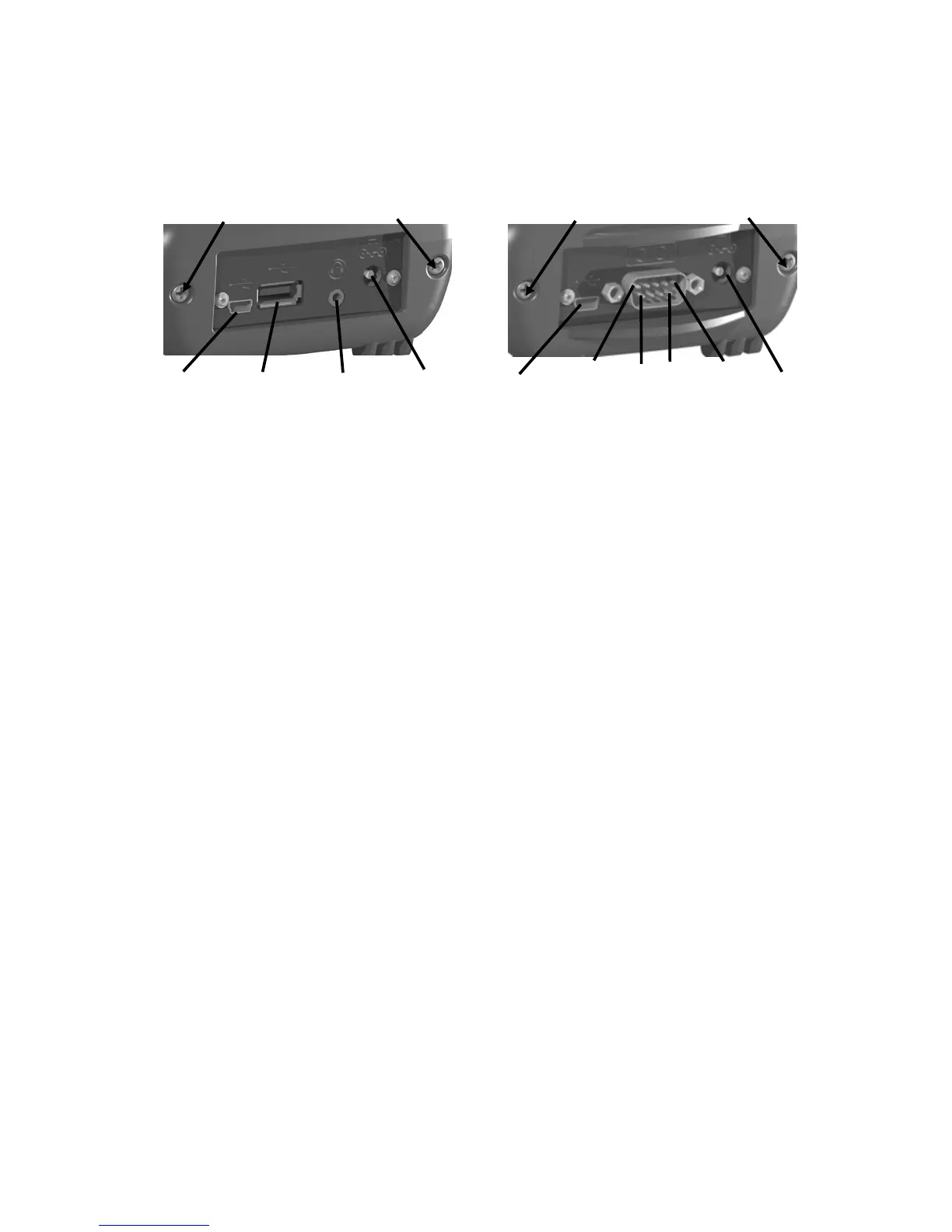
There are two types of boots available. The boots can be swapped
by loosening the screws pointed out in the picture below.
USB I/O Boot
Serial I/O Boot
Both boots have a mini-USB client that uses a USB 2.0 A male to
mini-USB B 5-pin cable (included with the unit). The Mini-USB
can be used to connect to a personal computer (PC).
USB I/O Boot: This boot has a mini-USB client, a USB host port
(to connect to USB client devices) and an audio jack that is wired
for a headset with a mono speaker(s) and microphone
combination. (It is not for stereo headsets.)
NOTE: Many USB host peripheral devices supported on personal
computers are not supported by this unit. There are two classes of
USB devices that have native support in the OS:
1.) USB Human Interface Devices (HID). Examples include
keyboards and some barcode scanners.
2.) USB Mass-Storage devices. Examples include memory keys,
hard disks, some digital cameras and memory card readers.
Before purchasing a USB peripheral, check with the manufacturer
to ensure that it will operate with one of these natively supported
USB classes. Some devices have no applicability in Windows
Mobile. For example, mice do not make sense to use with your
unit because it is designed to be touchscreen operated.
Serial I/O Boot: This boot has a mini-USB client, and is for use
with serial devices. NOTE: COM1 is always reserved in software
for the 9-pin port, even if you don’t have a unit with a serial boot.
Pin 5
Pin 1
USB
Host
External
Power
Audio
Jack
Pin 9
Pin 6
External
Power
Serial
Screws to swap boot
Screws to swap boot
Mini-
USB
Client
Mini-
USB
Client


 To Next Page