21
4 Adjustments
4.2 Adjusting the Printing Mechanism
Major adjustment of the printing mechanism beyond format-based settings is only required if the printhead assembly
has been removed or parts in this area have been replaced. Excluded from this is the replacement of the printhead,
after which readjustment is generally not required.
The following print quality imperfections may indicate maladjustment of the printing mechanism:
• Print image too light
• Print image is spotty
• Print image lighter on one side
• Horizontal lines not parallel to the horizontal label edges
• Clear lateral drift of the transfer ribbon
i
Notice!
Print image errors can also arise from wrinkling of the transfer ribbon. This is why you should check the
transfer ribbon feed path and the head locking system for correct adjustment before making adjustments to
the printing mechanism Operator's Manual.
Adjustment of the printing mechanism comprises the following procedures in the order specied:
1. Prepare the label printer for adjustment 4.2.1 on page 21.
2. Adjust the position of the printhead 4.2.2 on page 22.
3. Adjust the printhead pressure 4.2.3 on page 23.
4. Adjust the transfer ribbon feed path 4.2.4 on page 24.
5. Perform a nal test 4.2.5 on page 24.
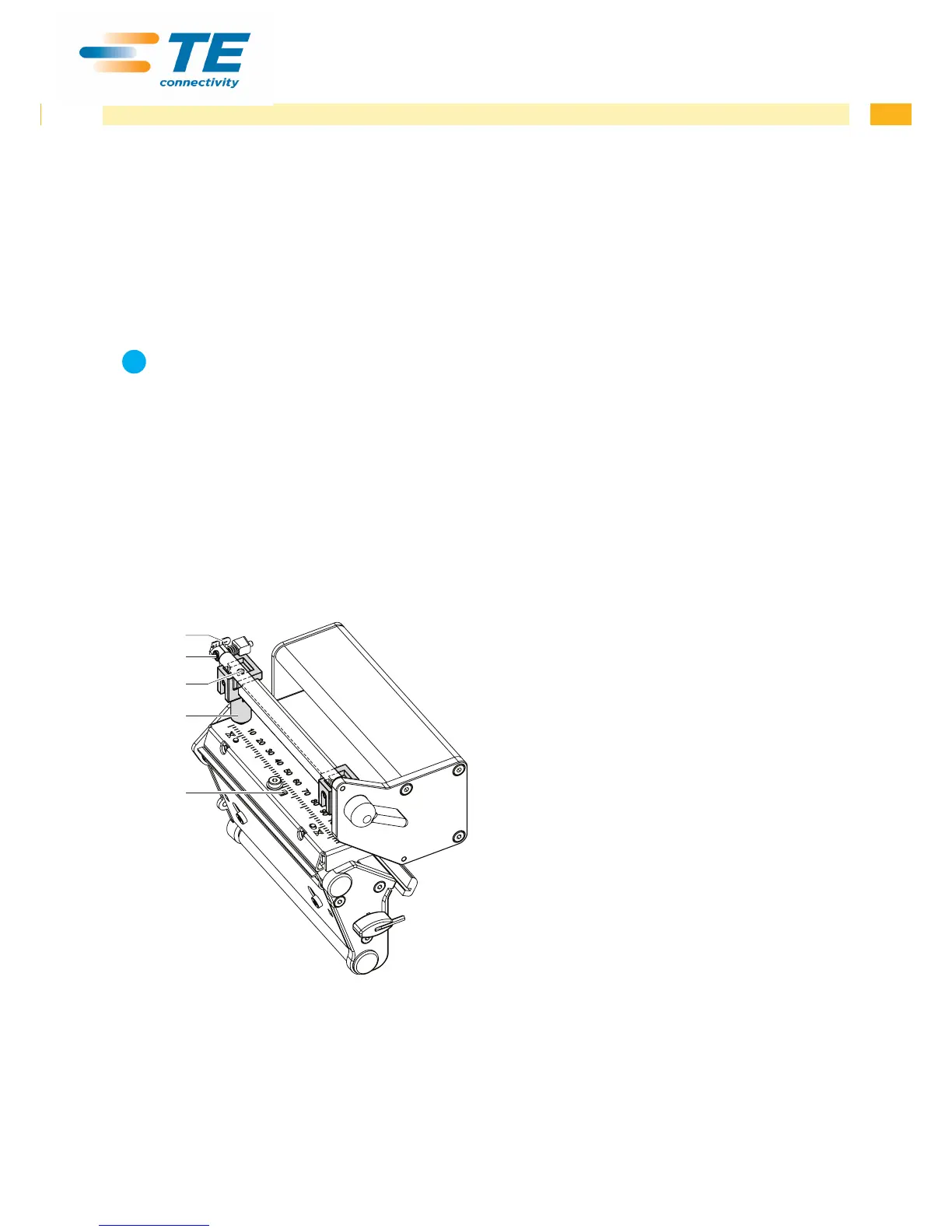
4.2.1 Preparing the Printer for Adjustment
5
4
1
2
3
1. Load labels and transfer ribbon which extend across
the entire printing width.
2. In the printer conguration, set the Heat level
parameter to -5 and the Print speed parameter to
100 mm/s..
3. Move the transfer ribbon deection to the central
position (5) with the screw (4).
4. Position the plungers (2) in such a way that the
adjustment screws are accessible through the holes
(3) of the square axis.
5. Loosen the screw (1) for the printhead bowing with
an Allen key (1.5 mm) and turn it counterclockwise
until turning becomes perceptibly easier. This should
occur after a maximum of a half a rotation.
6. Continue with the adjustment of the printhead
position 4.2.2 on page 22.
Fig. 17 Preparing the printer for adjustment


 To Next Page