EasyManua.ls Logo

Teac A-300 - Mechanical Checks and Adjustments (Continued); Tape Speed, Wow, and Flutter Adjustments

Teac A-300
40 pages
Print Icon
To Next Page IconTo Next Page
To Previous Page IconTo Previous Page
Loading...
5-4.
TAPE
SPEED/WOW
AND
FLUTTER
Specifications:
Tape
Speed
Deviation:
3,000
Hz+
45
Hz
Tape
Speed
Drift:
45
Hz
Wow
and
Flutter:
Playback:
0.10%
(WRMS)
Record/Playback:
0.25%
(RMS)
NOTE:
1.
Before
performing
this
adjustment,
clean
all
parts
in
the
tape
path,
particularly
the
Capstan,
the
Pinch
Roller
and
the
Heads
with
the
appro-
priate
liquid
from
the
TEAC
TZ-261
Cleaner
Kit
or
with
pure
alcohol.
2.
Wow
and
flutter
should
be
checked
in
two
ways;
Playback
only
and
Record/Playback
methods.
First
correct
tape
speed
and
wow
and
flutter
using
the
playback
only
method.
Then
measure
wow
and
flutter
using
record
and
play-
back
method.
3.
As
the
measured
results
may
vary
with
respect
to
location
on
tape
at
which
it
was
taken,
three
points
at
beginning,
middle
and
near
the
end
of
the
tape
should
be
measured.
54-1.
TAPE
SPEED
1.
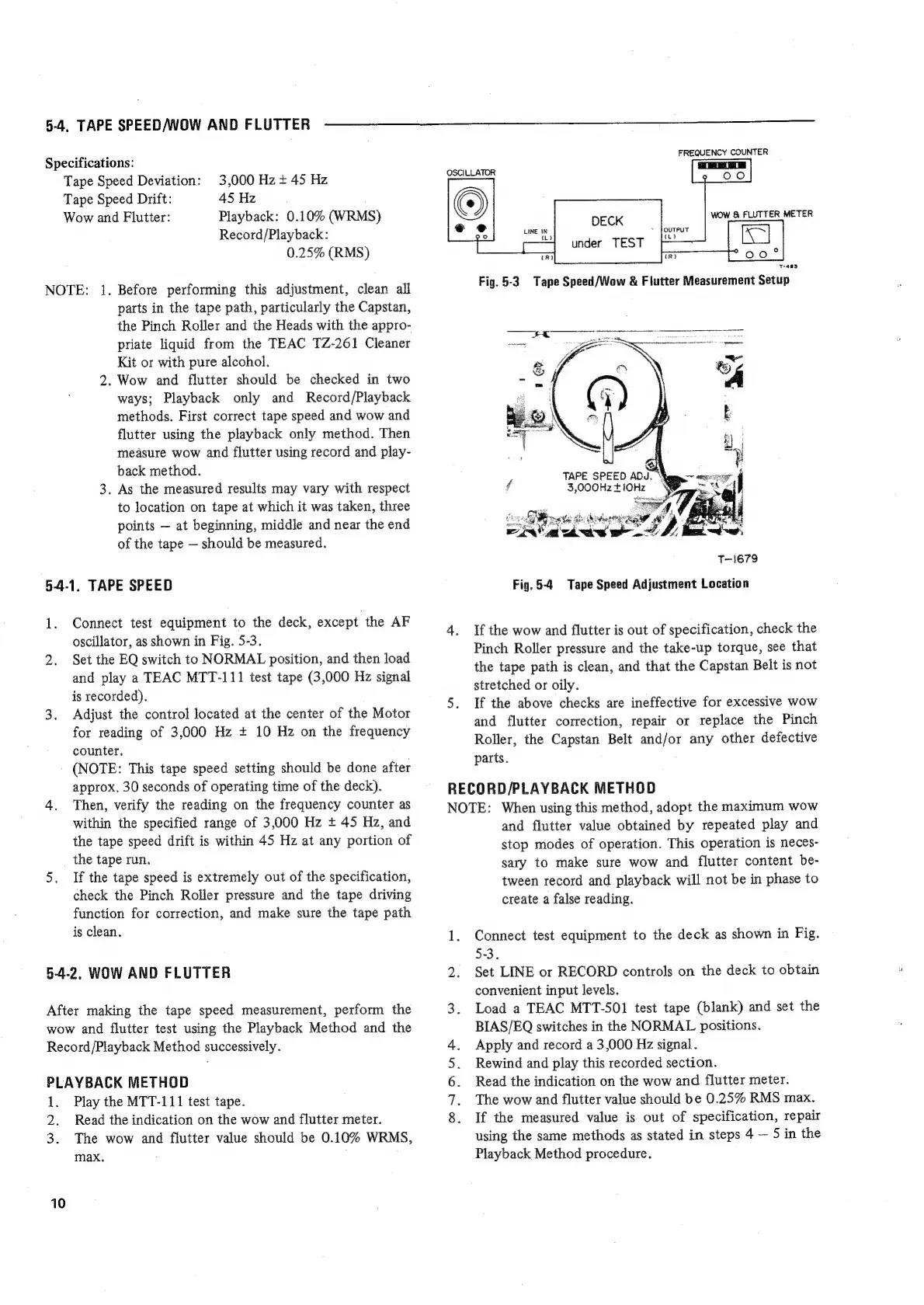
Connect
test
equipment
to
the
deck,
except
the
AF
oscillator,
as
shown
in
Fig.
5-3.
2.
Set
the
EQ
switch
to
NORMAL
position,
and
then
load
and
play
a
TEAC
MTT-111
test
tape
(3,000
Hz
signal
is
recorded),
3.
Adjust
the
control
located
at
the
center
of
the
Motor
for
reading
of
3,000
Hz
+
10
Hz
on
the
frequency
counter,
(NOTE:
This
tape
speed
setting
should
be
done
after
approx,
30
seconds
of
operating
time
of
the
deck).
4.
Then,
verify
the
reading
on
the
frequency
counter
as
within
the
specified
range
of
3,000
Hz
+
45
Hz,
and
the
tape
speed
drift
is
within
45
Hz
at
any
portion
of
the
tape
run.
5.
If
the
tape
speed
is
extremely
out
of
the
specification,
check
the
Pinch
Roller
pressure
and
the
tape
driving
function
for
correction,
and
make
sure
the
tape
path
is
clean.
5-4-2,
WOW
AND
FLUTTER
After
making
the
tape
speed
measurement,
perform
the
wow
and
flutter
test
using
the
Playback
Method
and
the
Record
/Playback
Method
successively.
PLAYBACK
METHOD
1.
Play
the
MTT-111
test
tape.
2.
Read
the
indication
on
the
wow
and
flutter
meter.
3.
The
wow
and
flutter
value
should
be
0.10%
WRMS,
max.
10
FREQUENCY
COUNTER
wow
&
FLUTTER
METER
DECK
under
TEST
¢
+463
Fig.
5-3
Tape
Speed/Wow
&
Flutter
Measurement
Setup
,
TAPE
SPEED
ADJ.
¥
f
3,000Hz
+
10Hz
OA
aude
wr
T-1679
Fig.
5-4
Tape
Speed
Adjustment
Location
4.
If
the
wow
and
flutter
is
out
of
specification,
check
the
Pinch
Roller
pressure
and
the
take-up
torque,
see
that
the
tape
path
is
clean,
and
that
the
Capstan
Belt
is
not
stretched
or
oily.
5.
If
the
above
checks
are
ineffective
for
excessive
wow
and
flutter
correction,
repair
or
replace
the
Pinch
Roller,
the
Capstan
Belt
and/or
any
other
defective
parts.
RECORD/PLAYBACK
METHOD
NOTE:
When
using
this
method,
adopt
the
maximum
wow
and
flutter
value
obtained
by
repeated
play
and
stop
modes
of
operation.
This
operation
is
neces-
sary
to
make
sure
wow
and
flutter
content
be-
tween
record
and
playback
will
not
be
in
phase
to
create
a
false
reading.
1.
Connect
test
equipment
to
the
deck
as
shown
in
Fig.
5-3.
2.
Set
LINE
or
RECORD
controls
on
the
deck
to
obtain
convenient
input
levels.
3.
Load
a
TEAC
MTT-SO1
test
tape
(blank)
and
set
the
BIAS/EQ
switches
in
the
NORMAL
positions.
Apply
and
record
a
3,000
Hz
signal.
Rewind
and
play
this
recorded
section.
Read
the
indication
on
the
wow
and
flutter
meter.
The
wow
and
flutter
value
should
be
0.25%
RMS
max.
If
the
measured
value
is.
out
of
specification,
repair
using
the
same
methods
as
stated
in
steps
4
5
in
the
Playback
Method
procedure.
On
Nn

Related product manuals