EasyManua.ls Logo

Teac A-300 - Electrical Checks and Adjustments; Playback Performance and Head Azimuth

Teac A-300
40 pages
Print Icon
To Next Page IconTo Next Page
To Previous Page IconTo Previous Page
Loading...
6.
ELECTRICAL
CHECKS
AND
ADJUSTMENTS
GENERAL
NOTES
1.
Before
performing
adjustments
on
the
amplifier
section
of
this
deck,
thoroughly
clean
and
demagnetize
the
entire
tape
path,
particularly
erase
head,
record/play-
back
head,
capstan
shaft
and
pinch
roller.
2.
Make
sure
the
deck
is
set
for
the
proper
voltage
and
frequency
for
your
locality.
3.
In
general,
checks
and
adjustments
for
other
than
specified
items,
are
done
in
the
sequence
of
left
chan-
nel
then
right
channel.
Double
designated
REF.
NO.
indicates
left
channel/right
channel
(example:
VR101/
201).
4.
dB
values
in
this
test
procedure
are
based
on
0
dB
=
0.775
V.
In
case
the
AC
Voltmeter
being
used
is
calib-
rated
to
some
other
standard
such
as
0
dB
=
1
V
etc,
please
use
the
voltage
values
given
in
parentheses
as
the
test
values.
6-1.
PLAYBACK
PERFORMANCE
NOTE:
All
alignments
in
the
PLAYBACK
PERFOR-
MANCE
only
have
to
be
done
with
EQ
switch
set
to
CrOz
position
unless
there
is
a
special
rea-
son
which
requires
that
other
positions
also
be
checked.
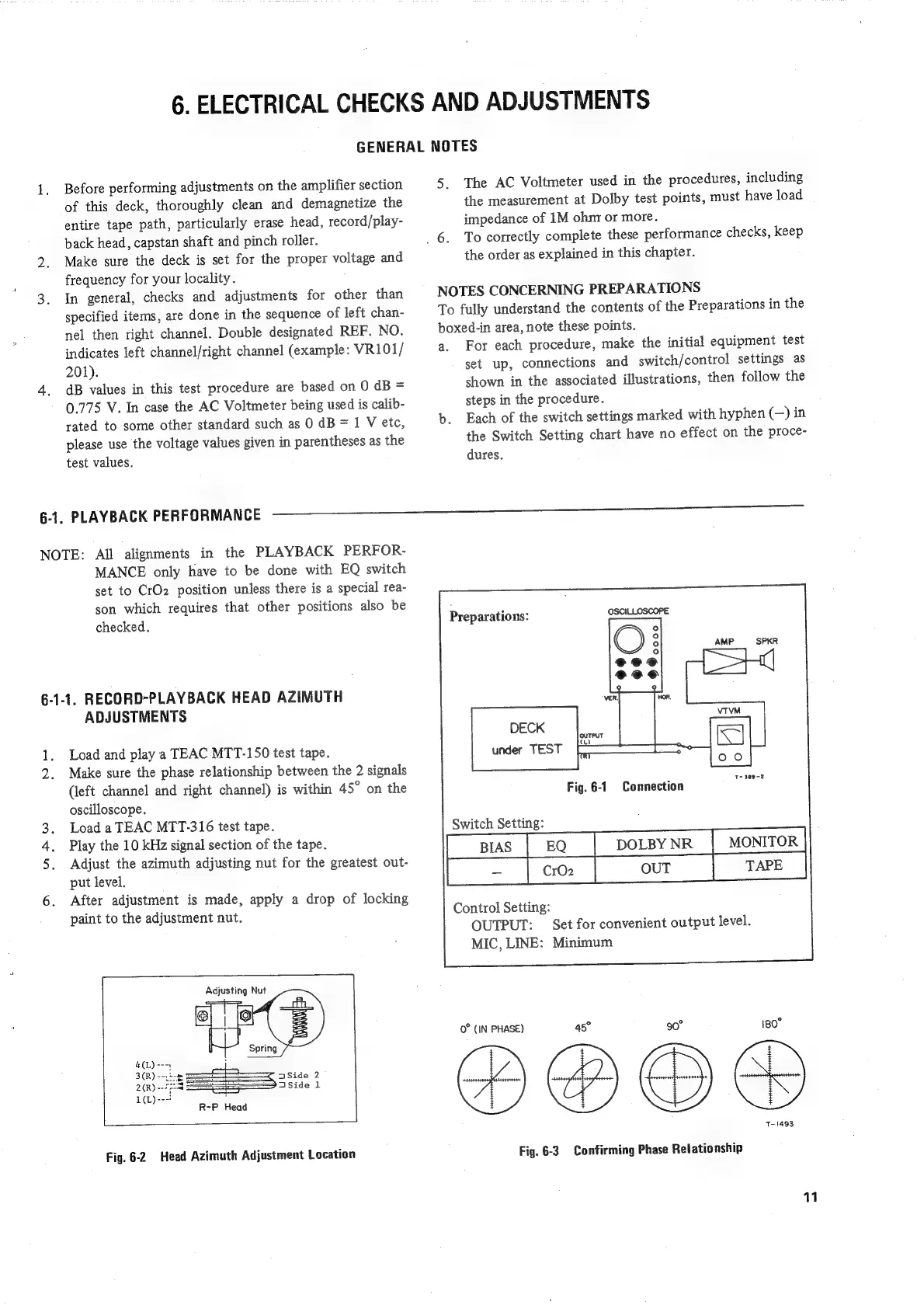
6-1-1,
RECORD-PLAYBACK
HEAD
AZIMUTH
ADJUSTMENTS
ray
Load
and
play
a
TEAC
MTT-150
test
tape.
2.
Make
sure
the
phase
relationship
between
the
2
signals
(left
channel
and
right
channel)
is
within
45°
on
the
oscilloscope.
Load
a
TEAC
MTT-316
test
tape.
Play
the
10
kHz
signal
section
of
the
tape.
Adjust
the
azimuth
adjusting
nut
for
the
greatest
out-
put
level.
6.
After
adjustment
is
made,
apply
a
drop
of
locking
paint
to
the
adjustment
nut.
aA
b&w
Adjusting
Nut
ica
R-P
Head
Fig.
6-2
Head
Azimuth
Adjustment
Location
5.
The
AC
Voltmeter
used
in
the
procedures,
including
the
measurement
at
Dolby
test
points,
must
have
load
impedance
of
1M
ohm
or
more.
6.
To
correctly
complete
these
performance
checks,
keep
the
order
as
explained
in
this
chapter.
NOTES
CONCERNING
PREPARATIONS
To
fully
understand
the
contents
of
the
Preparations
in
the
boxed-in
area,
note
these
points.
a.
For
each
procedure,
make
the
initial
equipment
test
set
up,
connections
and
switch/control
settings
as
shown
in
the
associated
illustrations,
then
follow
the
steps
in
the
procedure.
b.
Each
of
the
switch
settings
marked
with
hyphen
(—)
in
the
Switch
Setting
chart
have
no
effect
on
the
proce-
dures.
Preparations:
DECK
under
TEST
Fig.
6-1
DOLBY
NR
MONITOR
Control
Setting:
OUTPUT:
Set
for
convenient
output
level.
MIC,
LINE:
Minimum
Connection
Switch
Setting:
i
(IN
PHASE)
45°
30°
180
T-1493
Fig.
6-3
Confirming
Phase
Relationship

Related product manuals