EasyManua.ls Logo

Teac A-H300 - Rear Panel Overview; Rear Panel Terminals and Jacks; Speaker Connection Guide

Teac A-H300
44 pages
Print Icon
To Next Page IconTo Next Page
To Previous Page IconTo Previous Page
Loading...
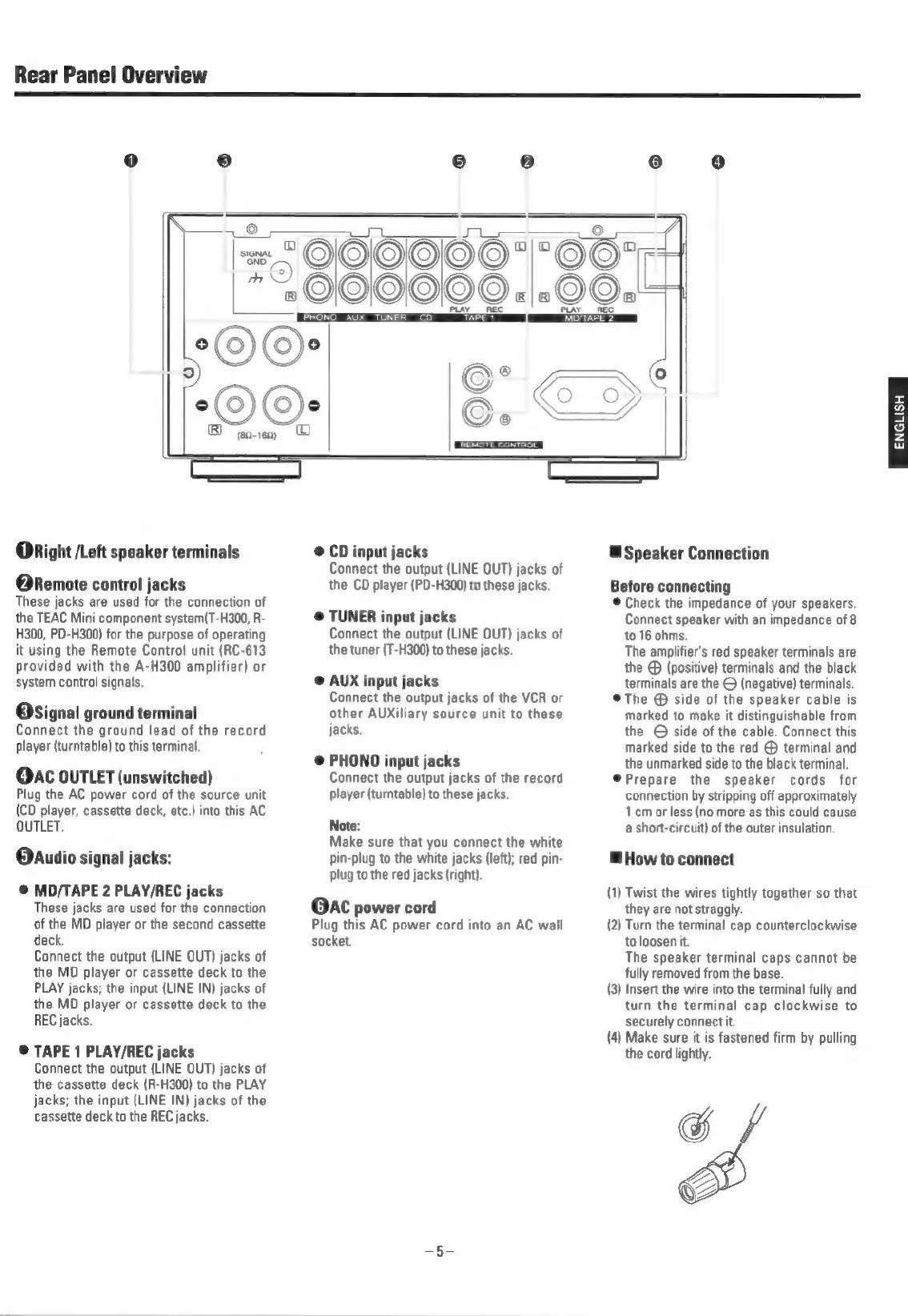
Rear
Panel
Overview
@Right
/Left
speaker
terminals
@Remote
control
jacks
These
jacks
are
used
for
the
connection
of
the
TEAC
Mini
component
system(T-H300,
R-
H300,
PD-H300)
for
the
purpose
of
operating
it
using
the
Remote
Control
unit
(RC-613
provided
with
the
A-H300
amplifier)
or
system
control
signals.
@Signal
ground
terminal
Connect
the
ground
lead
of
the
record
player
(turntable)
to
this
terminal.
@AC
OUTLET
(unswitched)
Plug
the
AC
power
cord
of
the
source
unit
(CD
player,
cassette
deck,
etc.)
into
this
AC
OUTLET.
@dudio
signal
jacks:
@
MD/TAPE
2
PLAY/REC
jacks
These
jacks
are
used
for
the
connection
of
the
MD
player
or
the
second
cassette
deck.
Connect
the
output
(LINE
OUT)
jacks
of
the
MD
player
or
cassette
deck
to
the
PLAY
jacks;
the
input
(LINE
IN)
jacks
of
the
MD
player
or
cassette
deck
to
the
REC
jacks.
@
TAPE
1
PLAY/REC
jacks
Connect
the
output
(LINE
OUT)
jacks
of
the
cassette
deck
(R-H300)
to
the
PLAY
jacks;
the
input
(LINE
IN)
jacks
of
the
cassette
deck
to
the
REC
jacks.
eas
REMOTE
CONTROL
©
CD
input
jacks
Connect
the
output
(LINE
OUT)
jacks
of
the
CD
player
(PD-H300)
to
these
jacks.
©
TUNER
input
jacks
Connect
the
output
(LINE
OUT)
jacks
of
the
tuner
(T-H300)
to
these
jacks.
@
AUX
input
jacks
Connect
the
output
jacks
of
the
VCR
or
other
AUXiliary
source
unit
to
these
jacks.
@
PHONO
input
jacks
Connect
the
output
jacks
of
the
record
player
(turntable)
to
these
jacks.
Note:
Make
sure
that
you
connect
the
white
pin-plug
to
the
white
jacks
(left);
red
pin-
plug
to
the red
jacks
(right).
@AC
power
cord
Plug
this
AC
power
cord
into
an
AC
wall
socket.
a
MOITAPE
>
@
Speaker
Connection
Before
connecting
©
Check
the
impedance
of
your
speakers,
Connect
speaker
with
an
impedance
of
8
to
16
ohms.
The
amplifier's
red
speaker
terminals
are
the
®
(positive)
terminals
and
the
black
terminals
are
the
©
(negative)
terminals.
©@The
side
of
the
speaker
cable
is
marked
to
make
it
distinguishable
from
the
©
side
of
the
cable.
Connect
this
marked
side
to
the
red
@
terminal
and
the
unmarked
side
to
the
black
terminal.
©@Prepare
the
speaker
cords
for
connection
by
stripping
off
approximately
lcm
or
less
(no
more
as
this
could
cause
a
short-circuit)
of
the
outer
insulation.
How
to
connect
(1)
Twist
the
wires
tightly
together
so
that
they
are
not
straggly.
(2)
Turn
the
terminal
cap
counterclockwise
to
loosen
it.
The
speaker
terminal
caps
cannot
be
fully
removed
from
the
base.
(3)
Insert
the
wire
into
the
terminal
fully
and
turn
the
terminal
cap
clockwise
to
securely
connect
it.
(4)
Make
sure
it
is
fastened
firm
by
pulling
the
cord
lightly.
ENGLISH

Related product manuals