EasyManua.ls Logo

Teac A-H300 - Front Panel Controls and Functions; Power and Indicator Controls; Source and Volume Controls; Playback and Special Functions

Teac A-H300
44 pages
Print Icon
To Next Page IconTo Next Page
To Previous Page IconTo Previous Page
Loading...
Front
Panel
Controls
and
Their
Functions
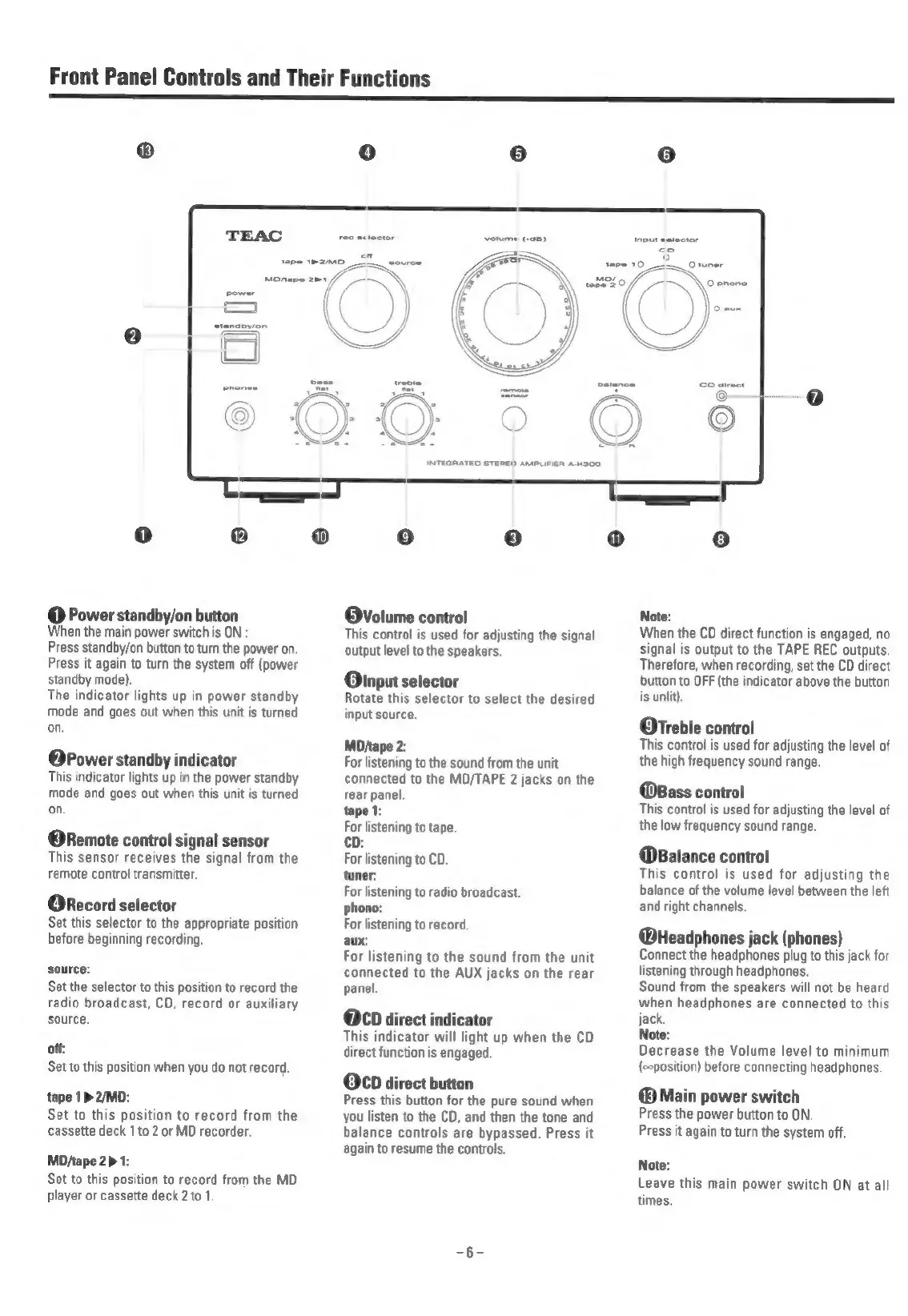
®
TEAC
@
Power
standby/on
button
When
the
main
power
switch
is
ON
:
Press
standby/on
button
to
turn
the
power
on.
Press
it
again
to
turn
the
system
off
(power
standby
mode).
The
indicator
lights
up
in
power
standby
mode
and
goes
out
when
this
unit
is
turned
on.
@Power
standby
indicator
This
indicator
lights
up
in
the
power
standby
mode
and
goes
out
when
this
unit
is
turned
on,
@Remote
control
signal
sensor
This
sensor
receives
the
signal
from
the
remote
control
transmitter.
ORecord
selector
Set
this
selector
to
the
appropriate
position
before
beginning
recording.
source:
Set
the
selector
to
this
position
to
record
the
radio
broadcast,
CD,
record
or
auxiliary
source,
off:
Set
to
this
position
when
you
do
not
record.
tape
1>2/MD:
Set
to
this
position
to
record
from
the
cassette
deck
1
to
2
or
MD
recorder.
MD/tape
2>
1:
Set
to
this
position
to
record
from
the
MD
player
or
cassette
deck
2to
1.
Volume
control
This
control
is
used
for
adjusting
the
signal
output
level
to
the
speakers.
Oinput
selector
Rotate
this
selector
to
select
the
desired
input
source.
MD/tape
2:
For
listening
to
the
sound
from
the
unit
connected
to
the
MD/TAPE
2
jacks
on
the
rear
panel.
tape
1:
For
listening
to
tape.
cD:
For
listening
to
CD.
tuner:
For
listening
to
radio
broadcast.
phono:
For
listening
to
record.
aux:
For
listening
to
the
sound
from
the
unit
connected
to
the
AUX
jacks
on
the
rear
panel.
OCD
direct
indicator
This
indicator
will
light
up
when
the
CD
direct
function
is
engaged.
OCD
direct
button
Press
this
button
for
the
pure
sound
when
you
listen
to
the
CD,
and
then
the
tone
and
balance
controls
are
bypassed.
Press
it
again
to
resume
the
controls.
Note:
When
the
CD
direct
function
is
engaged,
no
signal
is
output
to
the
TAPE
REC
outputs.
Therefore,
when
recording,
set
the
CD
direct
button
to
OFF
(the
indicator
above
the
button
is
unlit).
OrTreble
control
This
control
is
used
for
adjusting
the
level
of
the
high
frequency
sound
range.
@Bass
control
This
control
is
used
for
adjusting
the
level
of
the
low
frequency
sound
range.
@Balance
control
This
control
is
used
for
adjusting
the
balance
of
the
volume
level
between
the
left
and
right
channels.
@deadphones
jack
(phones)
Connect
the
headphones
plug
to
this
jack
for
listening
through
headphones.
Sound
from
the
speakers
will
not
be
heard
when
headphones
are
connected
to
this
jack.
Note:
Decrease
the
Volume
level
to
minimum
(ccposition)
before
connecting
headphones.
Main
power
switch
Press
the
power
button
to
ON.
Press
it
again
to
turn
the
system
off.
Note:
Leave
this
main
power
switch
ON
at
all
times.

Related product manuals