A
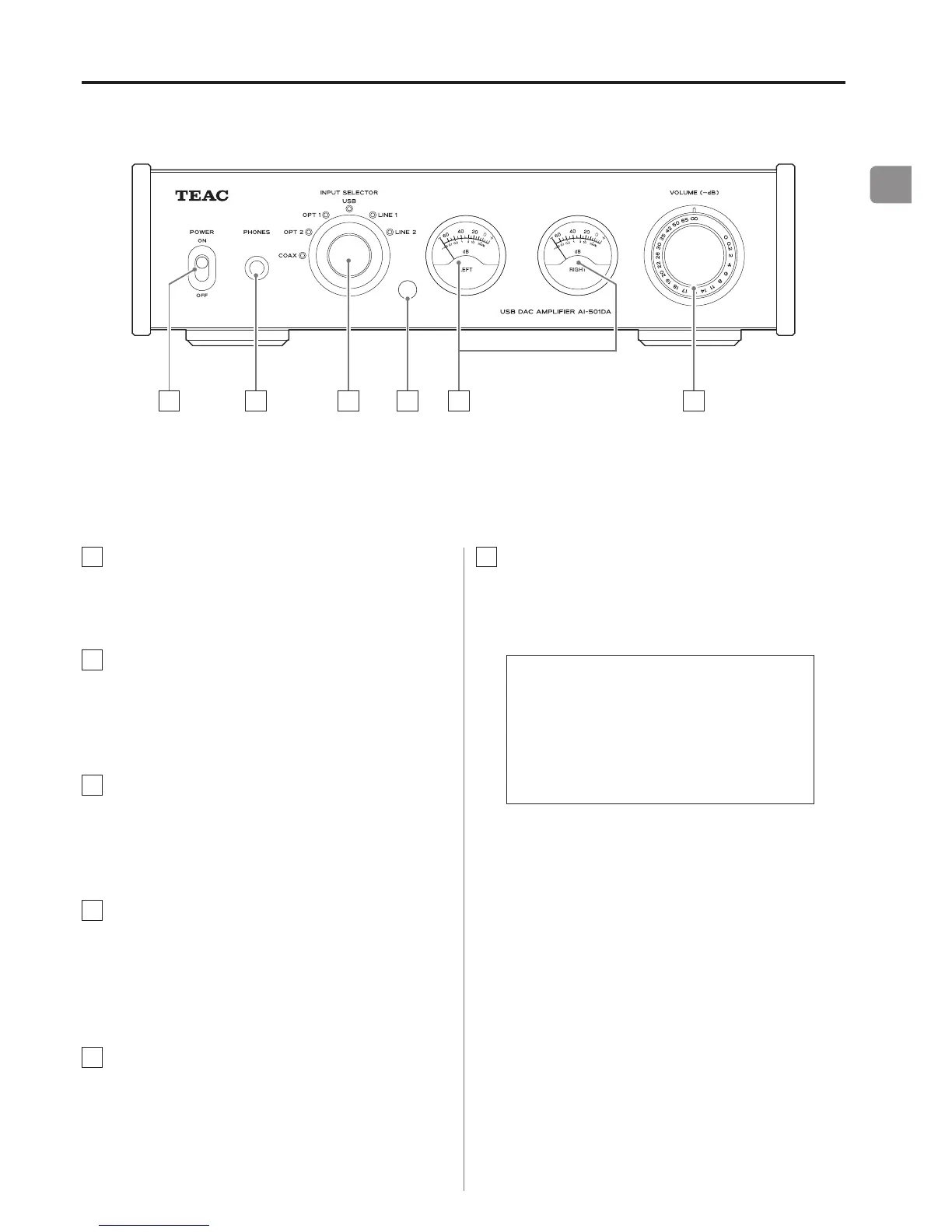
POWER switch
Use to turn the power ON and OFF.
B
PHONES jack
Connect headphones with a standard 6.3 mm (1/4")
stereo plug here.
C
INPUT SELECTOR knob
Use to select the input source. The indicator for the
selected input source lights.
D
Remote control signal receiver
Signals from the remote control are received here.
When using the remote control, point it toward this
area.
E
Level meters
These show the output levels.
Names and functions of parts (main unit)
F
VOLUME knob
Use to adjust the volume. Turn it clockwise (right) to
increase it and counterclockwise (left) to decrease it.
The maximum volume is 0, and the minimum
volume is −∞ (minus infinity). Before turning
the power ON, set the VOLUME knob to −∞.
Failure to do so could result in sudden loud
noises that could damage speakers and harm
your hearing.



 To Next Page