EasyManua.ls Logo

Teac AN-80 - Page 6

Teac AN-80
19 pages
Print Icon
To Next Page IconTo Next Page
To Previous Page IconTo Previous Page
Loading...
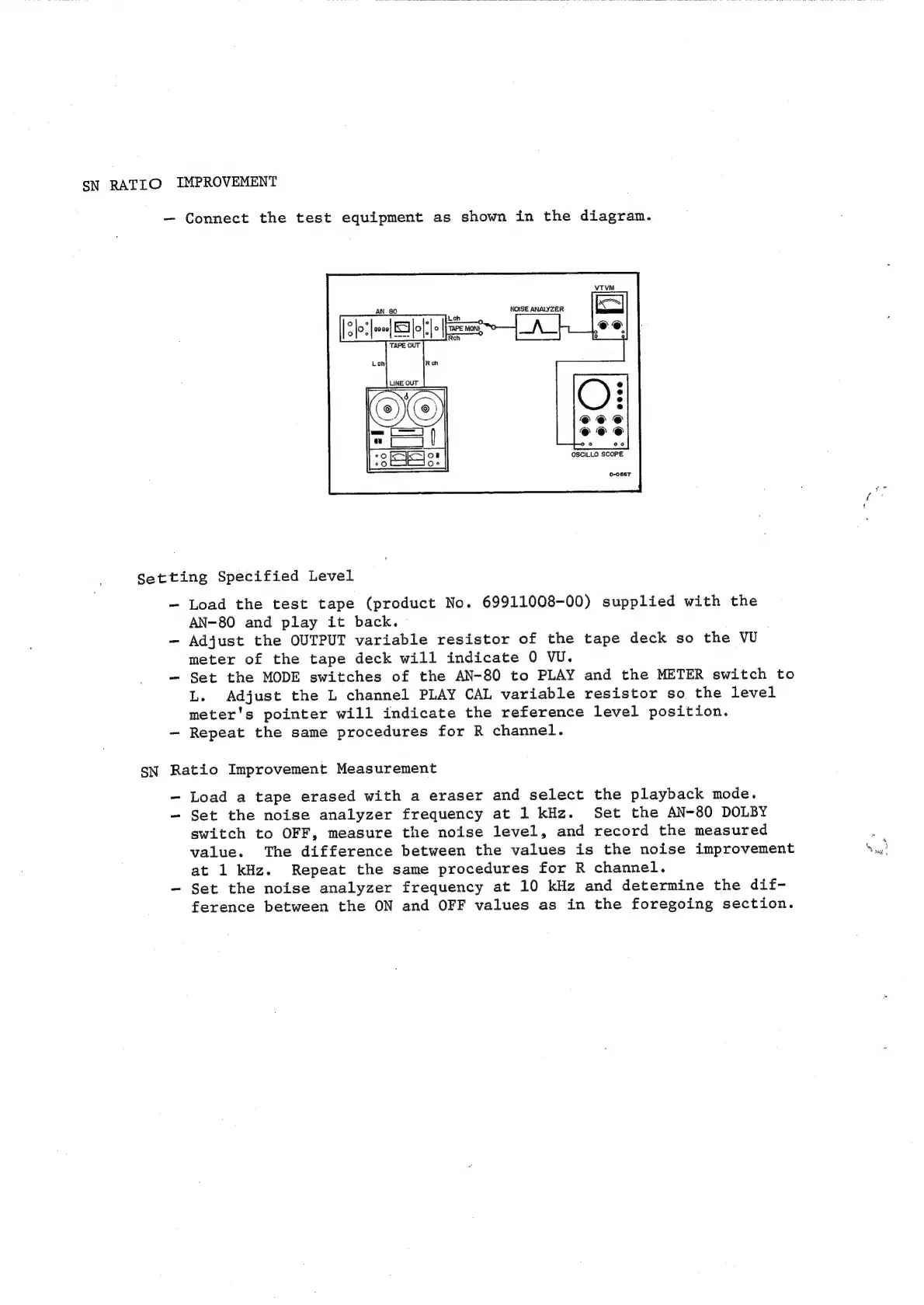
SN
RATIO
IMPROVEMENT
Connect
the
test
equipment
as
shown
in
the
diagram.
0-068T
Setting
Specified
Level
Load
the
test
tape
(product
No.
69911008-00)
supplied
with
the
AN-80
and
play
it
back.
Adjust
the
OUTPUT
variable
resistor
of
the
tape
deck
so
the
VU
meter
of
the
tape
deck
will
indicate
0
VU.
-
Set
the
MODE
switches
of
the
AN-80
to
PLAY
and
the
METER
switch
to
L.
Adjust
the
L
channel
PLAY
CAL
variable
resistor
so
the
level
meter's
pointer
will
indicate
the
reference
level
position.
Repeat
the
same
procedures
for
R
channel.
SN
Ratio
Improvement
Measurement
-
Load
a
tape
erased
with
a
eraser
and
select
the
playback
mode.
-
Set
the
noise
analyzer
frequency
at
1
kHz.
Set
the
AN-80
DOLBY
switch
to
OFF,
measure
the
noise
level,
and
record
the
measured
value.
The
difference
between
the
values
is
the
noise
improvement
at
1
kHz.
Repeat
the
same
procedures
for
R
channel.
-
Set
the
noise
analyzer
frequency
at
10
kHz
and
determine
the
dif-
ference
between
the
ON
and
OFF
values
as
in
the
foregoing
section.