12
Connecting equipment
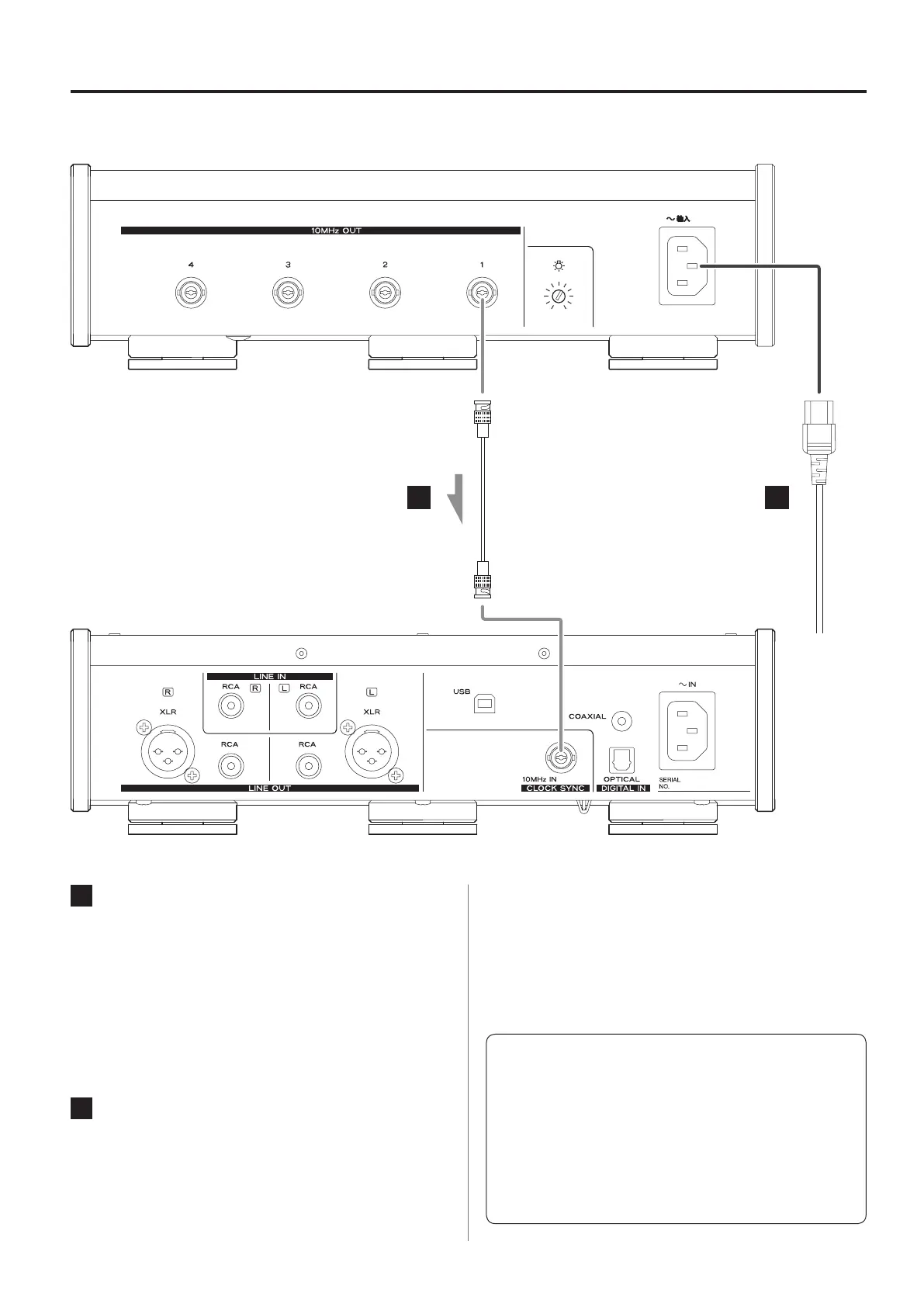
A Clock output (10MHz OUT) connectors
These output 10MHz clock signals.
Connect these clock output connectors to the clock input con-
nectors of CD players, D/A converters and other digital devices
that support 10MHz input.
Use a commercially-available BNC coaxial cable for
connection.
B Power inlet (~IN)
Connect the supplied power cord here.
After all other connections are complete, connect the power
cord’s plug to a wall outlet.
V
Do not use any power cord other than the one
included with this unit. Use of other power cords
could result in fire or electric shock.
V
Disconnect the power plug from the outlet if you
will not use the unit for a long time.
V
Complete all other connections before turn-
ing the unit on.
o Carefully read the manuals of the devices that you are
connecting and follow their instructions when making
connections.
o Do not bundle connecting cables with power cords. Doing
so could cause noise.
o Connect all plugs completely.
A
B
BNC coaxial cable
Included power cord
c
Wall outlet
Digital device that supports
10MHz input
(UD-503, etc.)


 To Next Page