12
123
456
789
0
OK
CH.FAV
AUDIO MUTE
DTV/USB INPUT
PICTURE SOUND ASPECTSLEEP
EXIT
DISPLAY
CH
CH
VOL
VOL
HOLD
D.MENU D.TITLE
VOL
TV/TXT CANCEL REVEAL REPEAT
D.SETUP
SUBTITLE A-B GOTO
SIZE SUBPAGE INDEX
DELETE REC.LIST SCH.LIST SCREEN
MENU
EPG
0118020315
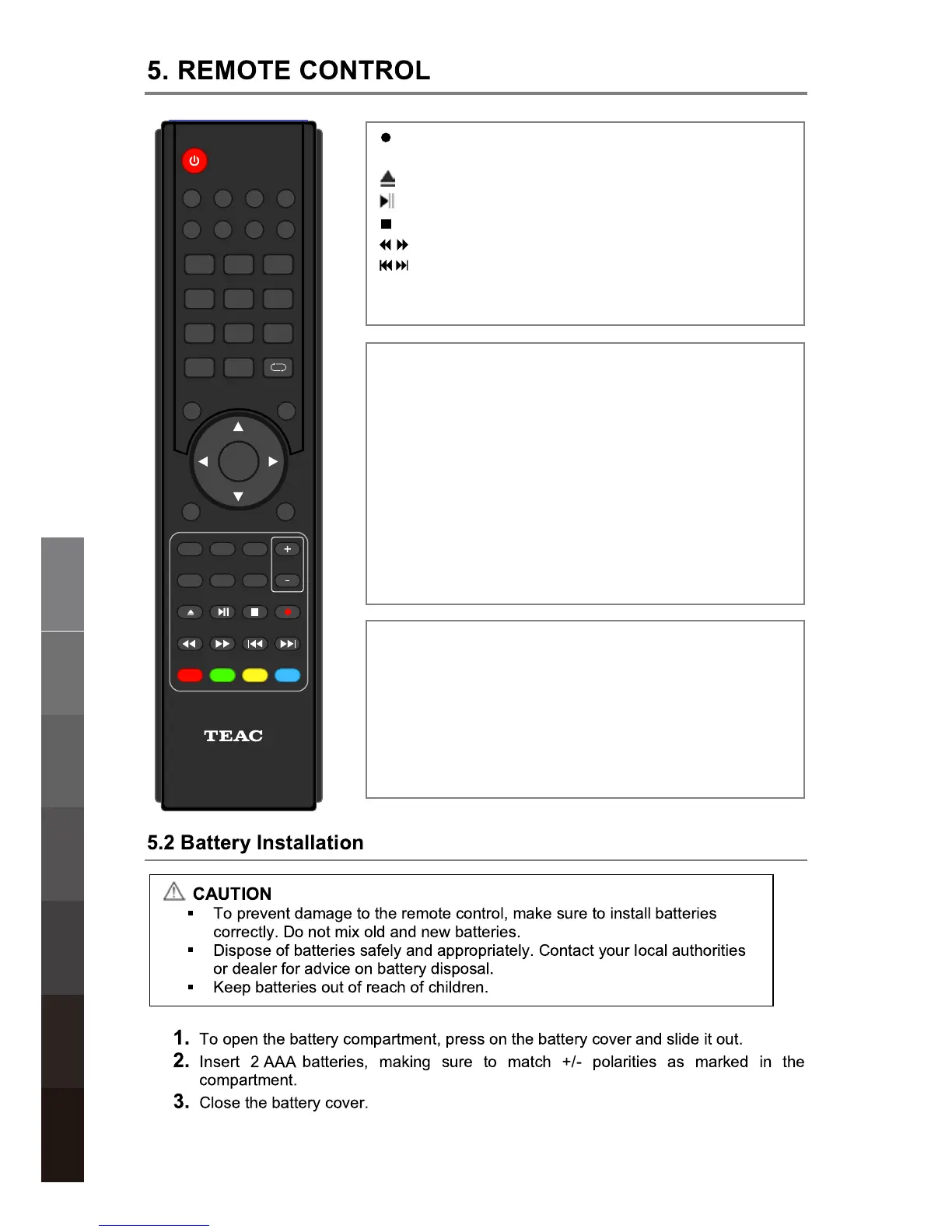
D.SETUP: Function not available for this model.
GOTO: Jump to a specific point during playback by keying
numbers in the format HH:MM:SS.
A-B: Define Points A and B for looping playback. Press
once for A, again for B, a third time to cancel looping.
ASPECT: Cycle through different picture aspect settings by
pressing this button repeatedly.
SLEEP: Cycle through and set Timer Sleep settings by
pressing this button repeatedly.
(REC): Start recording when in DTV Mode.
REPEAT: Toggle Repeat options in USB Mode.
: Stop playback.
: Fast Rewind/Fast Forward up to 16x.
D.MENU: Function not available with this model.
D.TITLE: Function not available with this model.
: No function for this model.
: Play/Pause playback, or toggle DTV Time Shift.
: Previous/next chapter/track.
Teletext operation:
Teletext is an information system broadcasted by certain
channels providing news, weather forecasts, puzzles as
well as subtitles. Subject to availability from broadcaster.
SUBPAGE: Toggle subpage.
HOLD: Hold or resume browsing the subpage.
SIZE: Cycle through page zoom-in views.
INDEX: Go to Index.
CANCEL: Cancel the Teletext Display.
REVEAL: Reveal any hidden text.
TV/TXT: Toggle Teletext viewing modes.
Co
lour buttons: Shortcut keys per on-
screen hints.
USB Multimedia
Playback
Remote Control
On-Screen DisplayTV & Electronic
Programme Guide
Digital Video
Recording (DVR)
(OSD) Menu
Reference
DVD Operation


 To Next Page