15
ENGLISH FRANÇAIS
Nomenclature (2)Name of Each Control (2)
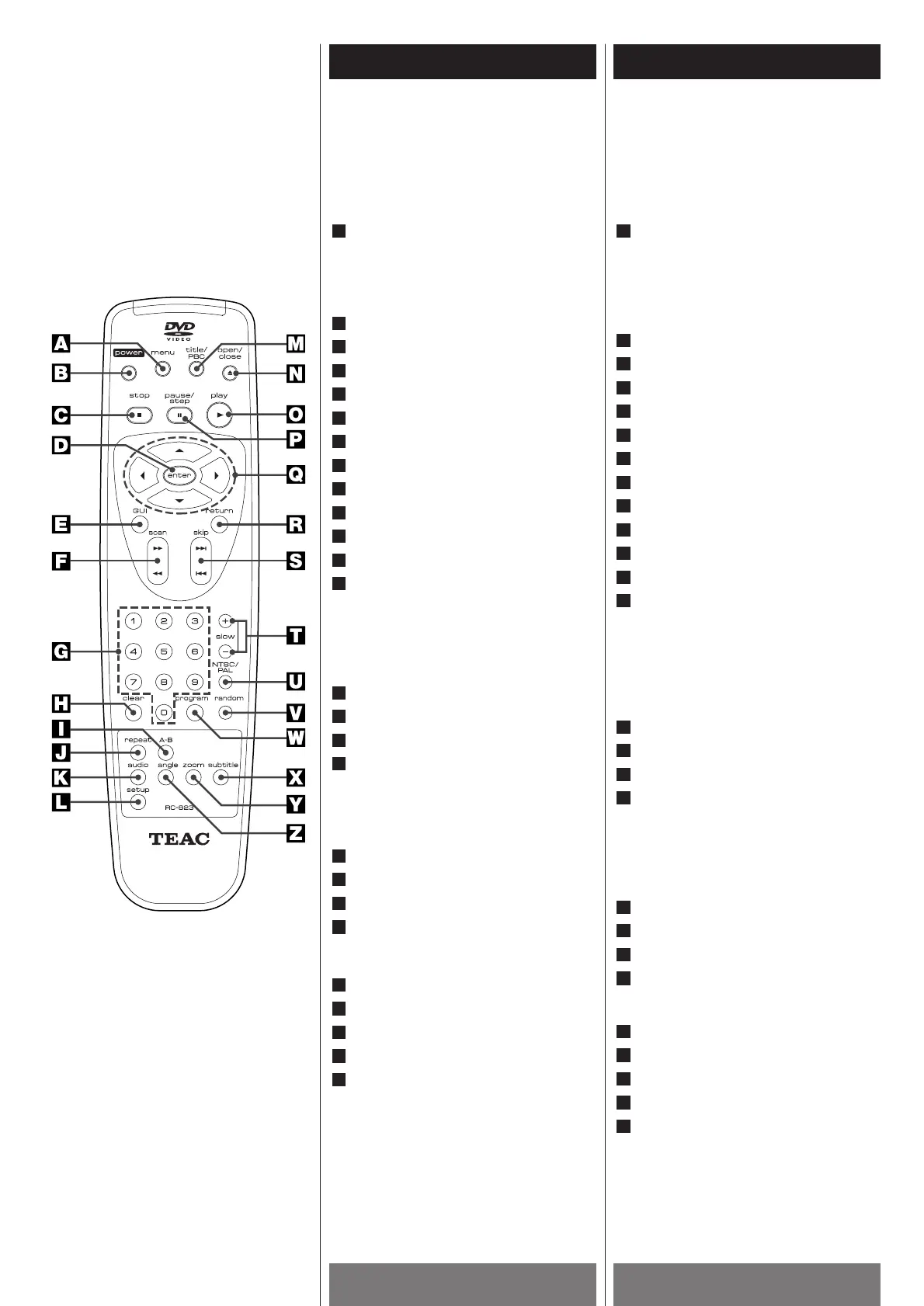
REMOTE CONTROL
You will find instructions for each of the
remote control functions in the appropriate
sections of this Owner's Manual.
MENU button
Use the MENU button to display the menu
screen included on DVD video discs. To
operate a menu screen, follow the
instructions in "Using a DVD Menu".
POWER button
STOP button ( H
)
ENTER button
GUI button
SCAN buttons (m
/ ,)
Number buttons
CLEAR button
A-B button
REPEAT button
AUDIO button
SETUP button
TITLE/PBC button
Displays the title menu when playing a
DVD.
OR
Switches the PBC functions to on or off
when playing a VCD (Ver. 2.0) or SVCD.
OPEN/CLOSE button ( L )
PLAY button ( y
)
PAUSE/STEP button ( J )
Directional arrow buttons
(5, b, t, g)
For use in highlighting a selection on a
GUI menu screen, TITLE and MENU
screen.
RETURN button
SKIP buttons (. / /)
SLOW buttons (+/–)
NTSC/PAL button
Changes the color system to match your
TV standard.
RANDOM button
PROGRAM button
SUBTITLE button
ZOOM button
ANGLE button
Z
Y
X
W
V
U
T
S
R
Q
P
O
N
M
L
K
J
I
H
G
F
E
D
C
B
A
TELECOMMANDE
Vous trouverez les consignes portant sur
chaque fonction de télécommande dans les
sections appropriées de ce mode d'emploi.
Bouton MENU
Utilisez la touche MENU pour afficher
l'écran Menu des disques vidéo DVD.
Pour faire fonctionner un écran Menu,
respectez les consignes de la section
"Utilisation d'un menu DVD".
Bouton POWER
Bouton STOP ( H
)
Bouton ENTER
Bouton GUI
Boutons SCAN (m
/ ,)
Bouton numérique
Bouton CLEAR
Bouton A-B
Bouton REPEAT
Bouton AUDIO
Bouton SETUP
Bouton TITLE/PBC
Sert à afficher le menu de titres lors de la
lecture d’un disque DVD.
OU
Sert à mettre en ou hors service le
fonctionnement PBC à la lecture d’un
disque VCD (Version2,0) ou SVCD.
Bouton OPEN/CLOSE ( L )
Bouton PLAY ( y
)
Bouton PAUSE/STEP ( J )
Boutons à curseurs à flèches de
direction (5, b, t, g)
(haut, bas, gauche, droit) qui s'utilisent
pour mettre en valeur la sélection d'une
option sur un écran de menu GUI, un
écran TITLE et un écran MENU.
Bouton RETURN
Boutons SKIP (. / /)
Boutons SLOW (+/–)
Bouton NTSC/PAL
Sert à commuter l’appareil sur les
normes NTSC ou PAL.
Bouton RANDOM
Bouton PROGRAM
Bouton SUBTITLE
Bouton ZOOM
Bouton ANGLE
Z
Y
X
W
V
U
T
S
R
Q
P
O
N
M
L
K
J
I
H
G
F
E
D
C
B
A



 To Next Page