ENGLISH FRANÇAIS
14
Nomenclature (1)Name of Each Control (1)
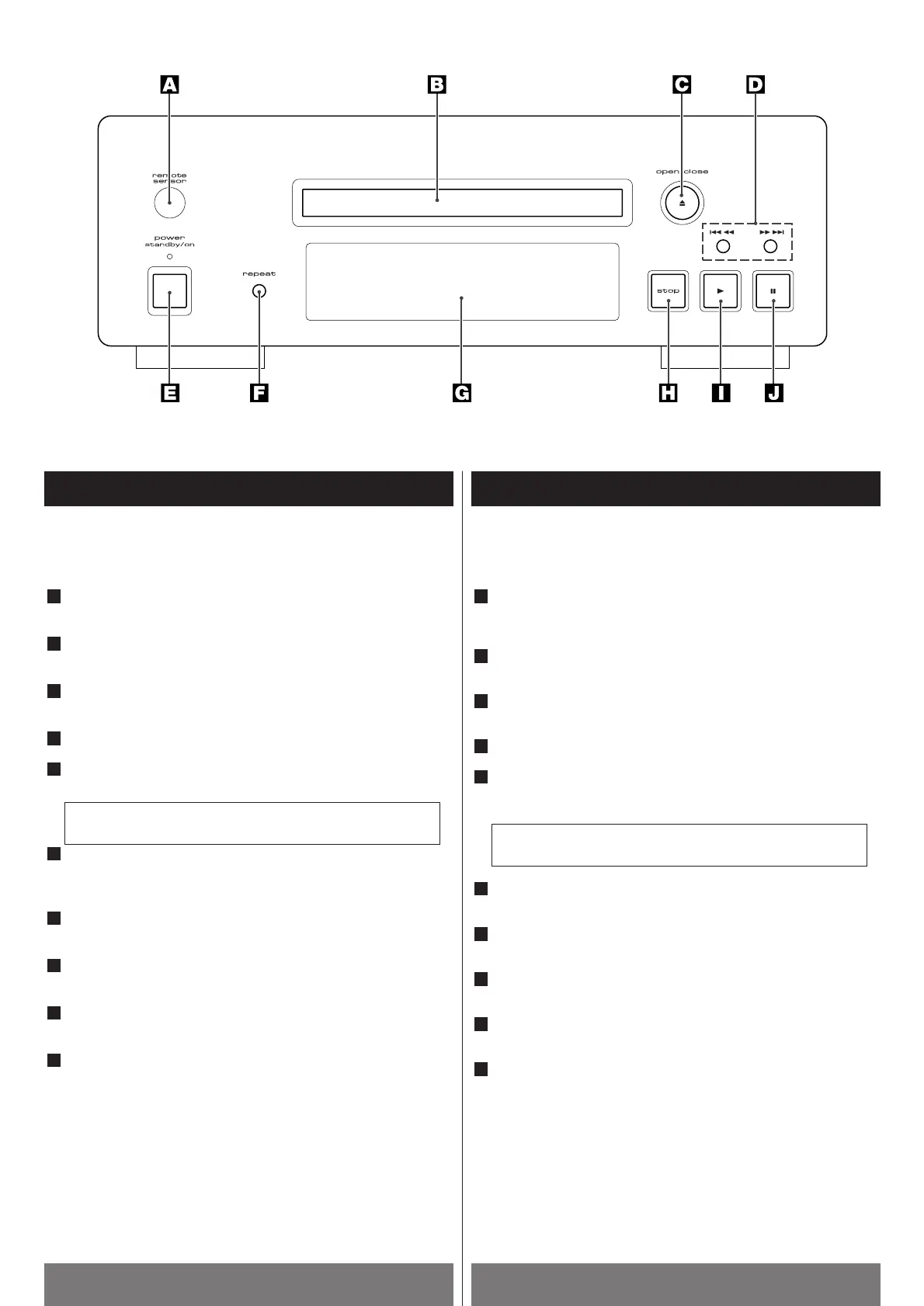
Front Panel
REMOTE SENSOR
C’est un endroit sensible aux signaux provenant de la
télécommande à infrarouge.
Plateau porte-disque
Placer un disque sur ce plateau.
Touche OPEN/CLOSE(L)
Sert à ouvrir et fermer le plateau porte-disque.
Touches SKIP/SCAN (.m /,/ )
Interrupteur et indicateur. Mise sous tension / Veille
(POWER/STANDBY/ON)
C’est l’interrupteur d’alimentation principale du système.
Touche REPEAT
Sert à choisir entre plusieurs modes de répétition.
Afficheur
Indique le temps de lecture entre autres.
Touche STOP (H)
Sert à arrêter la lecture d’un disque.
Touche PLAY (G)
Sert à mettre un disque en lecture.
Touche PAUSE (J)
A arrêter un disque momentanément.
J
I
H
G
F
Cet appareil consomme un faible courant même si cet
interrupteur est en position relâchée.
E
D
C
B
A
Front Panel
REMOTE SENSOR
Accepts the remote control signals.
Disc Tray
Place a disc on the tray.
OPEN/CLOSE button (L)
Opens or closes the disc tray.
SKIP/SCAN buttons (.m /,/ )
POWER/Standby button and indicator
Turns on and off the main power of the system.
REPEAT button
Lets you select from different repeat modes.
Display Window
Indicates the playing time, etc..
STOP button (H)
Stops playing a disc.
PLAY button (G)
Plays a disc.
PAUSE button (J)
Pauses a disc.
J
I
H
G
F
The equipment draws nominal non-operating power from the
AC outlet with its POWER switch in the OFF position.
E
D
C
B
A



 To Next Page