-6-
REMOTE CONTROL OVERVIEW
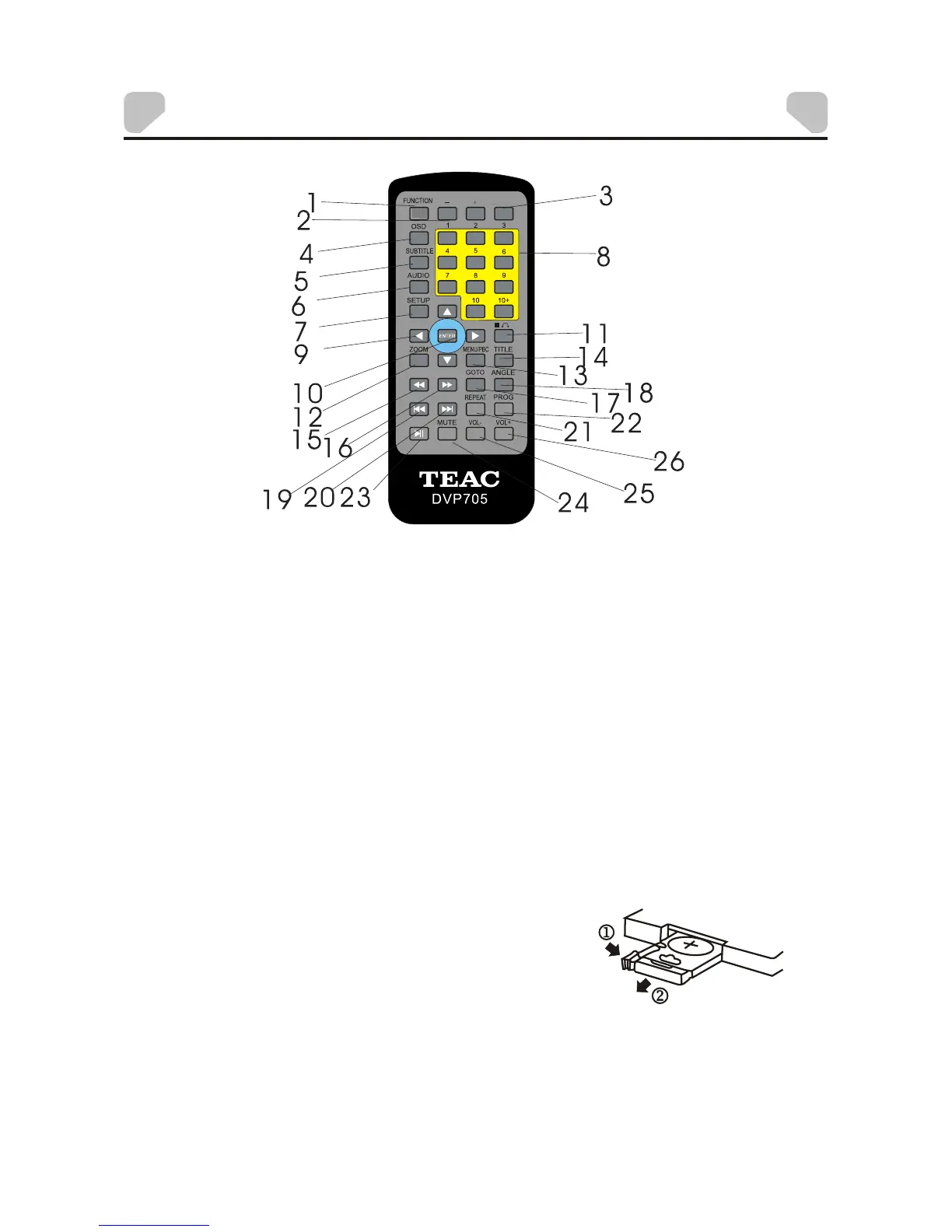
Battery installation
Remove the cover of the battery compartment of
the remote control according to the diagram on the
right.
Step 1: Press the ridged area to the right.
Step 2: At the sametime, pull thebattery tray out.
Step 3: Place a CR2025 lithium battery on the tray
with the positive side facing upward.
Step 4: Replace the cover.
Remote control
USB/CARD
1. FUNCTION
2. -/+
3. USB/CARD
4. OSD
5. SUBTITLE
6. AUDIO
7. SETUP
8. 0-9/10+NUMBER
9.DIRECTION BOTTON
10. ENTER
11. STOP/RETURN
12. ZOOM
13. MENU/PBC
14. TITLE
15. FAST REVERSE
16. FAST FORWARD
17. GOTO
18. ANGLE
19. PERV
20. NEXT
21. REPEAT
22. PROG
23. PLAY/PAUSE
24. MUTE
25. VOL-
26. VOL+



 To Next Page