PANEL AND REMOTE OPERATION
6
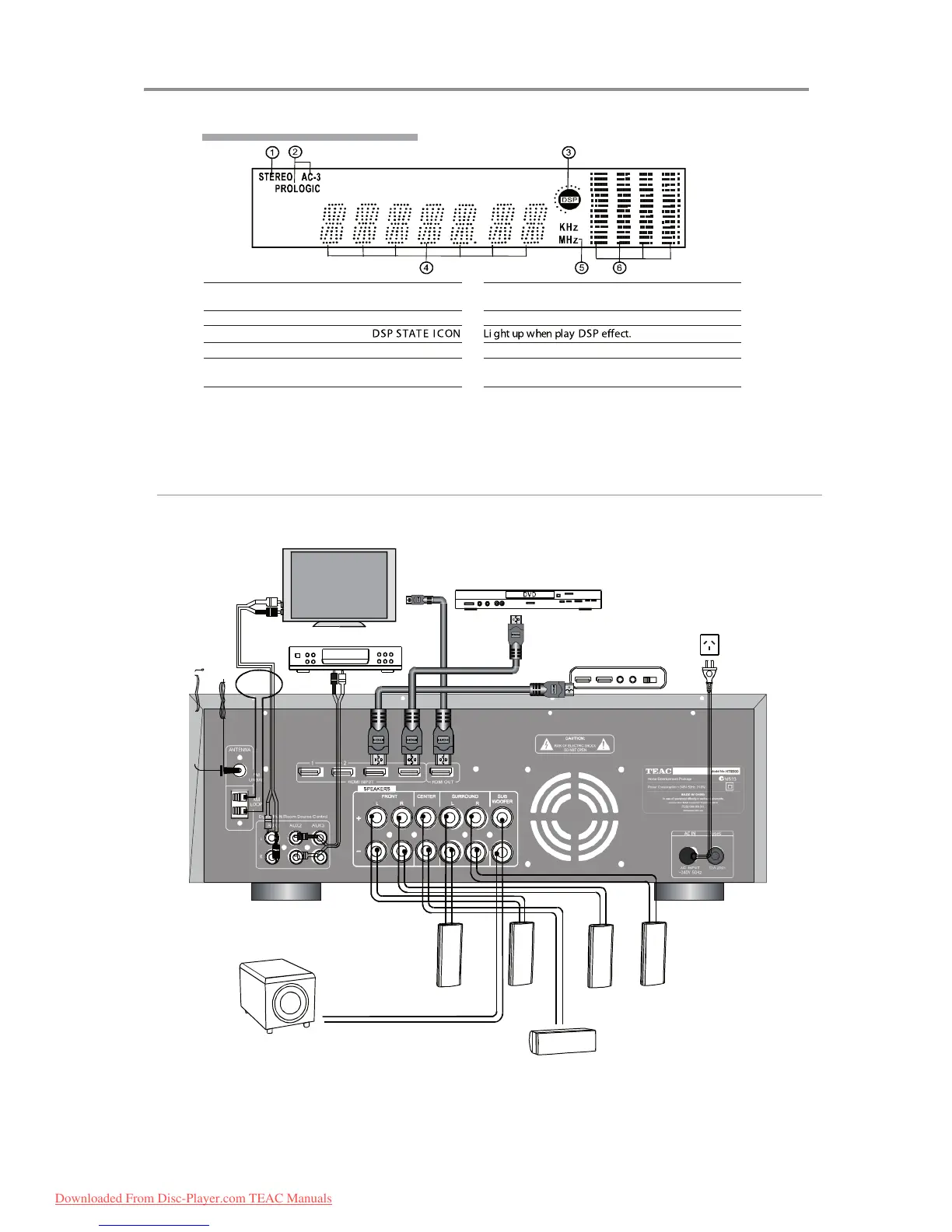
F ront Panel Display W indow
Name F unction
1.STE R EO DV D/CD/PHONO/TUNE R /MP3/
iPhone INPUT
Light up when DVD ,CD
input.
,PHONO FM/AM , Mp3/
iPhone
2.A C-3 PROL OGIC HDMI I NPUT Li ght up when input.5.1 channel or HDMI1/2/3/4
3.DSP
4.DIGI T A L DIS PL AY Li ght up to display value of current input mode.
5.K Hz M Hz KH z M Hz ICON Li ght up when tuner input is selected and indicates the
value on the display for K Hz/M Hz.
6.SPE CT R UM D ISPL AY Li ght up to display the spectrum of dierent channel.
Rear Panel Connection Setup
HDMI IN (sources may
include: TVs, disc players,
game consoles, computers,
media servers)
Stereo Output
TV/Monitor Screen
Blu-ray/DVD player
AC Power Outlet
Subwoofer
AMPLIFIERS
Side left
Front left Front right Side right
Center
Downloaded From Disc-Player.com TEAC Manuals



 To Next Page