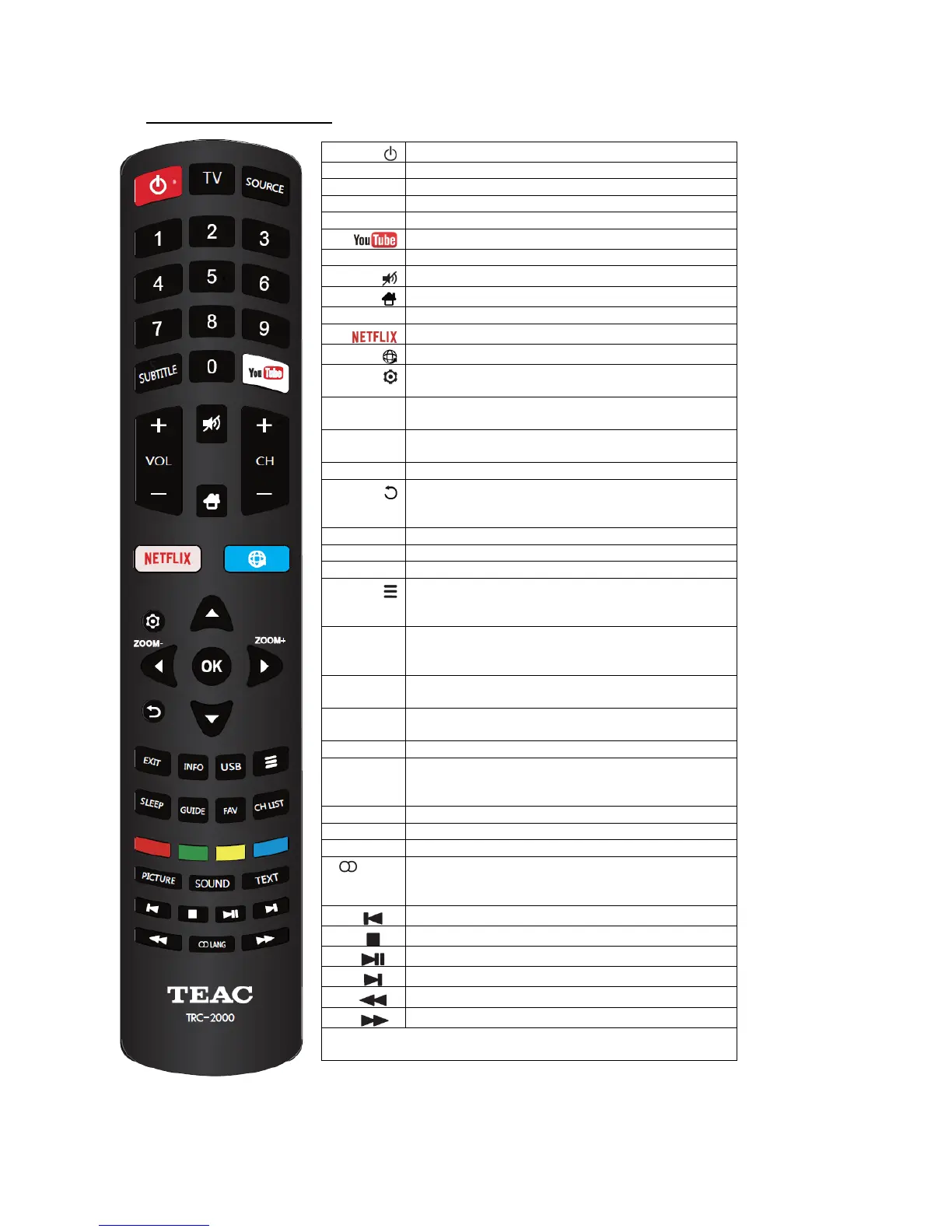
(POWER) Turns the TV on or standby
Bring up the SOURCE menu for changing input
(Numeric buttons) Enters channel numbers
Select from available subtitle languages
Go to the YouTube homepage
(VOLUME UP/DOWN) Adjust the TV's volume
(MUTE) Turn the volume off or on
(HOME) Go to the smart TV homepage.
(CHANNEL UP/DOWN) Navigate the channel list
Go to the Netflix homepage
Go to the browser homepage
(SETTING) Brings up the main menu or press to
return to the previous menu.
Press to select the desired screen format.
Note: This function is not available in USB mode
(UP/DOWN/LEFT/RIGHT) Highlight different items
in the menu system and adjust the menu controls
Confirm selection or change settings in the menu
(BACK) In Menu Mode, goes back to the previous
menu or interface; in TV Mode, goes back to the
most recently viewed channel
Displays information on the current program/source
Enters USB Mode to view multimedia files
(OPTION) Shortcut to Wireless Display, Enjoy
Music, Sleep Timer, PVR, Soundbar ready,
Sports Mode
Repeatedly press to set the TV to turn off after a
given amount of time. To cancel the sleep timer,
press until Off appears
Toggles the Electronic Programme Guide.
Note: Only available in DTV mode
Brings up your Favourite Channel List.
Note: See Program Edit in “Menu Systems”
Displays the channel list menu.
(RED/GREEN/YELLOW/BLUE) Performs the
corresponding function indicated at the bottom of
the screen
Press to cycle through available Picture Modes
Press to cycle through available Sound Modes
Teletext (Teletext service depends on your region)
Select an available sound type for analogue TV, or
select an audio language available for the current
digital TV program
(PREVIOUS) Skip to the previous chapter
(STOP) Stops media playback
(PLAY/PAUSE) Starts/pauses playback
(NEXT) Skip to the next chapter
Note: The above six buttons can be used for playing music,
pictures and videos in USB Mode


 To Next Page