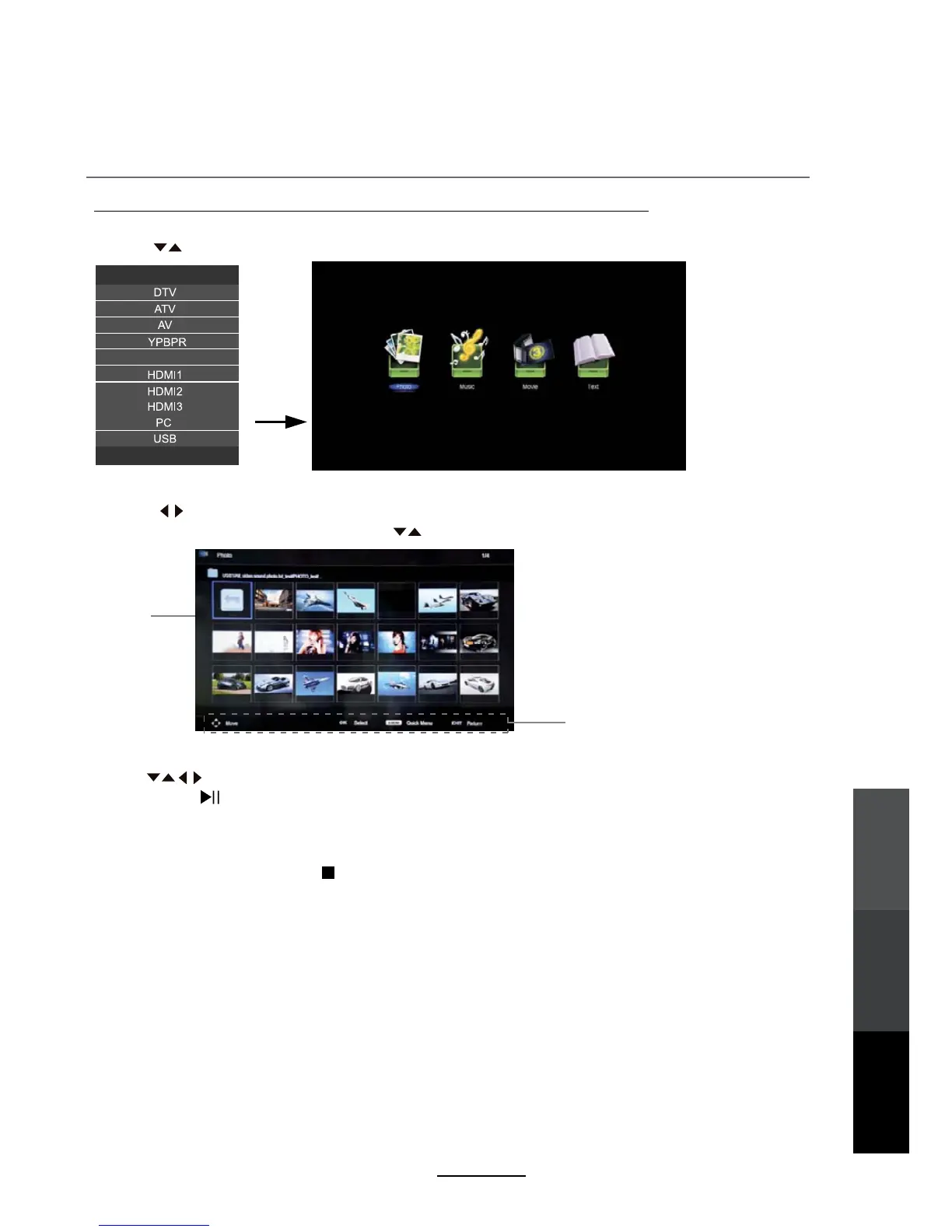
Press to browse through the files. Press the OK button to select the file or access the folder,
then press the button to play the selected media in full screen.
In full screen mode, you can access playback controls at the bottom of the screen by pressing the OK button
and press EXIT to hide it. Press to stop and exit the full screen program.
Basic Operation
2). Press to select the type of media you want to play from the connected USB device, as follows:
PHOTO, MUSIC, MOVIE and TEXT. Press to select the device and press OK button to enter.
1). Press the INPUT button on the remote control to display the input source menu and select USB
with the buttons. Press the OK button to enter the Multimedia menu as shown below.
Hints for operation
Multimedia Operation
Return to
device list
Multimedia
Operation
Recording
Operation
Maintenance
and Service
23
SOURCE
Exit
SOURCE:
DVD



 To Next Page