8
Remote Control
Basic Operations
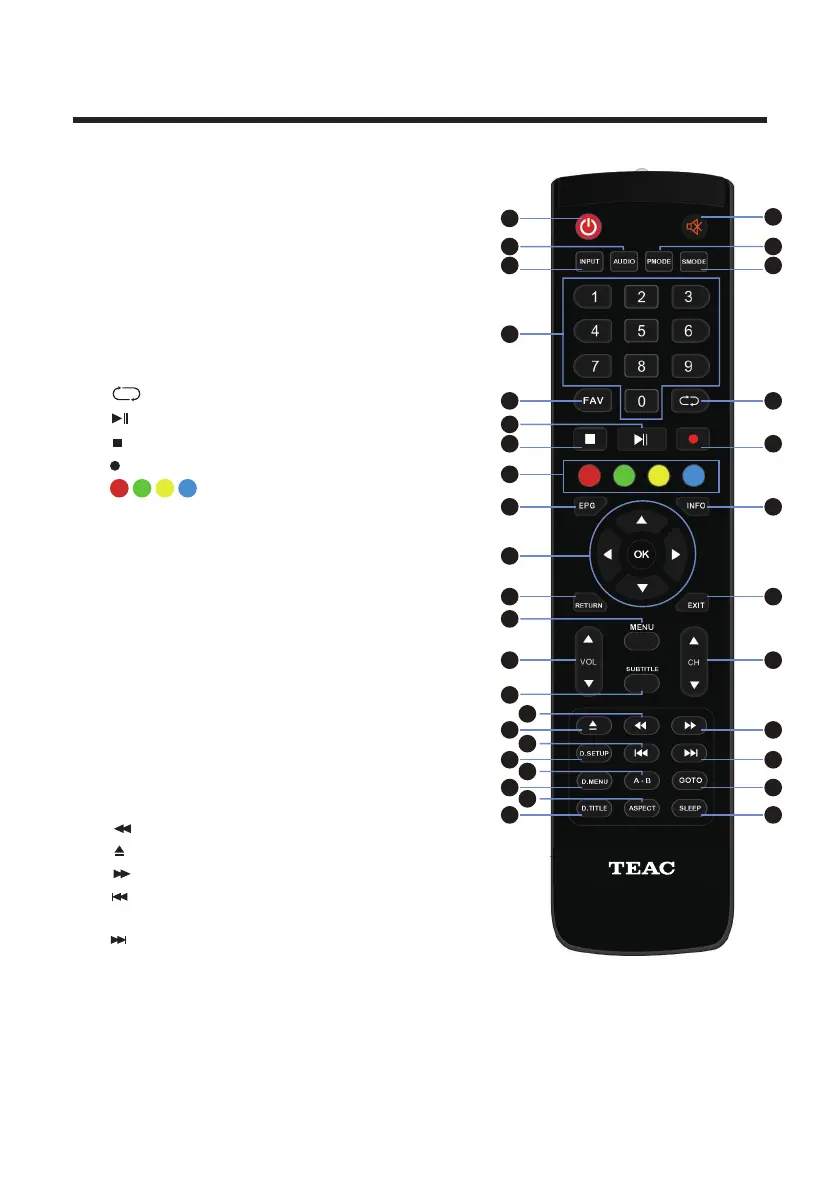
1. POWER: Turn on the TV/Standby.
4. INPUT: Press to change signal source.
3. PMODE : Cycle through the different picture modes.
5. SMODE : Cycle through the different sound modes.
6. NUMBER KEYS: Change the channel
directly.
18. MENU: Show Menu.
17. EXIT: Exit the Menu.
15. NAVIGATION KEYS (Up, Down, Left,
Right and OK/ENTER): To move in the
menus and confirm settings.
19. VOL: Increase and decrease volume.
20. CH: Change the channel up or down.
DVD or multimedia playing.
2.
AUDIO: Switch the audio channel when
13. EPG: Show the Electronic Program Guide.
14. INFO: Show informations.
16. RETURN: Press to return to the previous menu.
26. D.SETUP: Open DVD mode system settings menu.
9.
: Play/Pause.
: Return to the previous channel tuned.
8.
28. A-B: Press display button to repeat the play
in the time of A to B.
21. SUBTITLE:
Select subtitle of media video
file. (If available on disk or file)
10.
: Stop playback.
7.
FAV: Displays the Favourite Program List.
1
7
2
9
18
22
21
4
10
6
12
13
15
14
16 17
19
20
23 24
25
26 27
28
29
30
31
32
33
34
3
5
11
8
23. : Open or close the disc compartment (DVD).
27. : Next file or chapter.
25.
: Previous file or chapter.
22.
: Fast rewind playback.
24.
: Fast forward playback.
: Press the appropriate colour to
direct access functions in TELETEXT or EPG
OSD mode.
12.
11.
: Record program in DTV mode.



 To Next Page