ENGLISH FRANÇAIS
Playback 1
1
Lecture 1
16
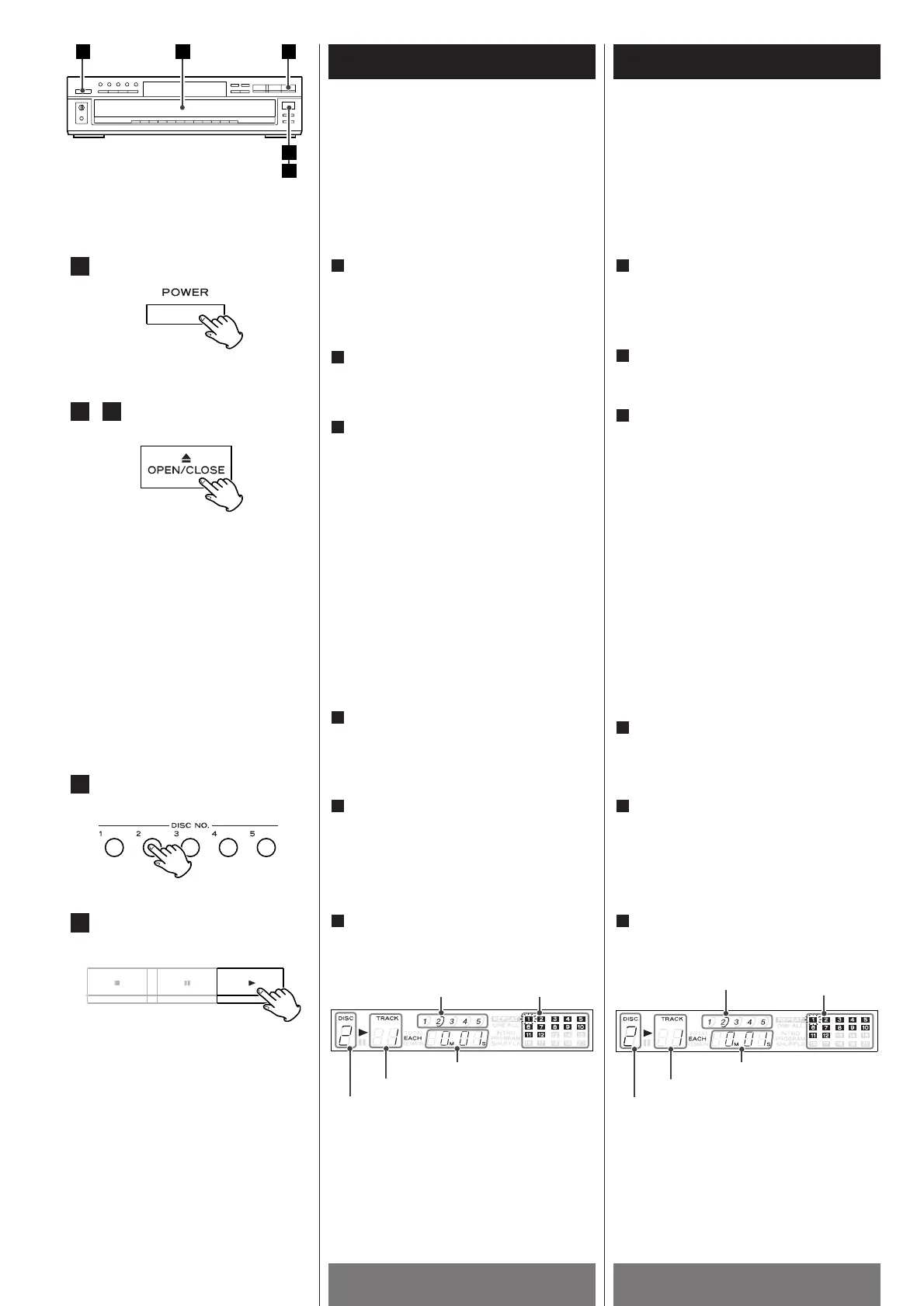
Press the POWER button to ON.
The tray turns clockwise automatically.
1
Appuyer sur la touche d’alimentation
POWER sur ON.
Le plateau tourne automatiquement dans
le sens des aiguilles d’une montre.
Appuyer sur la touche OPEN/CLOSE(L)
pour ouvrir le plateau de disque.
Charger le(s) disque(s) sur le(s)
plateau(x) de disque, la face portant
l’étiquette tournée vers le haut.
<
Appuyer sur la touche DISC SKIP pour
charger tous les 5 disques.
<
Chaque fois que la touche DISC SKIP est
pressée, le plateau tourne dans le sens
des aiguilles d’une montre à la position
suivante du plateau.
Attention:
<
Ne pas toucher le carrousel pendant qu’il
tourne.
<
Ne rien placer, à l’exception d’un disque
compact, dans le plateau. Des objets
étrangers peuvent endommager le
mécanisme.
Appuyer à nouveau sur la touche
OPEN/CLOSE(L
).
4
3
2
1
The music calendar lights to show the
available unplayed tracks. If there are
more than 20 tracks on a disc, the track
number 1-20 will light.
Le damier musical s'éclaire et indique les
plages musicales qui n'ont pas été
jouées. Si le disque porte plus de 20
plages musicales, les témoins 1-20 sont
éclairés.
Press the PLAY(y) button.
6
Press the DISC NO.(1~5) button which
corresponds to the tray number of the
disc to be played.
5
Press the OPEN/CLOSE button(L) again.
4
Load the disc(s) on the disc tray(s), label
side(s) up.
<
Press the DISC SKIP button to load all
5 discs.
<
Each time the DISC SKIP button is
pressed, the tray turns clockwise to the
next tray position.
Caution:
<
Do not touch the carousel while it is
rotating.
<
Do not put anything except a compact
disc into the tray. Foreign objects can
damage the mechanism.
3
Press the OPEN/CLOSE button(L ) to
open the disc tray.
2



 To Next Page