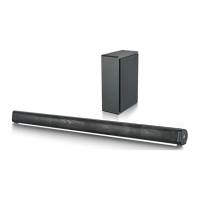
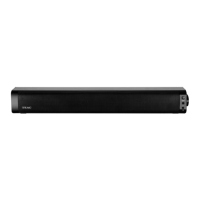
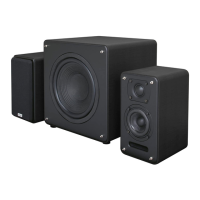
This document describes the TEAC SB21204WD 95cm 2.1CH BT Soundbar with Wired Subwoofer, a home audio system designed to enhance your television's sound experience.
Function Description:
The TEAC SB21204WD is a 2.1 channel soundbar system that includes a main soundbar unit and a wired subwoofer. It offers multiple audio input options, including Bluetooth for wireless streaming, AUX In, Line-in, and USB for playing music from various sources. An FM radio function is also integrated, allowing users to tune into local stations. The system is designed to deliver improved audio quality for movies, music, and other media, with adjustable bass and treble settings to customize the sound profile. The wired subwoofer provides enhanced low-frequency response, contributing to a more immersive audio experience.
Important Safety Instructions:
Users are advised to heed all warnings and follow all instructions provided in the manual. The soundbar should not be used near water and must be cleaned with a dry cloth. Ventilation openings should not be blocked, and the unit should be installed according to the manufacturer's instructions, away from heat sources. Only attachments and accessories specified by the manufacturer should be used. To reduce the risk of electric shock, the cover should not be removed as there are no user-serviceable parts inside. The soundbar should not be exposed to dripping or splashing liquids, and no objects filled with liquids should be placed on it. The unit should be unplugged during lightning storms or when unused for long periods. Servicing should be referred to qualified personnel if the soundbar is damaged. No naked flame sources, such as lit candles, should be placed on the soundbar. Used electrical products and batteries should be disposed of safely according to local authority regulations. The manual emphasizes the importance of reading all instructions carefully before use and keeping them for future reference.
Recycling Electrical Products:
The manual encourages users to recycle waste electrical goods to help the environment. A symbol indicates that electrical products should not be disposed of with normal household waste and should be taken to a suitable disposal facility.
Quick System Installation Guide:
The installation guide provides step-by-step instructions for wall-mounting the soundbar. This involves:
- Placing a paper guide on the wall to mark the hanging position.
- Verifying the inclination angle of the soundbar is zero degrees using a level gauge.
- Locating screw holes on the paper guide and marking points with a pencil.
- Making holes with a drill bit corresponding to the wall type.
- Ensuring a minimum of 5mm clearance between the head of the screw and the wall to minimize the inclination angle.
- For optimal sound experience, it is advisable to place the soundbar at ear level height.
Package Contents:
The TEAC SB21204WD package includes:
- SB21204WD Soundbar
- Remote Control
- Power Adaptor
- AUX In cable
- User manual
- 3.5mm to 3.5mm Line In cable
- Subwoofer
The soundbar features several control buttons on its side:
- POWER: To turn the unit on/off.
- MODE: Short press for mode selection, long press for Play/Pause.
- NEXT V+: Volume up / Next track.
- PREV V-: Volume down / Previous track.
- LINE IN: Line In input.
- USB: USB input.
- LINE OUT: Line Out output.
Control and Functions (Back View):
The back panel of the soundbar includes:
8. SUB-OUT: Subwoofer output.
9. AUX IN: AUX input.
10. DC-18V-IN: DC power input.
11. FM ANT: FM antenna.
Remote Control:
The remote control provides comprehensive control over the soundbar's functions:
- Power On/Off: To turn the unit on or off.
- Source Menu (MODE): Quick select for input sources.
- Multimedia Keys: Play/Pause, Skip Forwards/Backwards.
- Master Volume: Adjusts overall volume.
- Bass Adjustment (BASS): Adjusts bass levels.
- Treble Adjustment (TREBLE): Adjusts treble levels.
- Digital Equalizer (ADJ MOVIE VOICE): Selects preset equalizer modes (Movie, Voice).
The remote control sensor is located at the front of the soundbar and is sensitive to commands up to a maximum of 8 meters away and within a maximum arc of 30 degrees. Operating distance may vary depending on room brightness.
Soundbar Hook Schematic:
A schematic diagram illustrates the dimensions and hook points for wall mounting the soundbar, showing a distance of 320mm between the two main mounting points.
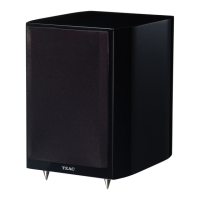
Wired Subwoofer:
The manual includes a diagram of the wired subwoofer, showing its connection cable.
Using the AUX In Cable:
- Connect the included AUX Stereo Audio Cable to the TV's stereo AUX (L/R) audio output socket.
- Connect the audio output cable of the soundbar via the 'AUX' input sockets of the unit.
- Press the MODE button on the remote control or on the unit repeatedly to scroll to the AUX IN function.
- Turn on your television.
Troubleshooting for AUX In: If not receiving a picture or encountering interference, ensure the AUX cable is connected to the 'output' AUX port on your TV. If the sound is not exported correctly, try an alternative connection method.
Connecting to the Mains Supply:
- Ensure the power supply voltage is between 100V~240V.
- Unwind the mains cable completely.
- Connect the mains plug to a mains socket.
- Ensure the mains plug is fully inserted.
- Connect the adapter to the unit via the DC-18V-IN input socket.
Important: All audio connections should be made before connecting to the mains power socket. Unplug the power cord when the unit is unused for an extended period.
Using the MP3 Link Connection (LINE IN):
- Plug one end of the included 3.5mm to 3.5mm Line In cable into the Line In port on the unit. Disconnect any cables connected to Stereo RCA Inputs before use.
- Plug the other end of the cable into the audio output/headphone output on an MP3 player or other audio source.
- Press the Power button on the soundbar or remote control to switch on the unit.
- Press the Mode button repeatedly on the soundbar or remote control to enter LINE in mode. Audio from the connected device will play through the speakers.
Connecting the Soundbar and Subwoofer:
- Connect the subwoofer cable to the soundbar.
- Ensure the soundbar is powered and switched 'ON' for initial setup.
- If experiencing connectivity issues, move the subwoofer closer to the soundbar.
Using the Bluetooth Function:
Pairing a Bluetooth Device for the First Time:
- Press the POWER button on the unit or remote control to switch on the unit.
- Select and press the MODE button repeatedly on the remote control until in Bluetooth mode, or press the Mode button repeatedly on the soundbar to enter Bluetooth mode.
- Using the native controls on your Bluetooth device, select "SB21204WD" in your Bluetooth settings to pair.
- Once successfully paired and connected, a beep will issue from the unit. After initial pairing, the unit will stay paired unless unpaired manually by the user.
- If your device becomes unpaired or is unable to connect, repeat the above steps.
Playing Audio Wirelessly:
- Follow the instructions for pairing a Bluetooth device.
- Use the native controls on the connected Bluetooth Device to select a track.
- Long press the 'Play/Pause' button to Play or Pause the track.
- Skip Forwards/Backwards to a selected track using the remote control.
- Audio played through the connected Bluetooth device will be heard through the speakers.
Using the USB Function:
- Insert a USB drive to play music automatically.
- Select and press the MODE button repeatedly on the remote control until in USB mode, or press the Mode button repeatedly on the soundbar to enter USB mode.
- Long press the 'Play/Pause' button to Play or Pause the track.
- Skip Forwards/Backwards to a selected track using the remote control.
- Audio played through the connected Bluetooth device will be heard through the speakers.
Using the FM Function:
- Select and press the MODE button repeatedly on the remote control, or press the Mode button on the soundbar repeatedly to enter FM mode.
- Ensure the wire aerial on the back panel of the soundbar is extended.
- When in FM mode, press and hold the 'Play/Pause' button on the remote or on the soundbar to begin searching for available FM stations.
- After the search is complete, the soundbar will save stations with good signal. To scroll through saved stations, press the 'Previous/Next' buttons on the remote control.
Please Note: If experiencing trouble receiving stations, perform another auto-scan and adjust the aerial as necessary.
Troubleshooting:
The manual provides a troubleshooting table for common issues:
- No power/function: Check if power is switched on at the wall and if the power adaptor is properly connected.
- No sound: Check if cables are properly installed, try an alternative cable, and ensure the unit is not in standby mode.
- No sound from Bluetooth connection: Forget the soundbar from your device and reconnect.
- Function disturbance: Switch off and unplug the unit for 2 minutes, then switch it on again. If a particular mode is causing problems, try an alternative connection (e.g., Optical or Bluetooth).
- Remote control does not work properly: Check if the battery has run out and replace if necessary. Check for obstacles in front of the remote sensor.
Product Specifications:
- Power Supply: DC 18V / 1.3A
- RMS Power: 44W (Soundbar 2 x 12W + Subwoofer 20W)
- Speaker Output Power: 90W (Soundbar + Subwoofer)
- Speaker Size & Number (Soundbar): 2" Full range speaker x 4
- Speaker Size (Wired Subwoofer): 5"
- Bluetooth Version: 5.0
- Bluetooth Distance: 10M
- Frequency Response: 70HZ - 18KHZ
- Working environment: -10°C ~ +55°C
- Audio Input: AUX In / Line-in / USB / Bluetooth
- Soundbar Dimensions: 95 x 5.5 x 6.5cm
- Wired Subwoofer Dimensions: 13.5 x 25 x 35cm
- Net Weight (Soundbar + Subwoofer): 4.45kg
Terms and Conditions (Warranty):
TEAC products come with guarantees under Australian Consumer Law. Consumers are entitled to a replacement or refund for major failures and compensation for foreseeable loss or damage, and to have goods repaired or replaced if they fail to be of acceptable quality.
- TEAC warrants the product free from defects in material and workmanship under normal domestic use. Maintenance and cleaning (e.g., laser head) are not covered. The warranty applies only to NEW TEAC products purchased from an Authorised Retailer in Australia and is non-transferable.
- Warranty benefits are in addition to other consumer rights under Australian Consumer Law.
- Refund or replacement via a TEAC Authorised Retailer is available for 14 days after purchase for goods with a major failure, but not for change of mind.
- The warranty covers TEAC products under a 12 Month Replacement Warranty Scheme from the date of original purchase.
- The warranty is void and claims may be refused if:
a) The product was not transported, installed, operated, or maintained according to manufacturer instructions.
b) The product was abused, damaged, tampered with, altered, or repaired by unauthorised persons.
c) Product failure is due to accidents, installation/transit issues, power surges, use of defective/incompatible external devices, exposure to abnormal conditions (excessive temperatures/humidity), liquids, objects, creatures, or cockroach infestations.
d) The customer cannot provide proof of purchase.
e) The serial number is missing or tampered with.
- No one is authorised to assume liability or impose obligations on TEAC beyond what is stated in this warranty.
- TEAC and/or its Authorised Service Centres reserve the right to inspect and verify claimed major failures.
TEAC Warranty Service Hotline: 1300 553 315 (Monday to Friday - 8:30 AM to 5 PM AEST). Users should have their purchase receipt and product's serial number ready. For other enquiries and support, visit www.teac.com.au.

 Need help?
 General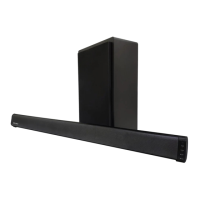

 To Next Page