13
ENGLISH FRANÇAIS
Programmed Playback 2 Lecture programmée 2
A
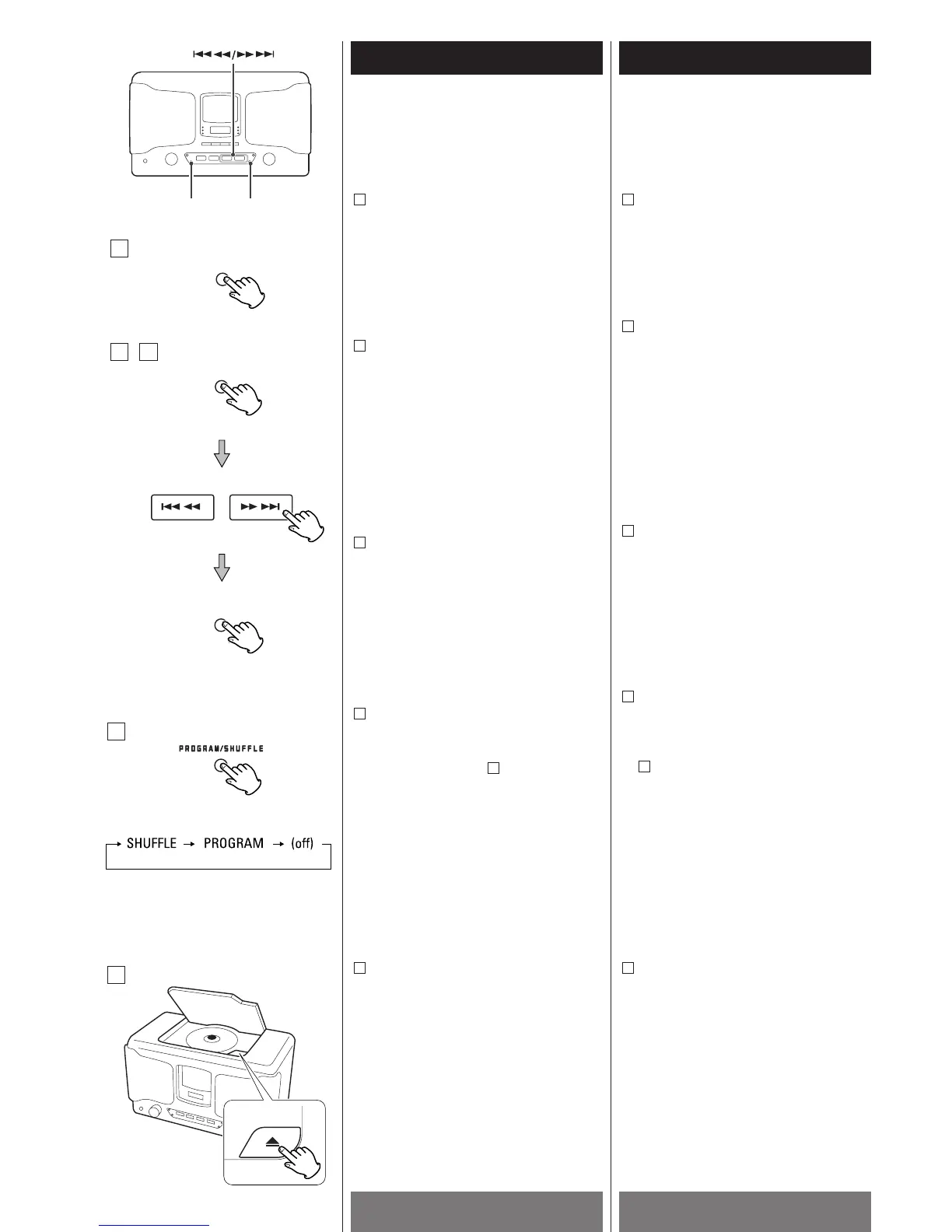
To add a track to the end of the program
In the stop mode, press the MEMORY
button repeatedly until a program number
(P02~P20) appears on the display.
Select a track number by pressing the
SKIP/SEARCH button and then press the
MEMORY button.
The track is added to the end of the
program.
B
To clear program
To clear the programmed contents, press
the OPEN/CLOSE button (L
).
The program will also be cleared when
the MEMORY button and the STOP button
are pressed in the stop mode.
<
If the unit is disconnected from the power
supply for more than 3 minutes, the
programmed contents will be cleared.
E
To cancel the program playback mode
Every time the PROGRAM/SHUFFLE
button is pressed, the playback mode is
changed as follows :
When the PROGRAM/SHUFFLE button is
pressed once, "PROGRAM" indicator goes
off, but the programmed contents aren't
lost.
To return to the program mode, press the
PROGRAM/SHUFFLE repeatedly until the
PROGRAM indicator lights.
D
D
To check the programmed order
In the stop mode, press the MEMORY
button repeatedly.
The track number will be shown on the
display.
A
To overwrite the program
In the stop mode, press the MEMORY
button repeatedly until the track number
to be changed appears on the display.
Select a new track number by pressing
the SKIP/SEARCH button and then press
the MEMORY button.
C
Pour ajouter une piste à la fin du
programme
En mode arrêt, appuyer sur la touche
MEMORY répététivement jusquà temps
qu’un numéro de programmation
(P02~P20) est affiché
Choisir un numéro de piste en appuyant
sur la touche SKIP/SEARCH et ensuite
appuyer la touche MEMORY.
La piste est ajoutée à la fin du
programme.
B
Pour vidanger la programmation
Pour vidanger le contenu de la
programmation, appuyer sur la touche
OPEN/CLOSE (L)
La programmation sera aussi vidanger si
la touche MEMORY et la touche stop sont
appuyées en mode arrêt.
<
Si l’appareil est débranché pour plus de 3
minutes, la programmation est vidangée.
E
Pour annuler la lecture programmée
Chaque fois que la touche
PROGRAM/SHUFFLE est appuyée, le
mode de lecture est changé tel qui suit :
Quand la touche PROGRAM/SHUFFLE est
appuyée une fois, l’indicateur
“PROGRAM” s’éteint mais le contenu de
la programmation n’est pas perdue.
Pour retourner en mode programmation,
appuyer sur la touche
PROGRAM/SHUFFLE répététivement
jusqu’à temps que l’indicateur PROGRAM
est allumé.
D
D
Pour vérifier l’ordre de programmation
En mode arrêt, appuyer sur la touche
MEMORY répététivement.
Le numéro de la piste est affiché
A
Pour recouvrir un programme
En mode arrêt, appuyer la touche
MEMORY répététivement jusqu’ à temps
que le numéro de piste à changer est
affiché. Choisir un nouveau numéro de
piste en appuyant sur la touche
SKIP/SEARCH et ensuite la touche
MEMORY.
C


 To Next Page