EasyManua.ls Logo

Teac T-X3000 - Page 3

Teac T-X3000
18 pages
Print Icon
To Next Page IconTo Next Page
To Previous Page IconTo Previous Page
Loading...
.
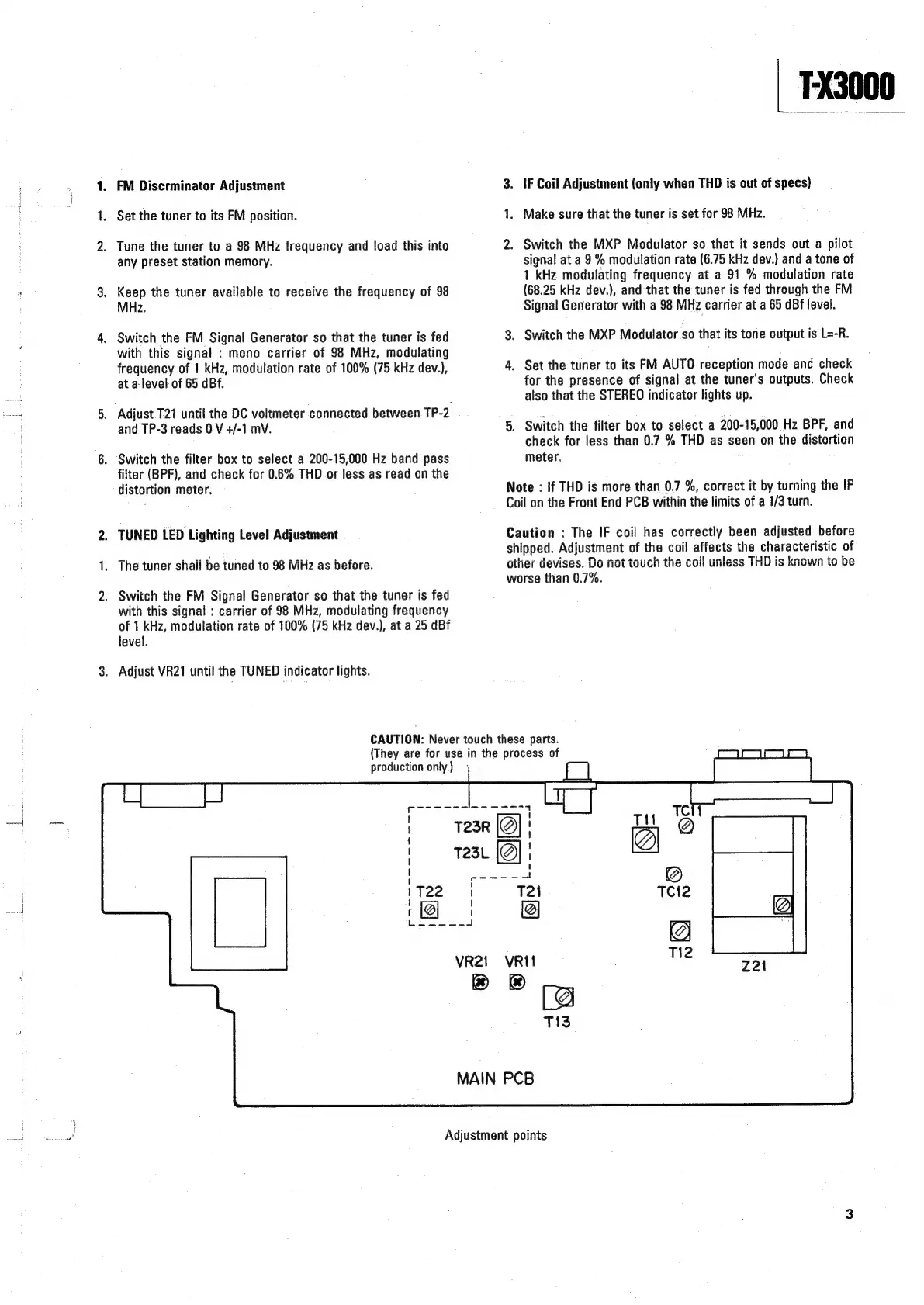
FM
Discrminator
Adjustment
.
Set
the
tuner
to
its
FM
position.
.
Tune
the
tuner
to
a
98
MHz
frequency
and
load
this
into
any
preset
station
memory.
.
Keep
the
tuner
available
to
receive
the
frequency
of
98
MHz.
.
Switch
the
FM
Signal
Generator
so
that
the
tuner
is
fed
with
this
signal
:
mono
carrier
of
98
MHz,
modulating
frequency
of
1
kHz,
modulation
rate
of
100%
(75
kHz
dev.),
at
a-level
of
65
dBf.
;
‘Adjust
T21
until
the
DC
voltmeter
connected
between
TP-2
and
TP-3
reads
0
V
+/-1
mV.
.
Switch
the
filter
box
to
select
a
200-15,000
Hz
band
pass
filter
(BPF),
and
check
for
0.6%
THD
or
less
as
read
on
the
distortion
meter.
.
TUNED
LED
Lighting
Level
Adjustment
1.
The
tuner
shall
be
tuned
to
98
MHz
as
before.
.
Switch
the
FM
Signal
Generator
so
that
the
tuner
is
fed
with
this
signal
:
carrier
of
98
MHz,
modulating
frequency
of
1
kHz,
modulation
rate
of
100%
(75
kHz
dev.),
at
a
25
dB
level.
.
Adjust
VR21
until
the
TUNED
indicator
lights.
FX3000
3.
IF
Coil
Adjustment
(only
when
THD
is
out
of
specs}
1.
Make
sure
that
the
tuner
is
set
for
98
MHz.
2.
Switch
the
MXP
Modulator
so
that
it
sends
out
a
pilot
signal
at
a
9%
modulation
rate
(6.75
kHz
dev.)
and
a
tone
of
1
kHz
modulating
frequency
at
a
91
%
modulation
rate
(68.25
kHz
dev.},
and
that
the
tuner
is
fed
through
the
FM
Signal
Generator
with
a
98
MHz
carrier
at
a
65
dBf
level.
3.
Switch
the
MXP
Modulator
so
that
its
tone
output
is
L=-R.
4.
Set
the
tuner
to
its
FM
AUTO
reception
mode
and
check
for
the
presence
of
signal
at
the
tuner's
outputs.
Check
also
that
the
STEREO
indicator
lights
up.
“5.
Switch
the
filter
box
to
select
a
200-15,000
Hz
BPF,
and
check
for
less
than
0.7
%
THD
as
seen
on
the
distortion
meter.
Note
:
!f
THD
is
more
than
0.7
%,
correct
it
by
turning
the
IF
Coil
on
the
Front
End
PCB
within
the
limits
of
a
1/3
turn.
Caution
:
The
IF
coil
has
correctly
been
adjusted
before
shipped.
Adjustment
of
the
coil
affects
the
characteristic
of
other
devises.
Do
not
touch
the
coil
unless
THD
is
known
to
be
worse
than
0.7%.
CAUTION:
Never
touch
these
parts.
(They
are
for
use
in
the
process
of
production
only.)
VRIt
®
&
MAIN
PCB
Ti2
Ko
Tis
Adjustment
points

Related product manuals