EasyManua.ls Logo

Teac T-X3000 - Page 4

Teac T-X3000
18 pages
Print Icon
To Next Page IconTo Next Page
To Previous Page IconTo Previous Page
Loading...
FX3000
AM
TEST
CONNECTIONS
60
cm
Loop
ANT.
or
|
ANT
Service
|_
Tool
'
1
8
.
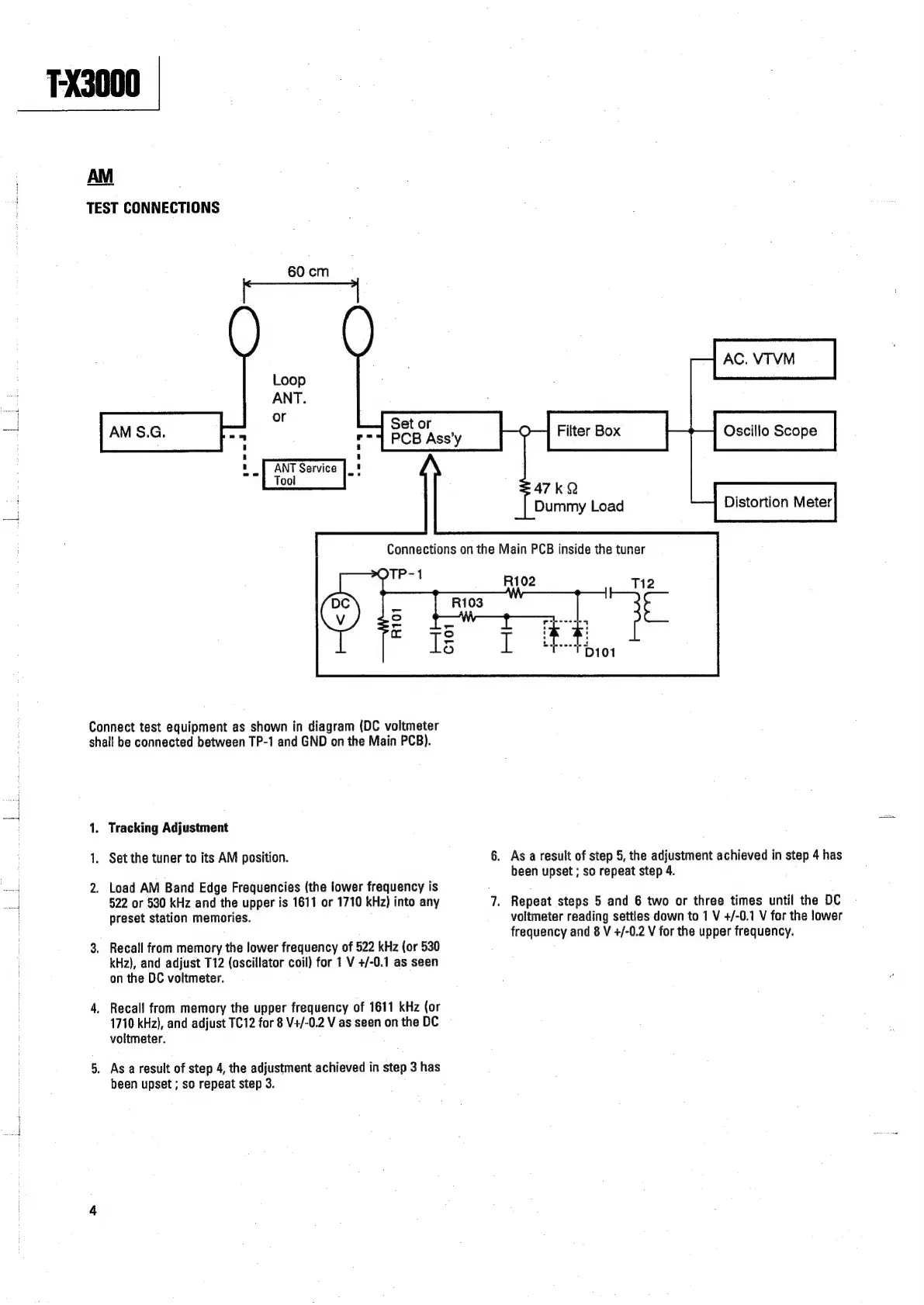
Connect
test
equipment
as
shown
in
diagram
(DC
voltmeter
shall
be
connected
between
TP-1
and
GND
on
the
Main
PCB).
1.
Tracking
Adjustment
1.
Set
the
tuner
to
its
AM
position.
2.
Load
AM
Band
Edge
Frequencies
(the
lower
frequency
is
522
or
580
kHz
and
the
upper
is
1611
or
1710
kHz)
into
any
preset
station
memories.
3.
Recall
from
memory
the
lower
frequency
of
522
kHz
(or
530
kHz),
and
adjust
T12
(oscillator
coil)
for
1
V
+/-0.1
as
seen
on
the
DC
voltmeter.
4.
Recall
from
memory
the
upper
frequency
of
1611
kHz
(or
1710
kHz),
and
adjust
TC12
for
8
V+/-0.2
V
as
seen
on
the
DC
voltmeter.
5.
Asa
result
of
step
4,
the
adjustment
achieved
in
step
3
has
been
upset
;
so
repeat
step
3.
Connections
on
the
Main
PCB
inside
the
tuner
47k
Q
Dummy
Load
.
As
a
result
of
step
5,
the
adjustment
achieved
in
step
4
has
been
upset
;
so
repeat
step
4.
.
Repeat
steps
5
and
6
two
or
three
times
until
the
DC
voltmeter
reading
settles
down
to
1
V
+/-0.1
V
for
the
lower
frequency
and
8
V
+/-0.2
V
for
the
upper
frequency.

Related product manuals