ENGLISH
Operation
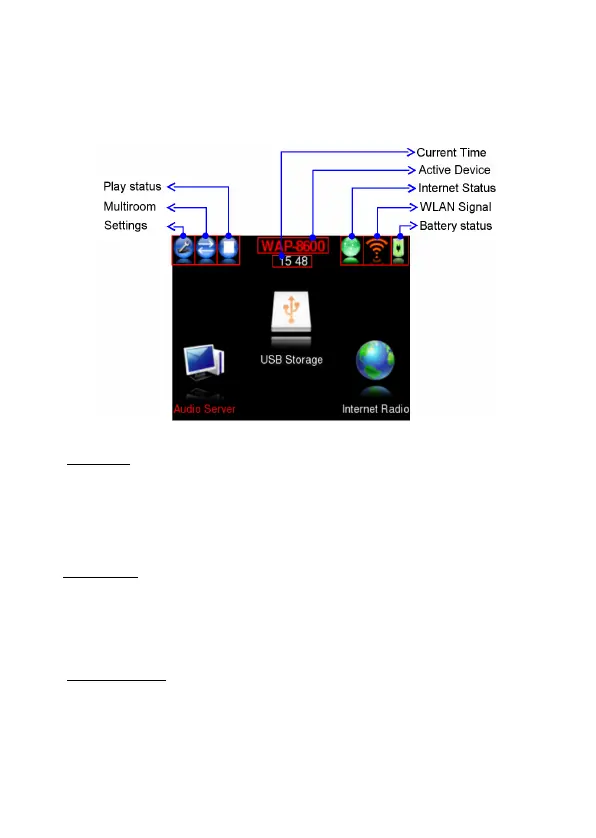
The main menu of WAP-8600 has two areas:
1. Status topline, with soft-keys (left) and status indications (right).
2. Operation area.
● Soft-keys – these three buttons change their function dependant from actual
screen. In main menue:
Settings: screen, date, time, network settings and system upgrade.
Multiroom: Directly opens the device list for selecting the SMR device to control.
Choice from multiple SMRs if available.
Play function (Stop/Play)
● Status area - displays various system informations:
Time
Active Device
Networking status (connected/=green, disconnected=red)
WLAN connection quality
Battery status (flash for charging, condition: low=red, medium=yellow, full=green)
● Operation area – main functions are:
1. Audio Server: to browse media server and choose tracks to listen.
2. USB Storage: to browse USB disk content and choose tracks to listen, to call
up previously stored playlists and Internet-Radio-playlists from PC, to store
Internet Radio recordings as well as device settings and playlists created by
WAP-8600.
3. Internet Radio browsing and “My Favorite Station” management



 To Next Page