Page 13
TEBO
TM
Elite Massage Chair Owner’s Manual
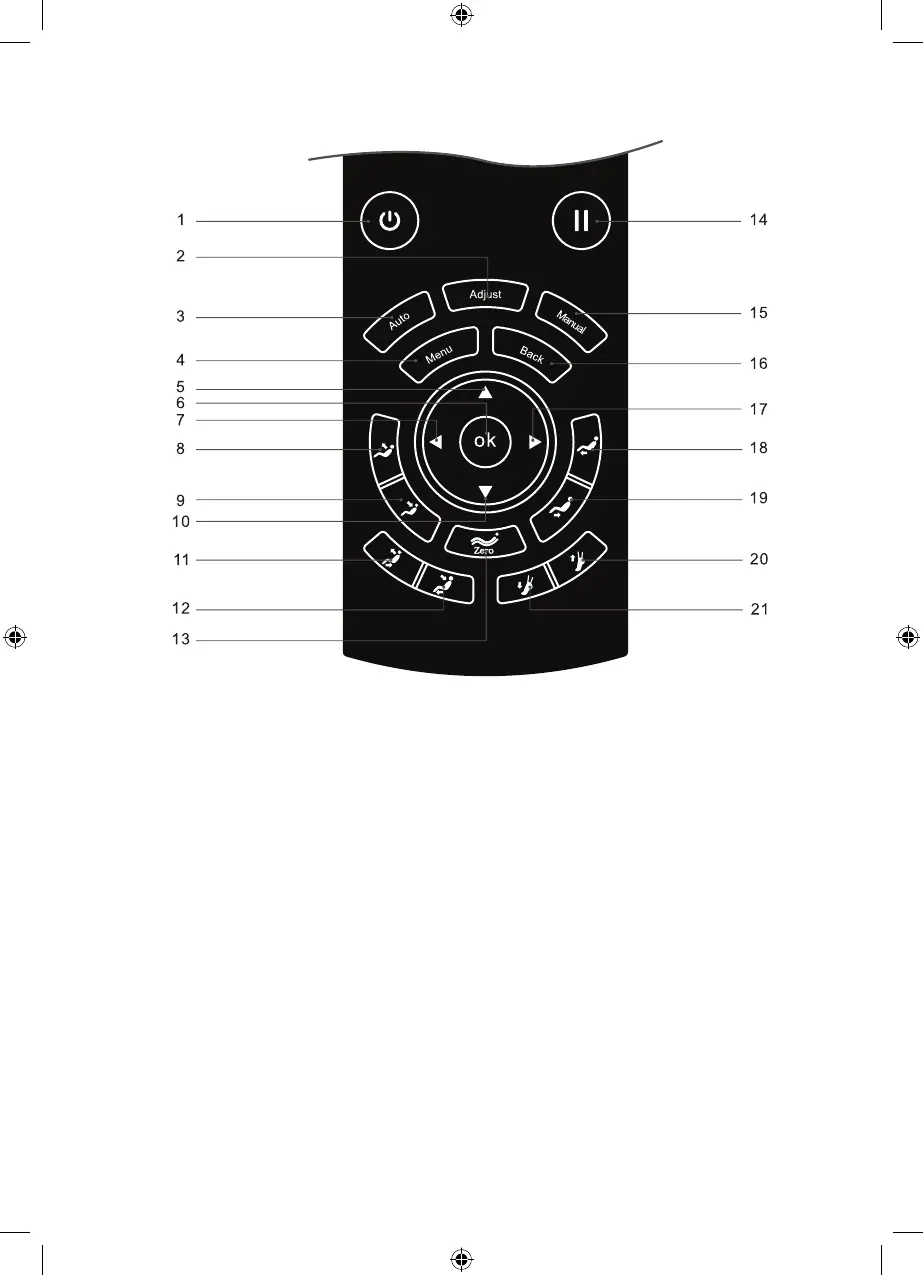
Remote control buttons
1. Power button: turn on or o
massage chair
2. Adjustment button: enter the
massage function selection
interface
3. Auto button: enter the
automatic mode selection
interface
4. Menu button: enter main menu
interface
5. Up button: navigation key up
6. OK button: OK
7. Left button: navigation key turn
left
8. Backrest rise button: adjust the
backrest rise
9. Backrest down button: adjust
the backrest down
10. Down button: navigation key
down
11. Sit Up button: Massage chair
lifts up.
12. Laying Down button: 12.
Massage chair reclines down
13. Zero G button: select Zero
Gravity setting.
14. Pause button: Pauses all the
functions
15. Manual button: enter the
manual mode selection
interface
16. Back button: return to massage
information interface
17. Right button: navigation key
turn right
18. Leg rest up button: adjust leg
rest up
19. Leg rest down button: adjust
leg rest down
20. Foot rest shorten button:
shortens the foot rest
21. Foot rest extend button:
extends the foot rest
TEBO Chair - Elite - Owners Manual - BDV1.indd 13TEBO Chair - Elite - Owners Manual - BDV1.indd 13 17/08/2020 6:17:11 p.m.17/08/2020 6:17:11 p.m.


 To Next Page