Page 17
TEBO
TM
Elite Massage Chair Owner’s Manual
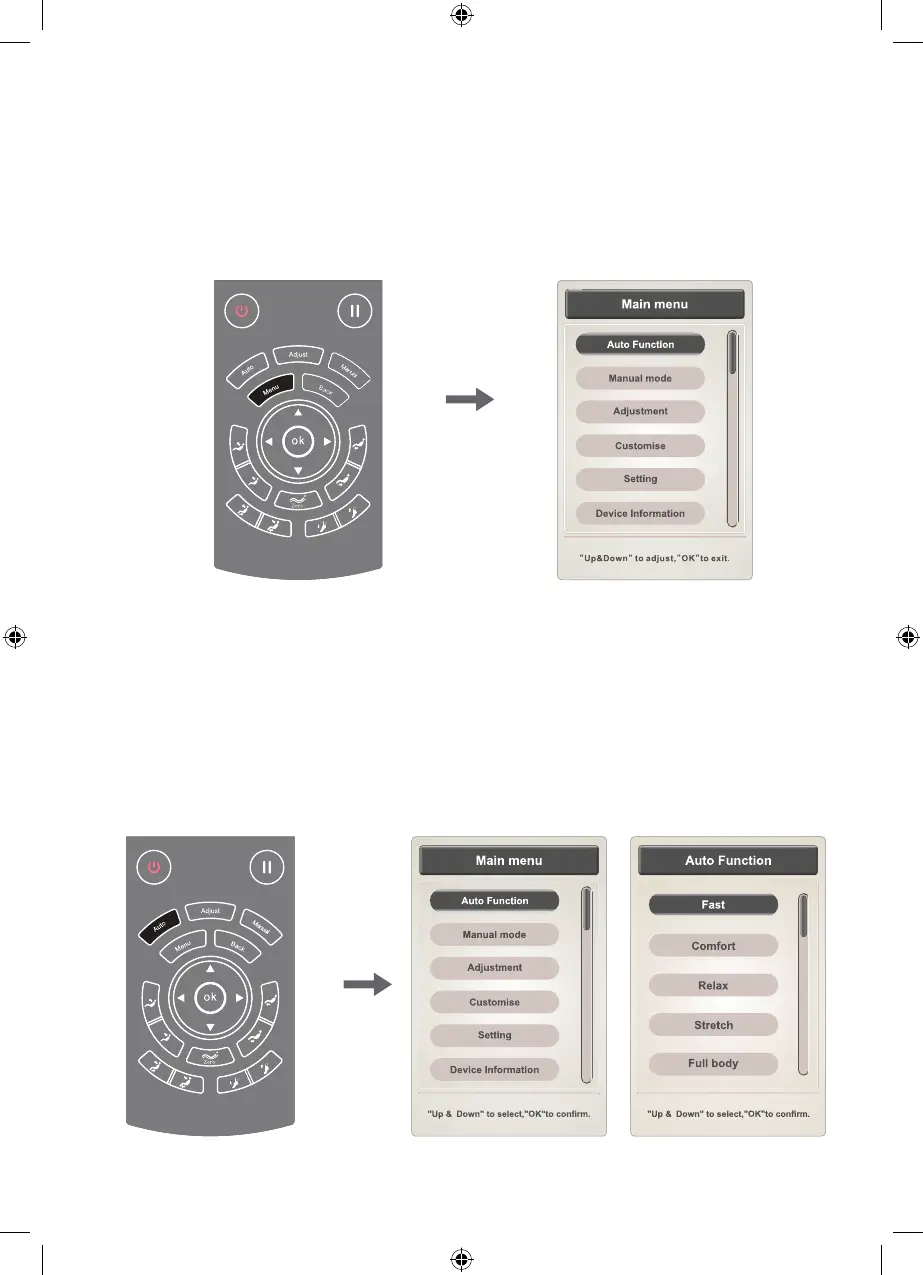
2.5 Menu button
Use the “Menu” button to select the main massage function menu. The
selection includes Auto function, Manual mode, Adjustment, Customise,
Setting, and Device information options.
Press the “up” or “down” buttons to select menu items. Press the "OK"
button to make your selection. Press the “Back” button to return to the
function selection information interface.
2.6 Auto Function Interface (Auto button is also a shortcut to the Auto
Function interface)
This will give you a choice of automatic modes including Fast,
Comfortable, Relax, Stretch, Full body, Shoulder and neck, Back and
waist and Full pressure.
Press the “up” or “down” button to select a massage function, and then
press the "OK" button to select your choice of function. Press the “Back”
button to return to the function selection information interface.
TEBO Chair - Elite - Owners Manual - BDV1.indd 17TEBO Chair - Elite - Owners Manual - BDV1.indd 17 17/08/2020 6:17:16 p.m.17/08/2020 6:17:16 p.m.


 To Next Page