Page 29
TEBO
TM
Elite Massage Chair Owner’s Manual
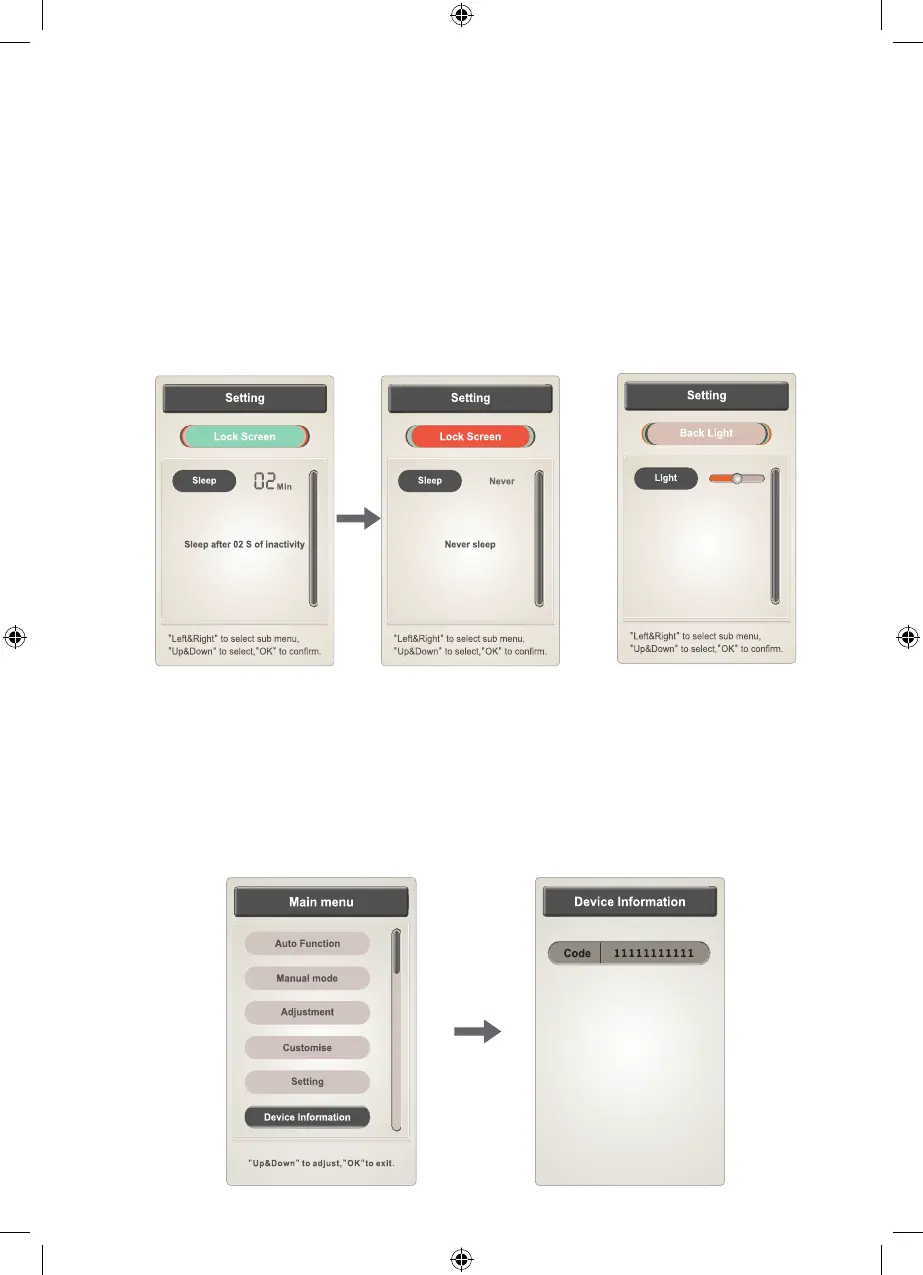
6.2 Lock Screen
Setting (lock screen) includes a choice of time lock, never lock and
automatic lock when there has been no input for 2 seconds.
Press the "OK" button on the remote control to adjust the screen lock
time. The screen lock time starts at 15 secs, then 30 secs, 1 min, 2 min,
or never locked by each single press on the "OK" button.
6.3 Backlight
Setting (backlight) select from ve levels for light adjustment.
Press “Back” to return to the operating information interface.
6.4 Device Information
Press “menu” button to enter main menu interface to select equipment
information function and display current equipment information.
Press “up” or “down” buttons to select your choice, then press the
"OK" button to conrm. Press “Back” button to return to the operating
information interface.
TEBO Chair - Elite - Owners Manual - BDV1.indd 29TEBO Chair - Elite - Owners Manual - BDV1.indd 29 17/08/2020 6:17:32 p.m.17/08/2020 6:17:32 p.m.


 To Next Page