13
TEC-61231-23 Technical Manualе PRIZRAK
22 Fuel tank volume 1-30 1
Used to convert fuel level from percent to liters.
1 – not defined. Fuel is measured in percent
2 - 10 liters..30-150 liters. Step is five liters
23
Alert delay if perimeter
was breached
1-5 1 1 - disabled; 2 - 0.5s; 3 - 1.0-s; 4 - 2.0s; 5 - 3.0s;
24 Engine lock via CAN 1-2 2
1 - enabled; 2 - disabled. If feature is enabled and
supported by the vehicle(check Integrator) - engine can
be locked via CAN bus (without additional connections)
25 Perimeter control pause(30s) 1-2 2 1 - on; 2 - off;
26 Beach mode – - –
27 Immobilizer bypass unit 1-2 - Set automatically. 1 - Fortin; 2 - iDatalink;
Option #13. "Parking system operation algorithm":
• "Activation by reverse gear". Front and rear parking sensors are
switched on when gearbox is in R position or by using a control
button. They are switched off when the speed exceeds 15 km/h
or by using the parking system control button
• "Activation by speed". Front parking sensors are switched on if
the vehicle speed is under 15 km/h. Rear parking sensors are
switched on if the vehicle moves backwards with a speed under 15 km/h.
In this mode all parking sensors can be disabled by using a control
button until the next ignition sequence or command from a control
button
• "Activation by reverse gear with a shutdown override". Here
algorithm is similar to "Activation by reverse gear". However, when
parking sensors are disabled by using a control button, they will not
be activated when gearbox is in R position up to the next ignition or
command from a control button.
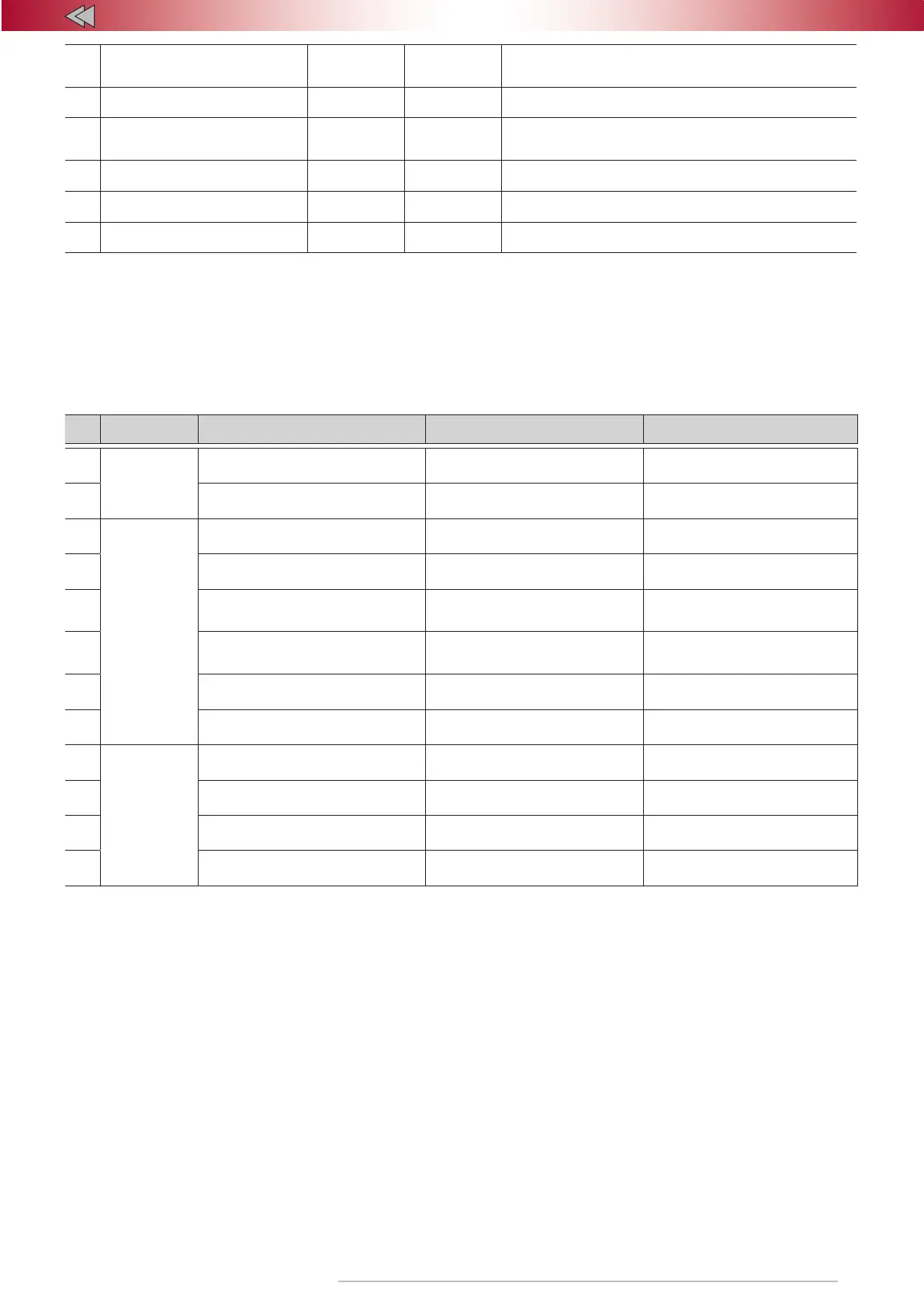
Table 8. Configuration of programmable configuration of inputs/outputs
# Connector Function Setting range
Factory
default settings
1
X1
18-pin
(+/–) output #15
(18-pin port)
1-41/Alternate hazard lights control Hazard lights alternate control
2 Polarity of output #15 1-2 Negative polarity
3
X2
8-pin
(–) output #5
(8-pin port)
1-41 17
4
(–) output #6
(8-pin port)
1-41 18
5
(–) output #7
(8-pin port) 1-41 25/alter. Central Lock
6
(–) output #8
(8-pin port) 1-41 4/alter. Central Lock
7
(–) input #1
(8-pin port)
1-24 12
8
(+) input #2
(8-pin port)
1-24 7
9
X1
18-pin
(+) input #5
(18-pin port)
1-24 1
10
(-) input #7
(18-pin port)
1-24 –
11
(-) input #14
(18-pin port)
1-24 2
12
(+) input #16
(18-pin port)
1-24 –
Options 1, 3-6. Designed to customize the Alarm outputs by
assigning a function to a specific output (see "Programmable output
functions" table).
Option 2.
Defines the polarity of the Alarm output #17.
The polarity can be defined only if this output is assigned one of
the functions (see "Programmable output functions").
Option 5 Arming pulse or lock Central Lock/lock/unlock Central
Lock
Option 6 Identity verification pulse or unlock Central Lock
Options 7, 12 To be able to program this pin “Digital buttons”
option has to be chosen
Options 7-14. Designed to customize the Alarm inputs by assigning
a function to a specific input (see "Programmable input functions"
table).


 To Next Page