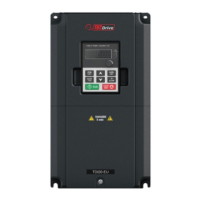
The TECDrive TEC-3 is an AC Variable Speed Drive designed for professional incorporation into complete equipment or systems as part of a fixed installation. It is distributed by TEC Electric Motors and is available in IP20 and IP66 (NEMA 4X) enclosed units. The drive supports motor power from 0.37 to 22kW (0.5 – 30HP) and operates on input voltages ranging from 110V to 480V.
Function Description
The TECDrive TEC-3 is designed to control the speed of AC motors, offering precise and variable speed operation. It features a keypad and display for configuration and monitoring, allowing users to manage parameters, view operating displays, and reset faults. The drive supports various control modes, including Terminal Control, Keypad Control (uni-directional and bi-directional), Modbus Network Control, PI Control, and CANopen Control.
A key feature is the "Fire Mode" function, designed for emergency conditions. This mode ensures continuous operation of the drive even when it might otherwise trip, by disabling certain protection features like over-temperature, external trip, and phase imbalance. This allows the drive to continue operating to clear smoke or maintain air quality in critical situations.
The drive includes an internal motor thermal overload function (l.t-trP trip) to protect the motor. It also supports optional brake resistors for improved braking torque in applications requiring it. For communication, the TECDrive TEC-3 can be connected to a Modbus RTU network via an RJ45 connector, allowing for remote control and monitoring of parameters and drive status.
Important Technical Specifications
- Power Range: 0.37 - 22kW (0.5 – 30HP)
- Input Voltage: 110 - 480V
- IP Ratings: IP20 (Open Units) and IP66 (NEMA 4X Enclosed Units)
- Control Terminals:
- +24Vdc User Output (100mA)
- Digital Inputs (8-30V DC)
- Analog Inputs (0-10V, 0-20mA, 4-20mA)
- +10V User Output (10mA, 1kΩ minimum)
- Analog Output / Digital Output (0-10V, 0-24V, 20mA max)
- Relay Output (250Vac, 6A / 30Vdc, 5A)
- Modbus RTU Communication:
- Protocol: Modbus RTU
- Error check: CRC
- Baud rates: 9600bps to 115200bps
- Data format: 1 start bit, 8 data bits, 1 stop bits, no parity
- Physical signal: RS 485 (2-wire)
- User interface: RJ45 connector
- Supported Function Codes: 03 (Read Multiple Holding Registers), 06 (Write Single Holding Register), 16 (Write Multiple Holding Registers for registers 1-4 only)
- EMC Filter: Internal EMC filter for compliance with European standards (C1, C2, C3 categories). Can be disconnected on IP20 units.
- Short Circuit Capacity: 100kA rms (AC) for 115V, 230V, and 400/460V.
- Motor Cable Length: Maximum 100 metres shielded, 150 metres unshielded.
- Operating Temperature: -10°C to 50°C (Open Drives), -10°C to 40°C (Enclosed Drives).
- Storage Temperature: -40°C to 60°C.
- Humidity: 95% non-condensing.
- Altitude: 2000m (derate 1%/100m above 1000m).
- Firmware Version: 3.04.
Usage Features
The TECDrive TEC-3 offers a user-friendly interface with a keypad and display for easy operation.
- Keypad Management: The keypad allows navigation through menus, increasing/decreasing parameter values, resetting tripped drives, and starting/stopping the motor.
- Operating Displays: Real-time information such as output frequency, motor current, motor power, and motor speed (RPM) can be viewed on the display.
- Parameter Configuration: Parameters are organized into Standard, Extended, and Advanced groups. A quick setup option (P-13) allows configuration based on application type (Industrial, Pump, Fan Mode). An access code (P-14) is required to modify Extended and Advanced parameters.
- Motor Control Modes: Various primary command sources (P-12) can be selected, including terminal control, keypad control, Modbus network control, PI control, and CANopen control, providing flexibility for different applications.
- Analog and Digital Inputs: The drive provides multiple analog and digital inputs that can be configured for various functions, such as speed reference, external trip, or PI feedback.
- Motor Connection: Supports both Star and Delta configurations for dual voltage motors.
- Single Phase Operation: Three-phase drives can be operated from a single-phase supply at up to 50% of maximum rated output current capacity.
- Brake Chopper: Frame Size 2 and above units have a built-in brake transistor, allowing an external resistor to be connected for improved braking.
- Fault Code Messages: A comprehensive list of fault codes and suggested remedies is provided for troubleshooting.
Maintenance Features
Routine maintenance is crucial for the longevity and optimal performance of the TECDrive TEC-3.
- Environmental Checks: Ensure the ambient temperature is within the specified range and that the enclosure is free from dust and condensation.
- Cooling System: Regularly check that heatsink fans are freely rotating and dust-free. Ventilation fans and air filters should be checked for correct airflow.
- Electrical Connections: All electrical connections, especially screw terminals, should be checked for correct torque. Power cables should be inspected for signs of heat damage.
- EMC Filter Disconnect: For IP20 units, the EMC filter can be disconnected by removing a screw, which may be necessary for applications sensitive to leakage current or during HiPot testing.
- Capacitor Reforming: If the drive has been stored for an extended period without power, the DC Link Capacitors may require reforming before power connection.
- Troubleshooting: The manual provides detailed fault code messages and suggested remedies to assist with diagnosing and resolving issues. For complex faults, users are advised to contact their local Invertek Drives Sales Partner.



 To Next Page
 General