THE INS AND OUTS
Standard Audio Procedure: TURN (SansAmp) ON FIRST. TURN
OFF LAST. To avoid unwanted and potentially speaker-damaging “pops”
when connecting or disconnecting any equipment, always mute mixing
board and/or turn down amp volume before plugging or unplugging!
WARNING:
DO NOT run the speaker output of any amp directly into the
SansAmp. Severe damage to the amp and/or SansAmp may result.
SIGNAL LEVEL TO INPUT
The SansAmp is designed to accommodate instrument level signals to the Input,
such as the output of a bass, the output of distortion pedals, etc. Signal level to
Input should be close to that of a standard electric guitar (approx. -10dB /
250mV). NOTE: Hot pickups will increase the gain structure of the SansAmp.
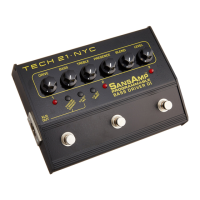
1/4” INPUT:
1 megOhm, instrument level. Also switches battery power
on/off. To avoid battery drain, unplug when unit is not in use.
BALANCED XLR OUTPUT: Balanced 600-Ohm low Z output.
Sends effected or bypassed signal to mixing console/recorder.
XLR Out Pad Switch: -20dB pad to match the output to equipment
with different input level requirements. In the line level (out) position, the
output is 0dB. In the instrument level (in) position, the output is -20dB.
1/4” OUTPUT: Unbalanced 1KOhm low Z output. Sends effected or
bypassed signal to amp rig or power amp.
1/4” Out Boost Switch: +10dB boost to match the output to equipment
with different input level requirements. In the instrument level (out) position,
the nominal output is -10dB. In the line level (in) position, the output is 0dB.
5
APPLICATIONS
With BASS AMP: Run the 1/4” output of the SansAmp directly into
the input of the power amp input, a.k.a. “effects return” (if applicable), of an
amp. This will bypass the tone coloring section of the pre-amp and will
defeat the amp’s master volume.
NOTE: BE SURE the BASS GUITAR VOLUME is OFF --BEFORE
you turn on the amp. Then slowly increase the volume of the bass. If it’s
too loud overall, check that the 1/4” Out Boost switch is disengaged (out posi-
tion) and then edit your presets accordingly. If it doesn’t get loud enough for
you, engage (in position) the 1/4” Out Boost switch to add 10dB.
Or, you can run the SansAmp into the front input of an amp. Be sure to keep
the Level of SansAmp close to unity gain, so as not to overload the amp’s
input, which could result in undesirable distortion.
Tips for setting up your amp when using front input:
1. Plug into low gain channel or input.
2. Turn off Bright switch.
3. Turn presence control (if applicable) to 12 o’clock or below.
4. Set tone controls as flat as possible.
To DRIVE a POWER AMP: Run the output of the SansAmp into the
input of a power amp with an input sensitivity of -10dB to 0dB. Then use the
master volume control of the power amp to adjust your stage volume.
DIRECT to MIXER: PA Live, Recording Desk, Computer
Interface. Plug the XLR or 1/4” Output directly into the input of a
mixer/recorder. Work with the input trim control on the mixer/recorder and
be sure not to overload its input. If the Level on the SansAmp is below 12
o’clock and is overloading the board, use the respective output level switch to
reduce the output:
If using 1/4-inch: +10dB Boost disengaged (out position).
If using XLR: -20dB Pad engaged (in position).
Bear in mind full-range systems yield a wide frequency response. Therefore,
you may need to adjust the EQ settings of the SansAmp to compensate.
4






 To Next Page