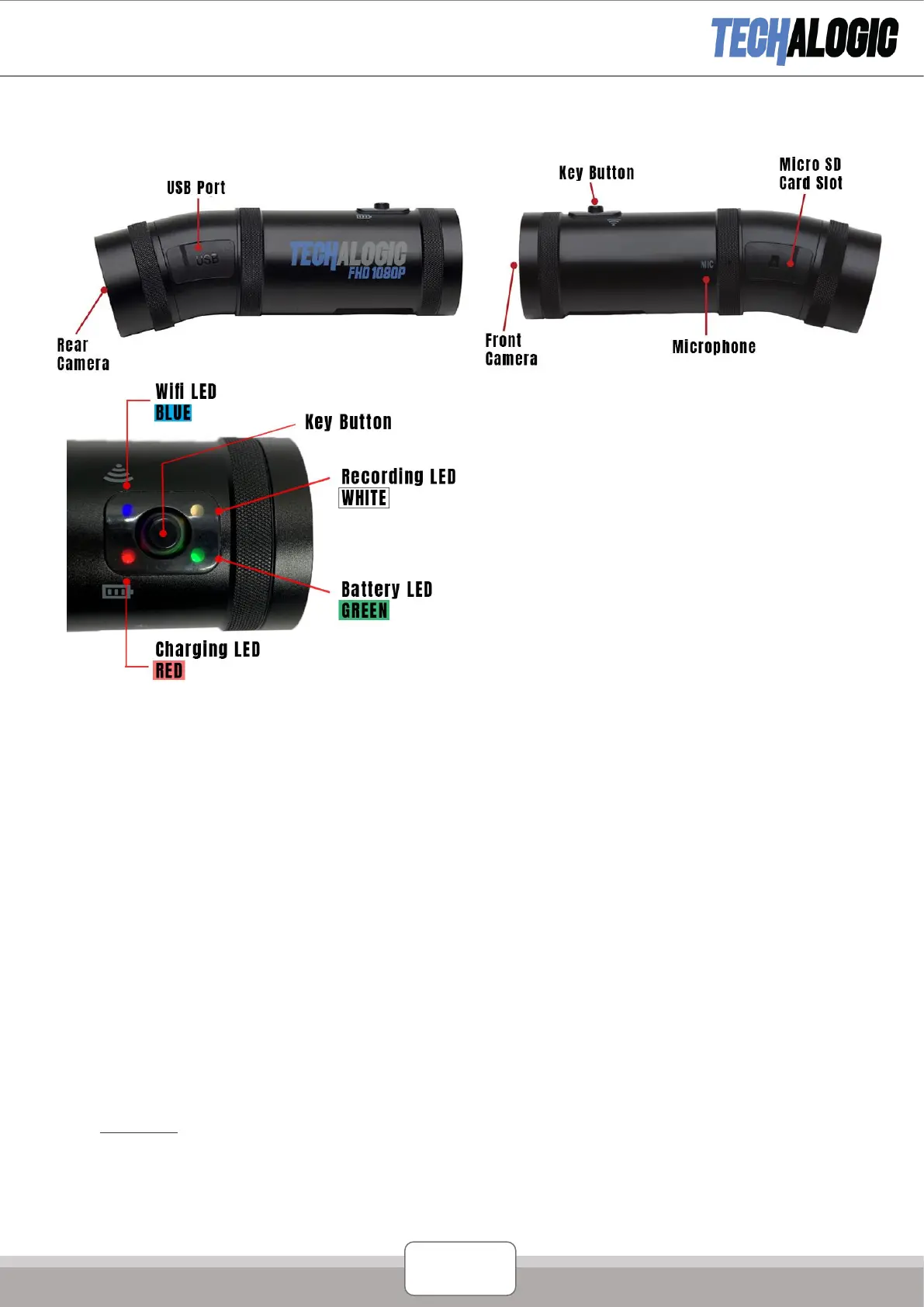
Product Structure
Product Operation
Charging the Battery
1. Use the micro USB cable to fully charge the camera before use.
The red charging light will light during charging. This will automatically shut off when the camera is 100%
charged.
2. The camera will continue to record whilst charging via any portable power bank with a standard USB output.
Insert the Micro SD Card
1. Open the rubber
cover
of
the
SD card slot
2.
Inser
t
the
SD card (rated
class
10 plus
) m
aximum of 128GB and
cover
the card slot.
3.
Please don’t
remove
the
SD card whilst camera is recording.
4. If using
the
SD card for the
first
time, please reformat it first
. T
wo
options
Option 1: Turn on the camera
(with
SD card
inser
ted) quick
shor
t
press
the main button 5
times.
If
format
successful
the camera will
vibrate
three times and the white
LED
will steadily flash.
Please note that the camera should be in standby mode (not
recording)
and
the
Wi-Fi
turned
off.
Option 2: When camera
turned
on
and Wi-Fi connected
to phone via the app select
format,
It will show if
‘Format
Success’.
Key Button
1. Long press (3 seconds) to turn the camera
on/off.
2. Short press once to start/stop recording.
3. Fast short press twice to turn Wi-Fi on/off.


 To Next Page