16
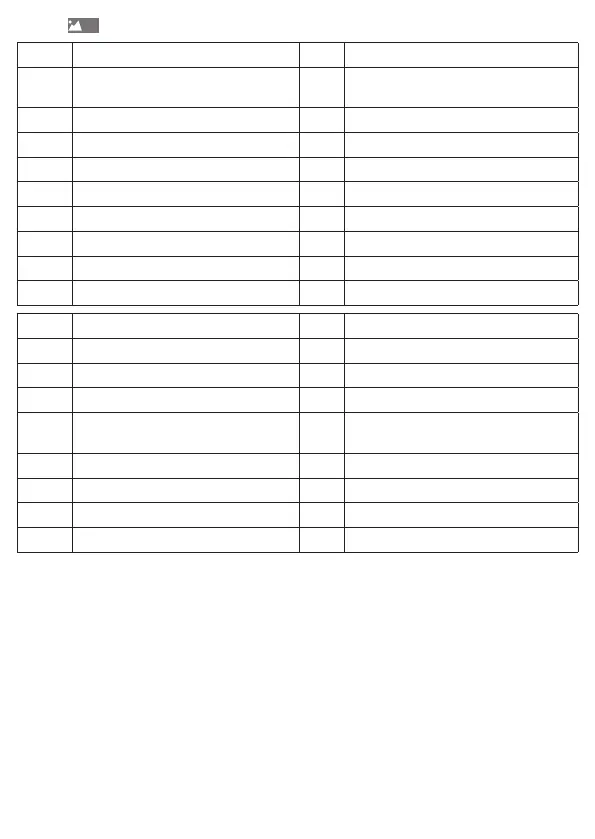
Key for
1 Readout level 2 Service level
1-01 Cumulated energy since
commissioning
2-01 Cumulated volume since commissioning
1-02-1 Display test "everything on" 2-02 Current flow rate
1-02-2 Display test "everything o" 2-03 Inlet temperature
1-02-3 Display test "UHF ON/OFF" 2-04 Outlet temperature
1-02-4 Due date value 2-05 Temperature dierence
1-02-6 Due date* 2-06 Current performance
2-07 Next due date
2-08 Device number
2-09 Firmware version number
4 Maximum value level 5 Test / parametrisation level
4-01-1 Max. output (last period) 5-01 “Energy unit” parametrisation
4-01-2 Max. output date (last period) 5-02 “Installation location” parametrisation
4-02-1 Max. output (current period) 5-03 “Energy test” test mode
4-02-2 Max. output date (current period) 5-04 “Energy test with simulated volume”
test mode
4-03-1 Max. rate of flow (last period)
4-03-2 Max. rate of flow date (last period)
4-04-1 Max flow (current period)
4-04-2 Max flow date (current period)
* Before the first due date: Production date or optional starting date
LT = long button push (> 2s)
KT = brief button push (< 2s)
Parametrisation level - for setting the variable device properties
- 5-01 "Unit"- energy unit (kWh/ GJ)
- 5-02 "InSTALL" - installation location (RL -outlet/ VL -inlet)
These levels show the “editing pen” on the display after you press the key long. As soon
as it becomes visible, let go of the key, the current selection then starts flashing.
Briefly press the key to move on to the next possible selection. Press the key until the
selection stops flashing and the currently set selection is accepted. If the selection is not
accepted (flashing continues), then no re-parametrisation takes place.
Restriction of parametrisation, see "Device properties” chapter


 To Next Page