HDMI EXTENDER OVER CAT.5E/6 CABLE
EN
HDMI EXTENDER OVER CAT.5E/6 CABLE
10
EN
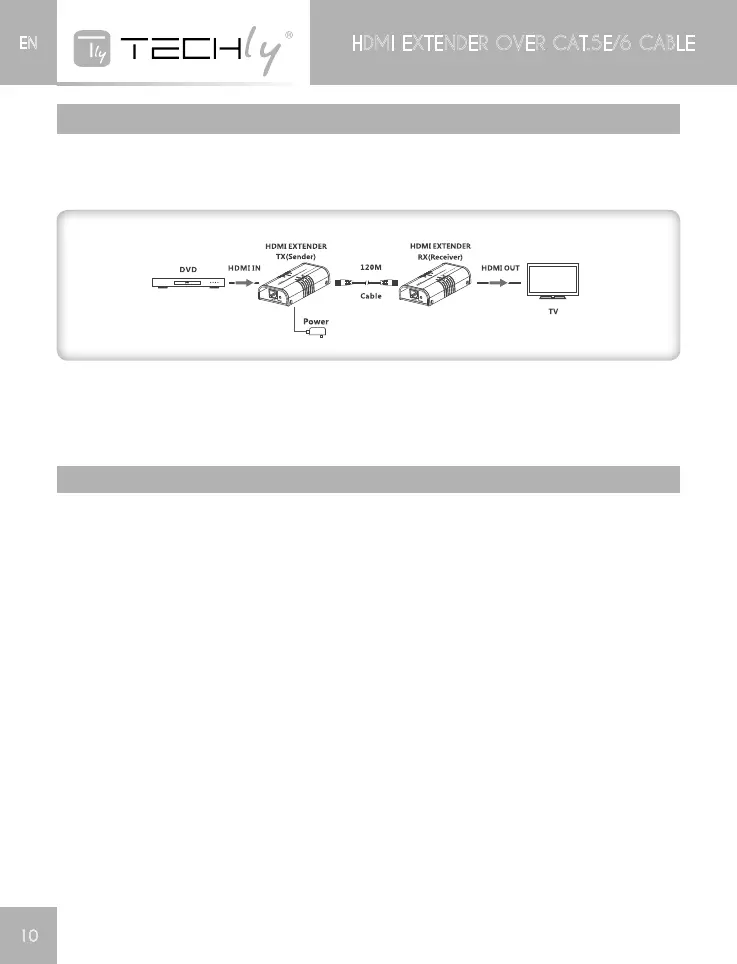
CONNECTIONS
PointtoPointconnection:Upto120meterstransmissiondistanceoversinglecable(Highquality
cablecanreach150meters).
NOTE
Onlyonepoweradapterisneededforthetransmitter,pleaseuse8corenetworkcablefollowthe
standardofEIA-568B.
FAQ
Q:TVdisplay“Waitingforconnection”ontherightcorner?
A: Please check if the power supply of TX (Sender) is connected, and make sure all cables are
connectedwellandfirmly.
Q:TVdisplay“PleasechecktheTXinputsignal”‘?
A:1)PleasecheckandmakesurethereisaHDMIsignalinputtothetransmitterunit.
2)Trytoconnectthesignalsourcetodisplaydevicedirectlytoseeifthereissignaloutputfrom
sourcedevice,orchangethesourcedevice,HDMIcableandtryagain.
Q:Displaynotfluent,notstable?
A:1)Pleasecheckandmakesurethecablelengthiswithintherequiredrange
2)Pressthe“reset”buttonontheTX/RXfrontpaneltorestarttheunits.












 To Next Page