tputport’sEDID,theaudiosupportsuptoLPCM
7.1channels.
• Bitstream Mode: Switch to Bitstream mode to
usetheHDMIoutputport’sEDID,theaudiosup-
portsuptocompressedaudio5.1channels.
• LPCM7.1CHMode:SwitchtoLPCM7.1modeto
usetheHDMIoutputport’sEDID,theaudiosup-
portsuptoLPCM7.1channels.
NOTE: Depending on the input audio format,
the unit may not output audio through all ou-
tputport.ForExample,the opticaloutput port
will have no audio when the input audio format
ismorethanLPCM7.1CH.
6. POWER:
Press this button to switch on the device or to set
it into standby mode.
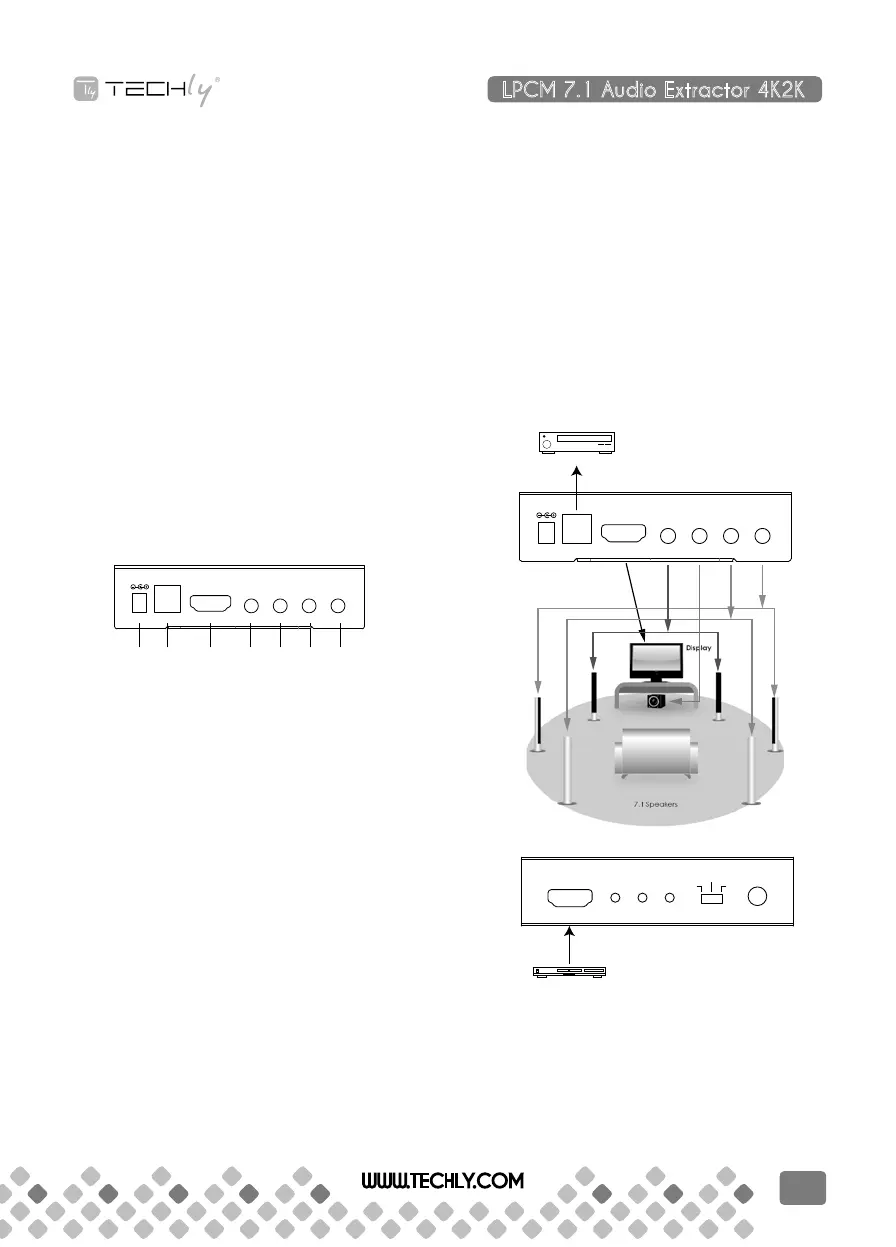
BACK PANEL
1 2 3 4 5 6 7
5 V/DC, 2 A
Optical HDMI Out FL/FR LFE/FC RL/RR RLC/RRC
1. DC 5V:
Plugwith5VDCpoweradaptorfromtheACwall
outlet for power supply.
2. OPTICAL OUT:
Connecttoaudioequipmentsuchasanampli-
fierorHi-Fisystemwithanopticalcablefordigi-
tal audio output. Supports up to bitstream audio
5.1CHandLPCM2CH..
3. HDMI OUT:
Connect to the display (TV/monitor) with an
HDMI cable for video and audio signal output.
For 4Kx2K or 3D image display, an equivalent
standard display is required. No HDMI output
connection is required to send audio through
the analog and optical outputs.
4. FL/FR OUT:
Connecttoaudioequipmentsuchasanampli-
fier or active speakers with 3.5mm phone jack
cable for front left and front right audio outputs.
5. LFE/FC OUT:
Connecttoaudioequipmentsuchasanampli-
fier or active speakers with 3.5mm phone jack
cable for low-frequency effects/subwoofer and
front center audio outputs.
6. RL/RR OUT:
Connecttoaudioequipmentsuchasanampli-
fier or active speakers with 3.5mm phone jack
cable for rear left and rear right audio outputs.
7. RLC/RRC OUT:
Connecttoaudioequipmentsuchasanampli-
fier or active speakers with 3.5mm phone jack
cable for rear left center and rear right center
audio outputs.
8. CONNECTION DIAGRAM:
Amplifier
5 V/DC, 2 A
Optical HDMI Out FL/FR LFE/FC RL/RR RLC/RRC
DVD or Blu-ray Player
HDMI In
LPCM Link Power
Power
Bitstream
LPCM
7.1CH
TV
LPCM 7.1 Audio Extractor 4K2K
QUICK INSTALL GUIDE
WWW.TECHLY.COM
7


 To Next Page
 Loading...