74
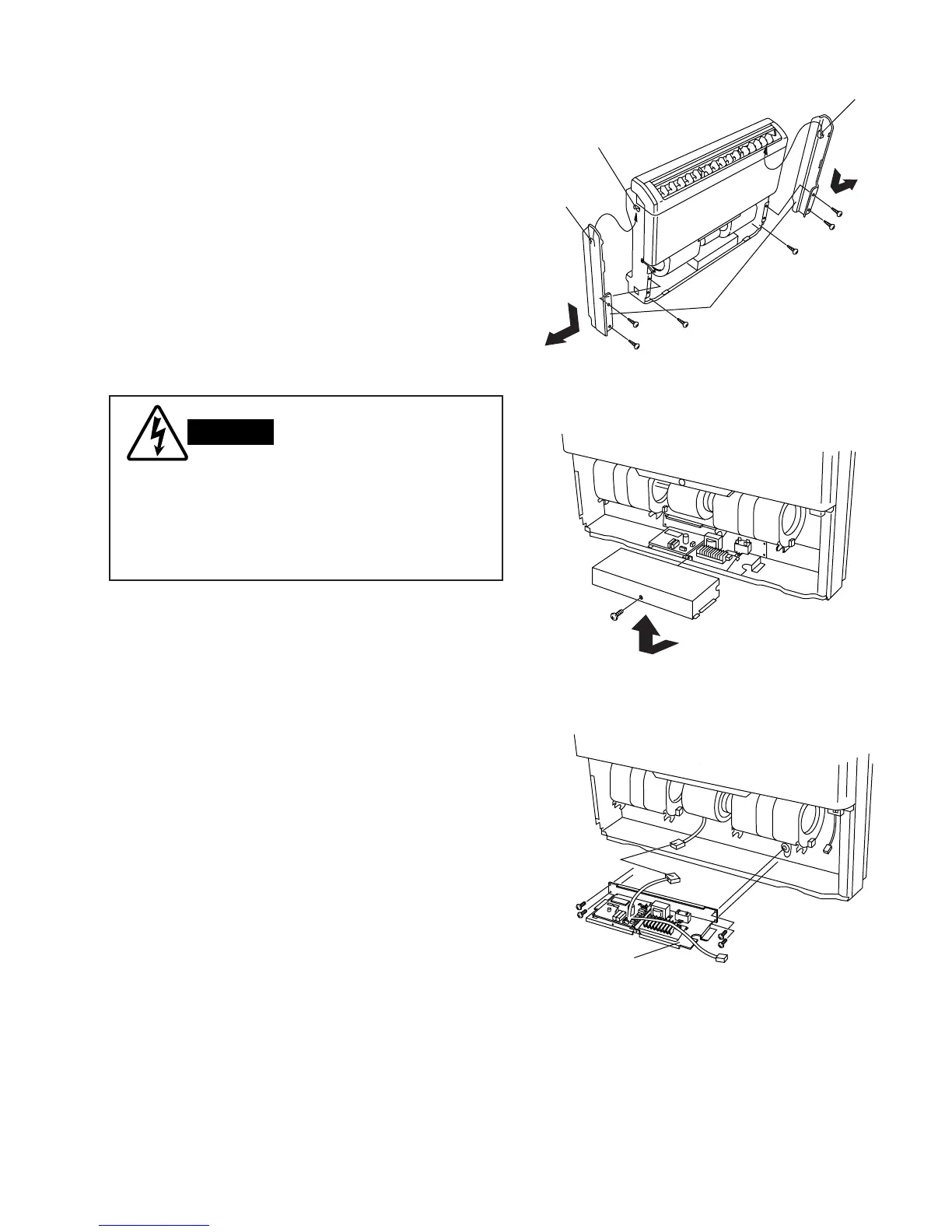
12-2. Removing Side Panels
(1) Remove the 3 screws attaching the left side panel.
(Fig. 3)
(2) Note the position of the hook on the inside of the
left side panel. To disengage the hook from the slot,
slide down the panel for removal. (Fig. 3)
(3) Do the same procedure for the right side panel.
12-3. Access and Removal of
Electrical Component Box
(1) Remove the front screw with a screwdriver. (Fig. 4)
(2) Slide the lid out and up. (Fig. 4)
(3) Disconnect the wiring as necessary.
(4) Remove the 4 screws, then pull out the electrical
component box. (Fig. 5)
Hazardous voltage can cause ELECTRIC
SHOCK or DEATH. Disconnect the power
or turn off circuit breaker before you start
checking or servicing.



 To Next Page
 Loading...