GB
10
5.6.3 - SETPOINT ADJUSTMENT
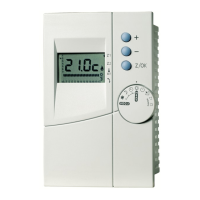
• Simultaneously press buttons (1) and (2) for at least 2 seconds, "SET" is displayed.
• Press the 2 buttons again, "Coo" is displayed. Using button (1) or (2), display either "HEA" or "Coo" corresponding to
the heating setpoint ("HEA") or cooling setpoint ("Coo").
• Simultaneously press the 2 buttons again for 2 seconds. The setpoint value appears. If needed, modify the value with
the buttons.
• Press the 2 buttons simultaneously to validate the setpoint.
• Return to the normal display by simultaneously pressing the 2 buttons for more than 2 seconds.
Reminder: control on the installation return temperature.
Note:
For terminal unit and boiler overhaul applications, the configuration and parameterisation of each machine are
factory-set for optimum operation.
5.6.4 - DISPLAY OF TEMPERATURES, ALARMS, AND HOUR COUNTERS
Accessible directly via the menu, see diagram 5.6.2.
•Temperatures "TP" :
Displays the values indicated by each temperature probe.
• Alarms "Err" :
Displays the list of all current alarms (scroll through the alarm messages with buttons (1) and/or (2)).
• Hour counters "OHr" :
Displays the operating time of the compressor ("OH1") and the circulating pump ("OHP"). The counter can be reset by
a long press (> 2 seconds) on button (1) when the counter value is displayed.
5.6.5 - ACCESS TO THE TECHNICAL PARAMETERS "PAr"
For qualified personnel after entering the password "PSS". Any incorrect adjustment may lead to serious
malfunctions.
• Go to the “PSS” section in the menu. Briefly and simultaneously press buttons (1) and (2). The "---" message appears.
Enter the password using buttons (1) and (2) and validate it by simultaneously pressing buttons (1) and (2). It is now
possible to enter the parameters section "PAr".
CAUTION:
After modifying one or more technical parameters, the controller must be turned off then back on again to reset
it with its new parameters.
5.7 - ALARMS
• When an alarm occurs:
- the alarm report is activated,
- the corresponding code flashes on the display unit. See table,
- the unit stops if necessary (see table below).
• Remedy the fault.
IMPORTANT NOTE:
All work must be carried out by qualified, experienced personnel.
• The alarms are normally reset automatically.
• Caution: the alarms: - HP,
- LP (low pressure),
- Anti-freeze,
- Water flow rate,
have an event counter that shifts to manual reset if the alarm occurs several times during the last hour.
• The "refrigerating circuit" alarm is reset manually.
• The alarms are reset by briefly pressing the "ON/OFF" button (1).
• When the alarm is cleared :
- the alarm report is de-activated,
- the display reverts to normal (not flashing),
- the machine can re-start (if it was stopped).
• Special features of the alarm relay :
- the potential-free change-over contact (2 A - 230 VAC max.), on the wiring board's terminal strip, originates from the relay
located on this board,
- the relay is actuated in the absence of an alarm (contacts: 5/6 closed and 5/7 open),
- in the case of alarm or power supply loss, the relay is released (contacts: 5/6 open and 5/7 closed).


 To Next Page