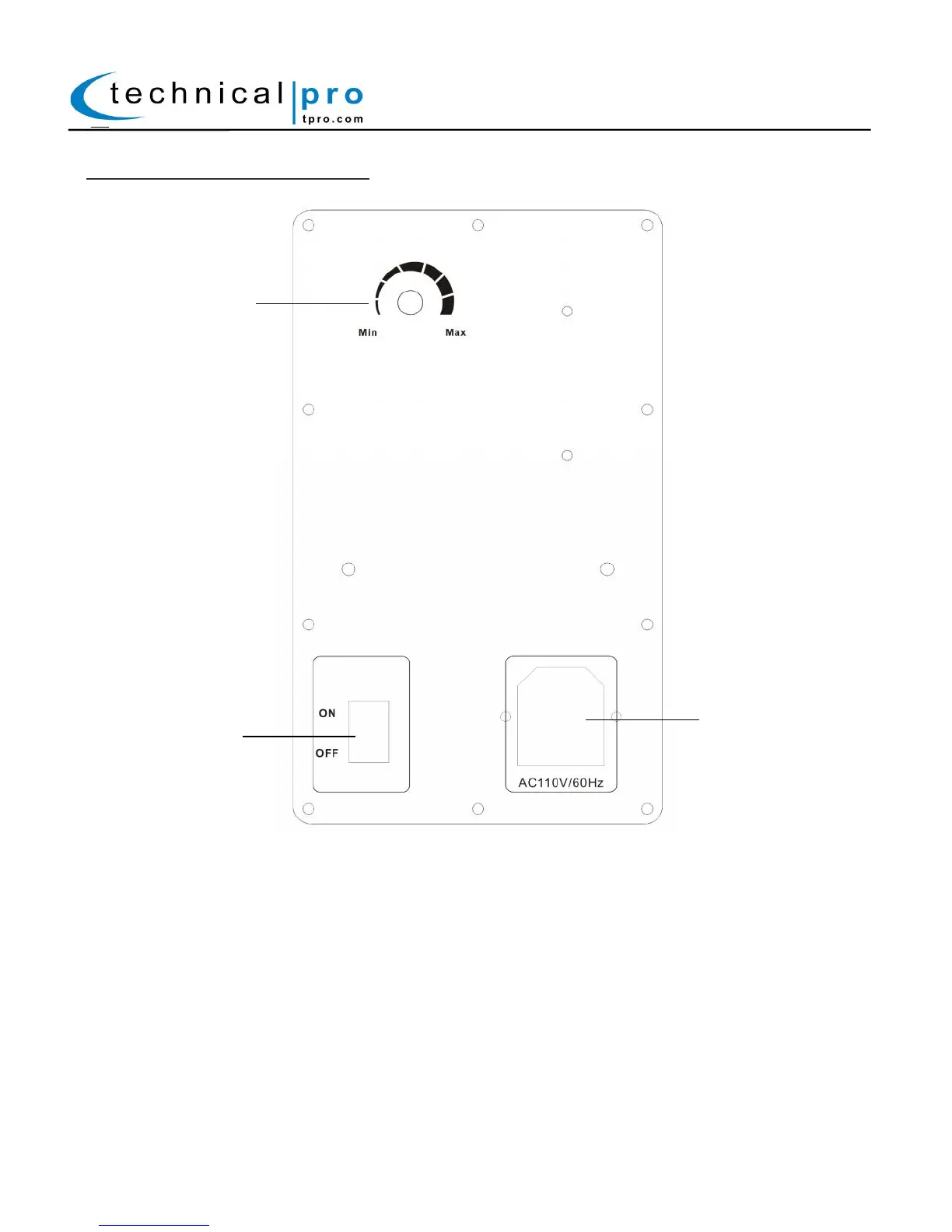
MBW5000 Slave Rear Panel:
The Slave speaker is designed to wireless receive a signal from the Master speaker. The Slave speaker will be
required to be power on in order to properly function.
16. Volume Limiter: The volume limiter will control the signal strength of the signal from the master speaker.
The actual volume will be controlled by the Master Volume knob (13). For example if the volume limiter is set
to 80% but the master volume knob is set to zero, there will be no sound coming through the slave speaker.
17. Power Switch: Before the unit is powered on, all of the level controls should be turned down all the way.
Once powered on, slowly begin to raise the levels of the inputs. This will prevent damaging both the speaker
and the amplifier.
18. Power Supply: Connect the power cord here. The power switch (3) should be set to the off position
before the power supply is connected.


 To Next Page