Before use
6
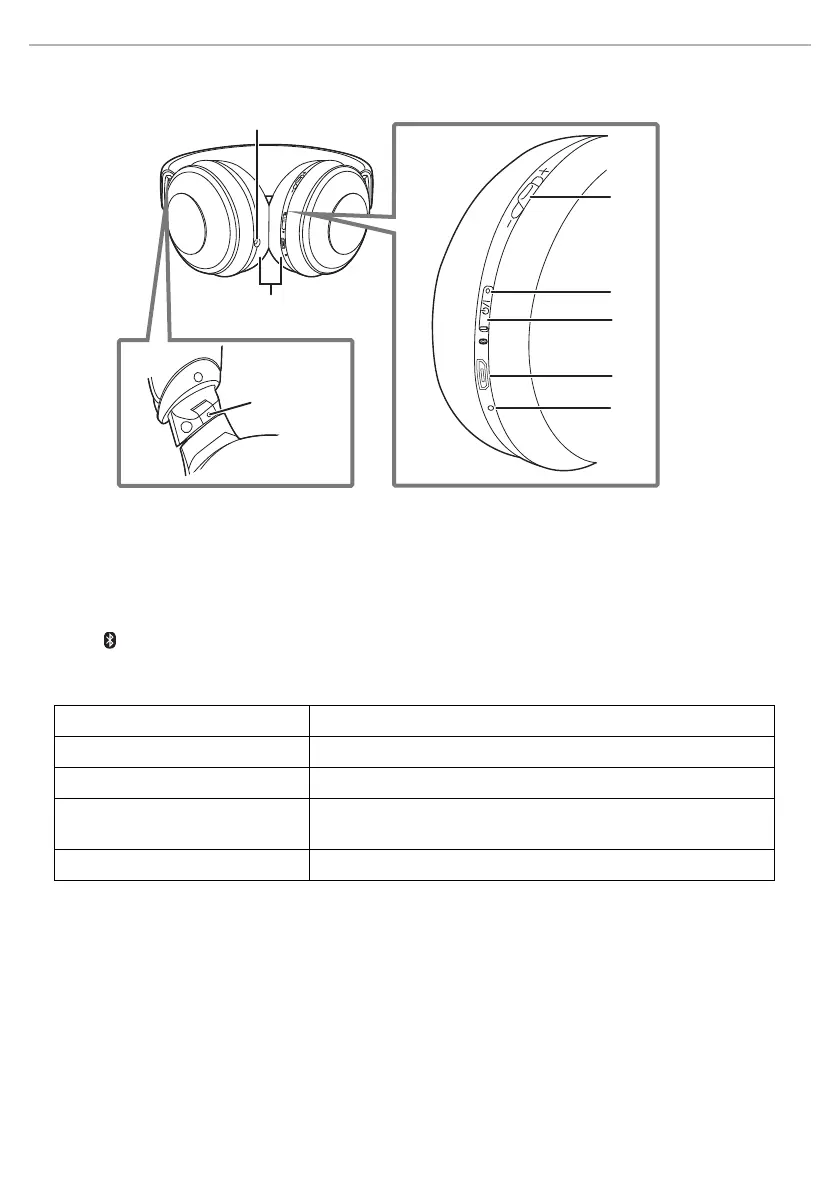
Part names
*1 Examples of lighting/blinking patterns
*2 Í/I: Standby/ON
*3 The battery is low when it is blinking in red. (
l 14, “Battery level notification”)
1 Audio input terminal
2 Multiple functions button
• You can perform a wide variety of operations by
pressing this button or moving it toward the “+” or
“−” side. (
l 10, “Remote controlling”)
3 Power/pairing LED
*1
4[Í/I ( )] button
*2
5 Charging terminal (DC IN)
• Connect the USB charging cord (supplied) to this
terminal when charging. (
l 7, “Charging”)
6 Microphone
7 Ear pads
8 Raised dot indicating the left side
Lighting (red): Charging is in progress
Lighting alternately in blue and red: Bluetooth
®
pairing (registration) standby
Blinking slowly (blue)
*3
: Bluetooth
®
connection standby
Blinking twice about every 2 seconds
(blue)
*3
:
A Bluetooth
®
pairing (registration) has been established or a call is in
progress
Blinking (blue)
*3
: A call is being received
7
1
8
3
4
5
2
6



 To Next Page