EasyManua.ls Logo

Technics SA-EX100 - Page 18

Technics SA-EX100
28 pages
Print Icon
To Next Page IconTo Next Page
To Previous Page IconTo Previous Page
Loading...
18
SA-EX300
only.
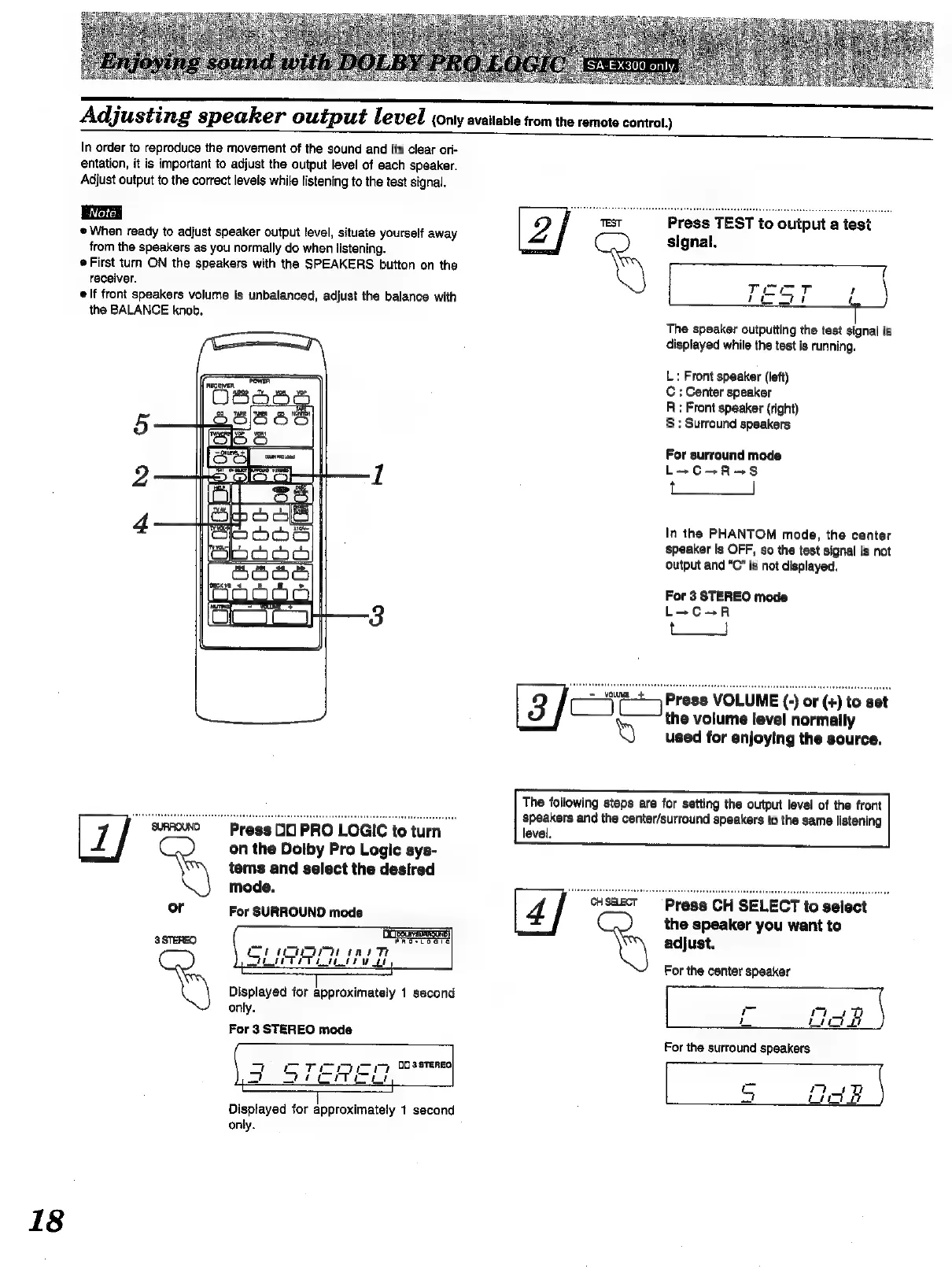
Adjusting
speaker
output
level
{Only
available
trom
the
remote
control.)
In
order
to
reproduce
the
movement
of
the
sound
and
its
clear
ori-
entation,
it
is
important
to
adjust
the
output
level
of
each
speaker.
Adjust
output
to
the
correct
levels
while
listening
to
the
test
signal.
When
ready
to
adjust
speaker
output
level,
situate
yourself
away
from
the
speakers
as
you
normally
do
when
listening.
First
turn
ON
the
speakers
with
the
SPEAKERS
button
on
the
receiver.
If
front
speakers
volume
is
unbalanced,
adjust
the
balance
with
the
BALANCE
knob.
tems
and
select
the
desired
mode.
or
For
SURROUND
mode
7
sRFOK0
Press
DC
PRO
LOGIC
to
turn
“By
on
the
Dolby
Pro
Logic
sys-
Ope
aE
Eee
a
Th
ath
IT
Le
eee
3
STEREO
Displayed
for
approximately
1
second
only.
For
3
STEREO
mode
Displayed
for
approximately
1
second
only.
signal.
The
speaker
outputting
the
test
signal
is
displayed
while
the
test
is
running.
L:
Front
speaker
(left)
C
:
Center
speaker
R
:
Front
speaker
(right)
§
:
Surround
speakers
For
surround
mode
L+C+R=+S
——
In
the
PHANTOM
mode,
the
center
speaker
is
OFF,
so
the
test
signal
is
not
output
and
“C”
is
not
displayed.
For
3
STEREO
mode
L+C+R
[3/or
Press
VOLUME
(-)
or
(+)
to
set
the
volume
[evel
normally
Y
used
for
enjoying
the
source.
The
following
steps
are
for
setting
the
output
level
of
the
front
speakers
and
the
center/surround
speakers
to
the
same
listening
level.
Press
CH
SELECT
to
select
the
speaker
you
want
to
adjust.
For
the
center
speaker
i
oe
For
the
surround
speakers

Other manuals for Technics SA-EX100

Related product manuals