EasyManua.ls Logo

Technics SD-s3300 - Page 35

Technics SD-s3300
84 pages
Print Icon
To Next Page IconTo Next Page
To Previous Page IconTo Previous Page
Loading...
4aE83s
O
D
Ft 2 3
4
5
I
.]OOOO
vgsssS
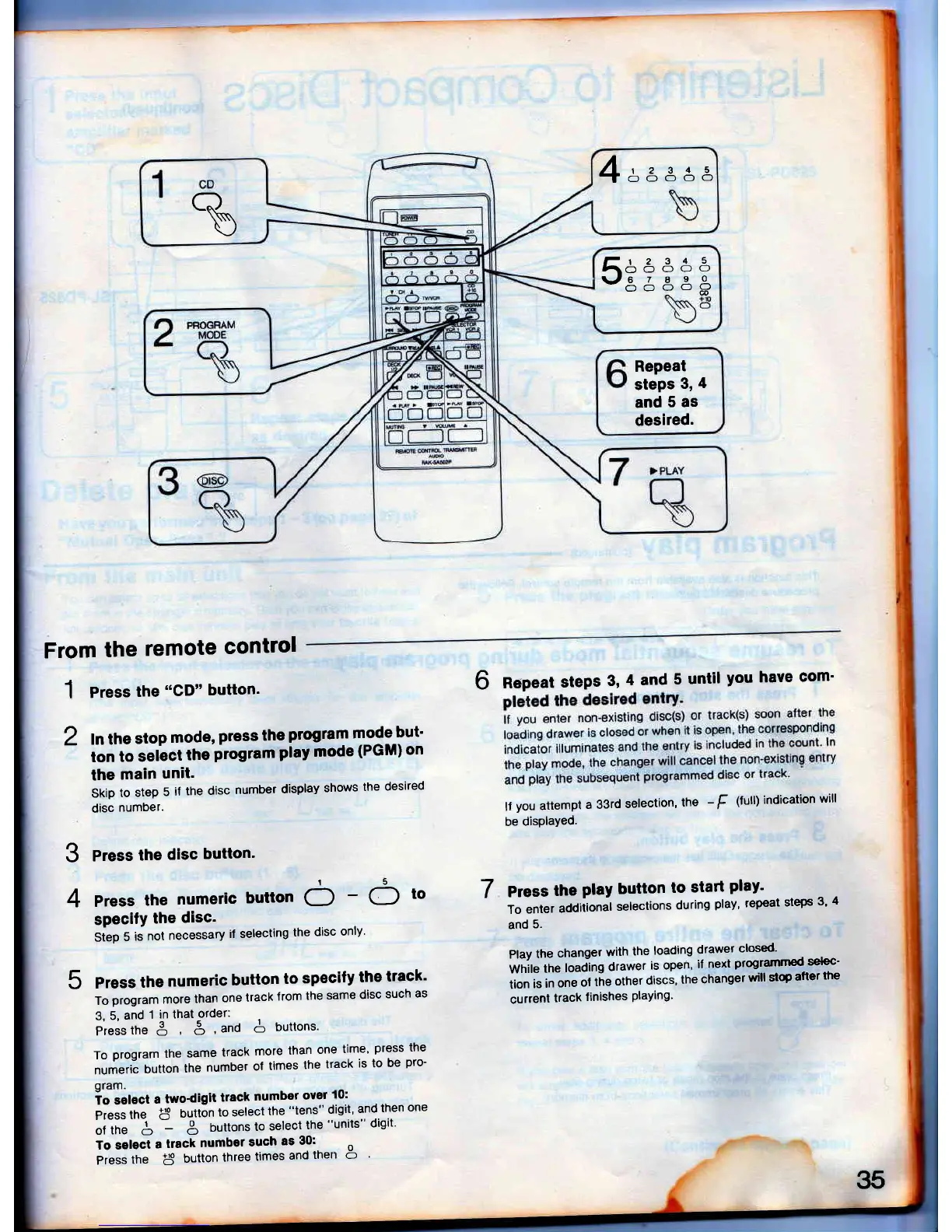
Repeat
steps
3,
4
and
5 as
desired.
From
the
remote
control
1
Pr"""
the
"CD"
button'
6
Repeat
steps
3,
4 and
5
until
you have
com'
lf
you
attempt
a 33rd
selection,
the
-
[
(full)
indication
will
be
disPlaYed.
7
Press
the
play
button
to
start
play'
To
enter
additional
selections
during
play' repeat
steps
3'
4
and
5,
Play
the
changer
with
the
loading
drawer
closed-
wnit"
tn"
loading
drawer
is open,
il
next
prog-rarnmed
selec-
tion
is
in
one
ol
the
other
discs'
the
changel
will
stQ
after
the
current
track
finishes
PlaYing'
2
ln the
stop
mode,
press the
program
mode
but'
ton
to
select
the
program
ptay mode
(PGM) on
the
main
unit.
Skip
to
step
5
if
the
disc
number
display
shows
the
desired
disc
number.
3
Press
the
disc
button'
4
Press
the
numeric
button
6
-
6
to
specifY
the
disc.
Step
5
is
not
necessary
if selecting
the
disc
only'
5
Press
the
numeric
button
to
specify
the
track'
To
program more
than
one
track
from
the
same
disc
such
as
3,
5,
and
1
in that
order:
Pt"..tn" 3
3,ano
A
buttons'
To
program
the
same
track
more
than
one
time'
press
the
nr."ri"
button
the
number
of
times
the
track
is
to
be
pro-
gram.
io select
a
two-diglt
track
number
over
0:
pi"..
tn"
I
Outton
to select
the
"tens" digit'
and
then
one
li
tn"
S
--
$
buttons
to
select
the
"units" digit'
To selecl
a
track
number
such
as
30:
o
Press
the
I
button
three
times
and
ther o
35

Table of Contents

Related product manuals