EasyManua.ls Logo

Technics SD-s3300 - To locate and play a certain tune

Technics SD-s3300
84 pages
Print Icon
To Next Page IconTo Next Page
To Previous Page IconTo Previous Page
Loading...
Deck
I
(qffil
(ffi)
llll:-T--__1
fbdrb
-
l-r
*, *
t-t
sCI
HX PPO
ffi
RS.TR3l1
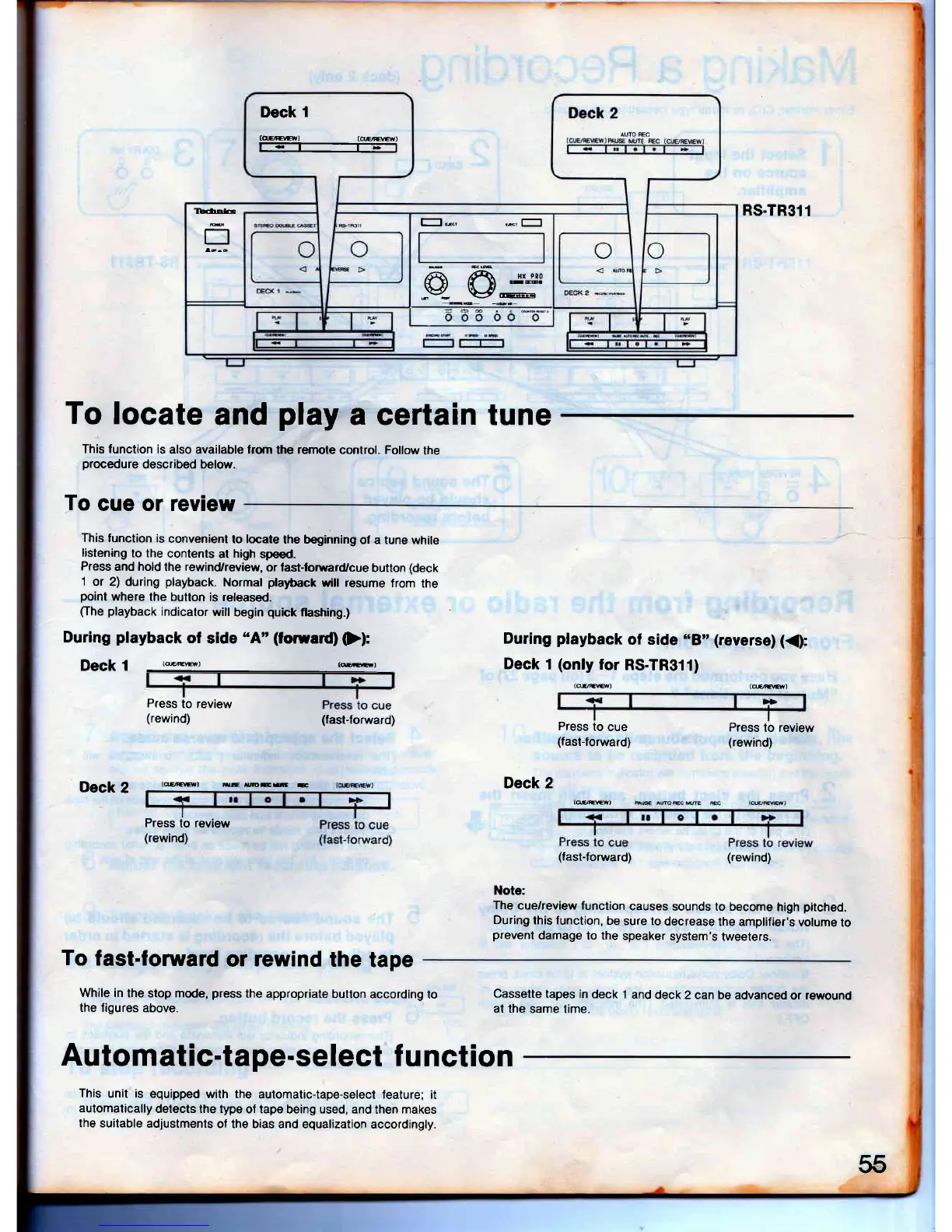
To
locate
and
play
a certain tune
This function
is
also available lrom
the
remote
control. Follow
the
procedure
described below.
To
cue or review
This
function
is
convenient
to locate
the beginning
of a tune
while
listening
to the
contents
at
high
speed_
Press
and hold
the
rewind/review,
or fast-forward/cue
button
(deck
1
or 2) during
playback.
Normal
playtack
wil! resume
from
the
point
where
the button
is released.
(l'he
playback
indicator
will
begin
quick
llashing.)
During
playback
of
side
"A'(foruard)
(}):
DeCk 1
((ffi)
(@)
Press
to review
(rewind)
(fast-lorward)
Deck
2
During
playback
ol side
"B',
(reverse)
({:
Deck
1
(oH:r
RS.TR311)
(@l
t(]ffi)
rcIDE.E
t
Deck 2
Press
to
cue
(fast-forward)
(offi)
Press
to review
(rewind)
Press
to
review
(rewind)
To
fast-forward
or
rewind
the
tape
While in
the stop mode,
press
the
appropriate builon
according
to
the figures
above.
(fasl-foruard)
(rewind)
Note:
The
cue/review function
causes
sounds lo become
high
pitched.
During
this lunction,
be
sure to
decrease
the amplifier's
volume
to
prevent
damage to the
speaker
system's
tweeters.
Cassette
tapes
in deck I
and
deck 2 can be
advanced
or
rewound
at the
same time.
Automatic-tape-select
f
unction
This
unit is equipped
with the
automatic{ape-selecl feature;
it
automatically
detects the type
of tape being used, and
then makes
the suitable
adjustments
of the bias and equalization
accordingly.
55

Table of Contents

Related product manuals