Tuner
r l
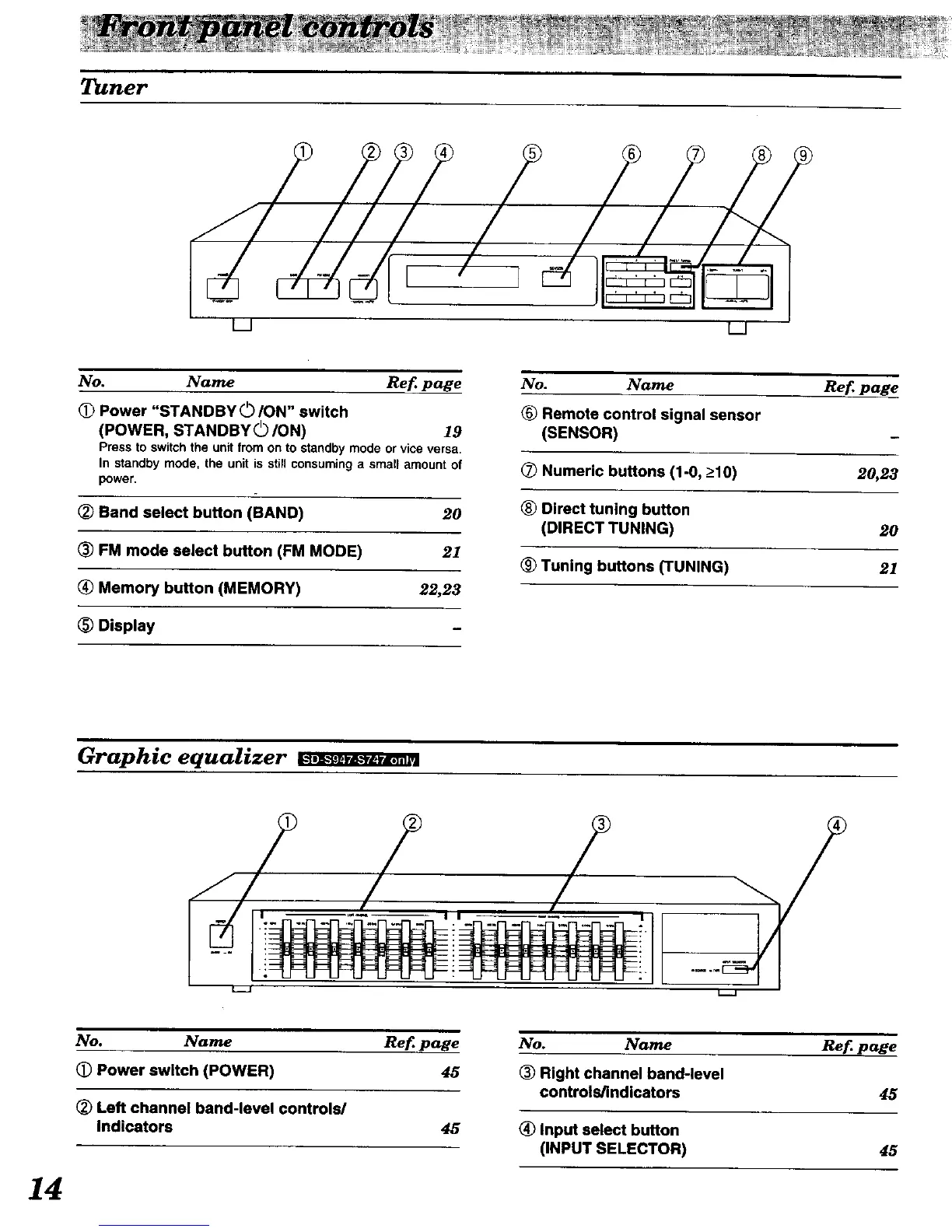
No. Name Ref page
Power "STANDBY 0/ON" switch
(POWER, STANDBYO/ON) 19
Press to switch the unit from on to standby mode or vice versa,
In standby mode, the unit is still consuming a smalFamount of
power.
(_ Band select button (BAND) 20
_) FM mode select button (FM MODE) 21
Memory button (MEMORY) 22,23
_) Display
No. Name Ref page
® Remote control signal sensor
(SENSOR)
(_ Numeric buttons (1-0, _>10) 20,23
® Direct tuning button
(DIRECT TUNING) 20
(_ Tuning buttons (TUNING) 21
Graphic equalizer
/
L_J
No. Name Ref page
(_) Power switch (POWER) 45
(_) Left channel band-level controls/
Indicators 45
No. Name Ref page
(_ Right channel band-level
controls/indicators 45
(_) Input select button
(INPUT SELECTOR) 45
14


 To Next Page