Amplifier
,!//I]/"'' '7,,
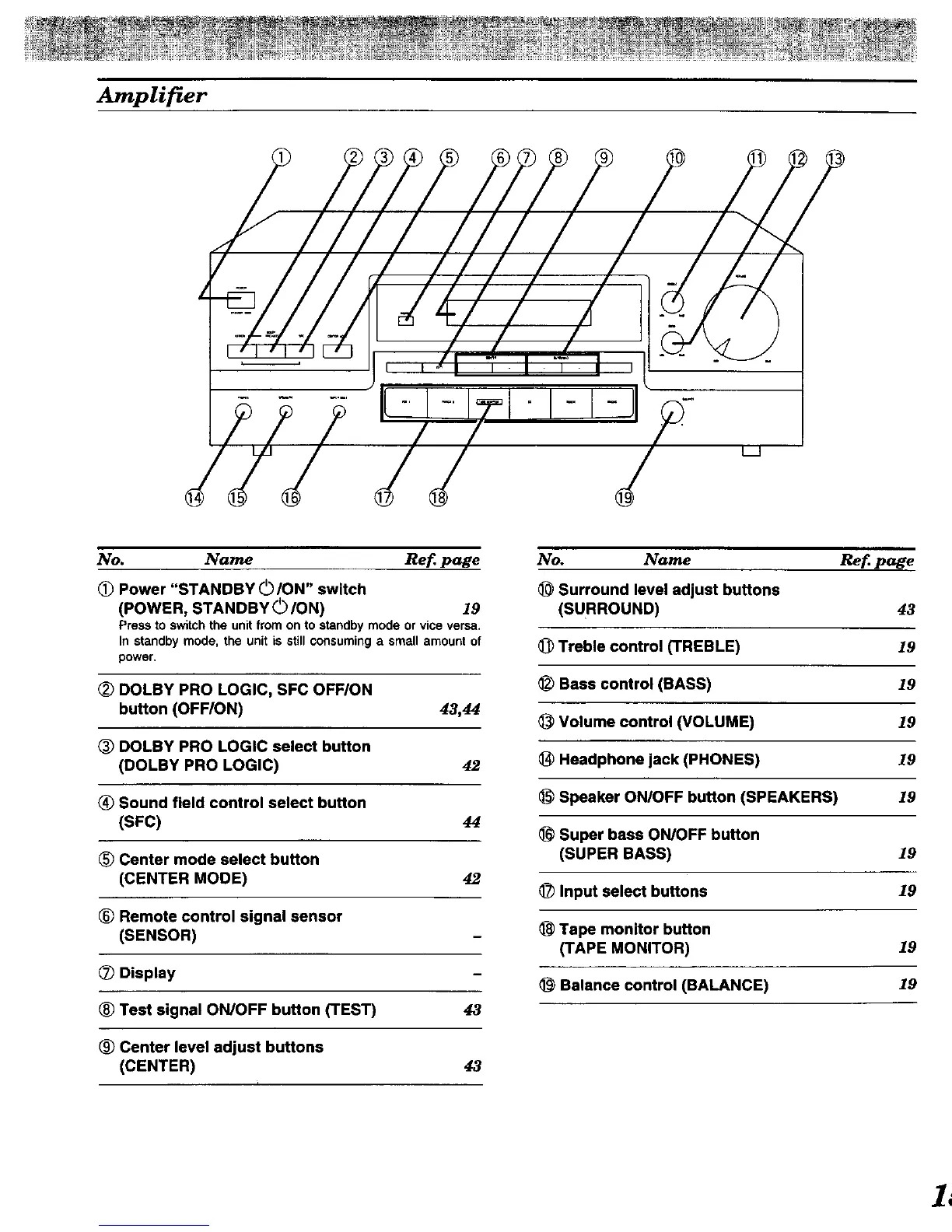
No. Name Ref page
(_ Power "STANDBY 0 ION" switch
(POWER, STANDBY 0/ON) 19
Press to switch the unit from on to standby mode or vice versa.
In standby mode, the unit is still consuming a small amount of
power,
_) DOLBY PRO LOGIC, SFC OFFION
button (OFF/ON) 43,44
DOLBY PRO LOGIC select button
(DOLBY PRO LOGIC) 42
_) Sound field control select button
(SFC) 44
(_ Center mode select button
(CENTER MODE) 42
® Remote control signal sensor
(SENSOR)
(_ Display
® Test signal ON/OFF button (TEST) 43
® Center level adjust buttons
(CENTER) 43
No. Name Ref page
Surround level adjust buttons
(SURROUND) 43
_) Treble control (TREBLE) 19
_) Bass control (BASS) 19
Volume control (VOLUME) 19
_) Headphone jack (PHONES) 19
Speaker ON/OFF button (SPEAKERS) 19
Super bass ON/OFF button
(SUPER BASS) 19
_) Input select buttons 19
Tape monitor button
(TAPE MONITOR) 19
Balance control (BALANCE) 19
1L


 To Next Page