EasyManua.ls Logo

Technics SL-P2000 - Page 12

Technics SL-P2000
41 pages
Print Icon
To Next Page IconTo Next Page
To Previous Page IconTo Previous Page
Loading...
SL-P2000
|
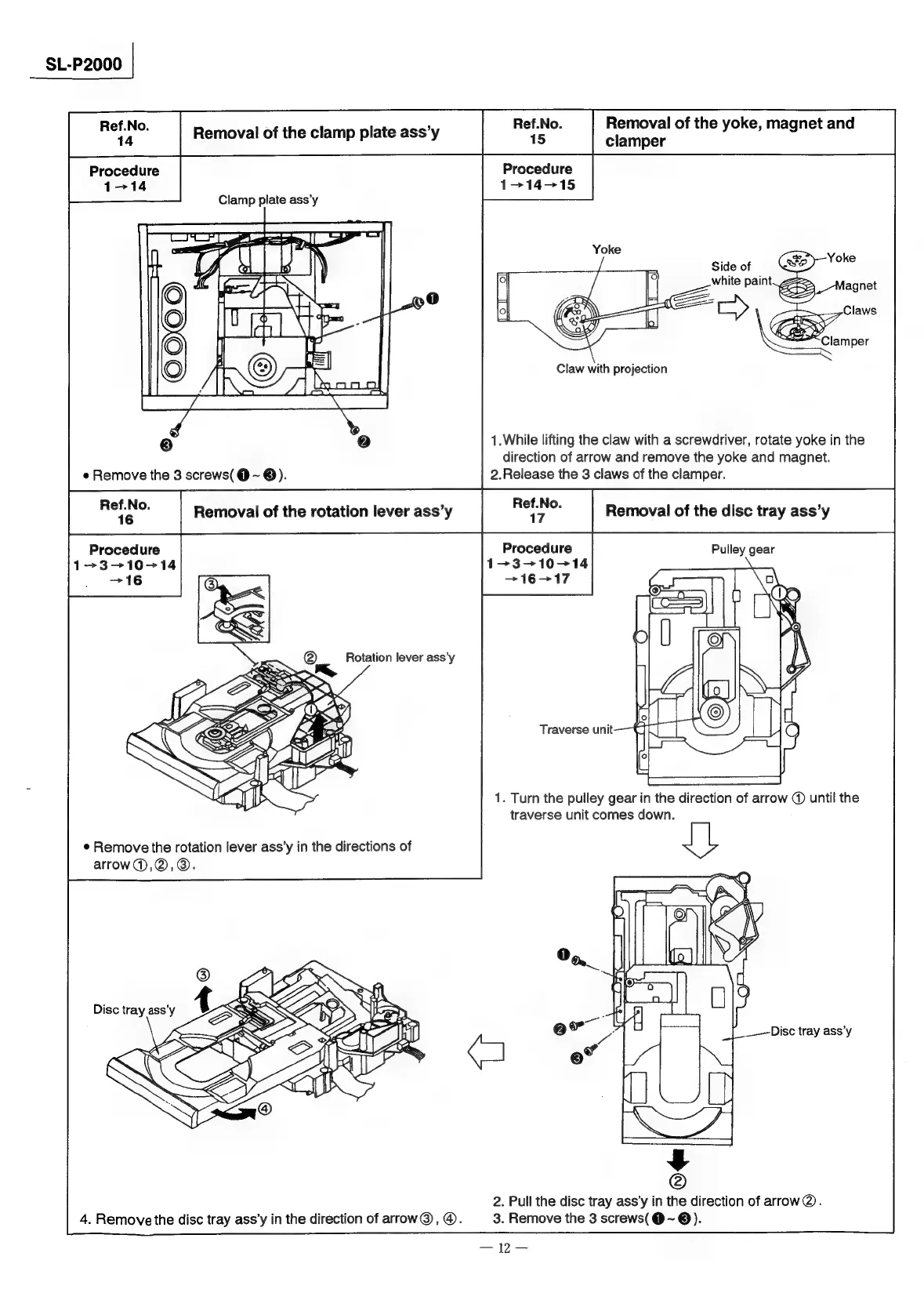
Ref.No.
14
Procedure
1-14
Removal
of
the
clamp
plate
ass’y
Ee
prciletie
of
the
yoke,
magnet
and
Procedure
114-15
Clamp
plate
ass’y
\
Claw
with
projection
1.While
lifting
the
claw
with
a
screwdriver,
rotate
yoke
in
the
direction
of
arrow
and
remove
the
yoke
and
magnet.
2.Release
the
3
claws
of
the
clamper.
Procedure
1-3-—-10-14
1.
Turn
the
pulley
gear
in
the
direction
of
arrow
@
until
the
traverse
unit
comes
down.
¢
Remove
the
rotation
lever
ass’y
in
the
directions
of
arrow@),@,@.
2.
Pull
the
disc
tray
ass’y
in
the
direction
of
arrow@.
3.
Remove
the
3
screws(
@
~
@).
4.
Remove
the
disc
tray
ass’y
in
the
direction
of
arrow@,
@.

Related product manuals