EasyManua.ls Logo

Technics SL-PD687 - Troubleshooting Guide

Technics SL-PD687
23 pages
Print Icon
To Next Page IconTo Next Page
To Previous Page IconTo Previous Page
Loading...
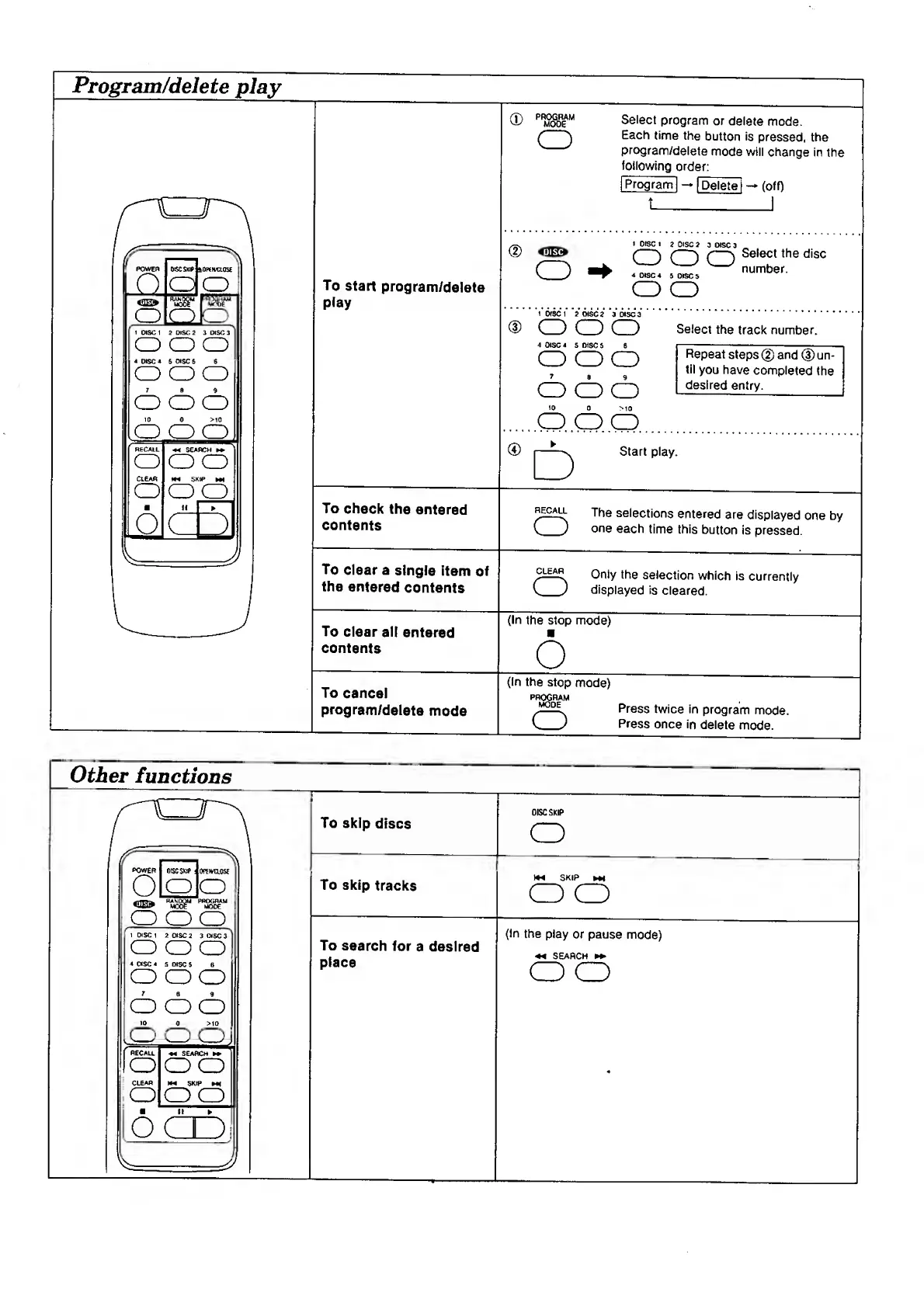
Program/delete
play
Other
functions
Select
program
or
delete
mode.
Each
time
the
button
is
pressed,
the
program/delete
mode
will
change
in
the
following
order:
fprogram
|
[Delete
i
(off)
To
start
program/delete
play
I
DISC
I
2
DISC
2
3
DISC
3
<3^
cz)
czD
dz)
number.
^
DISC
4
5
DISC
5
o
o
1
disc
1
2
DISC
2
3
DISC
3.
C
)
C
)
C
)
Select
the
track
number.
4
CISC
4
5
DISC
5
6
J---
o
oo
Repeat
steps
(5)
and
(D
un
7
g
g
have
completed
th(
^desired
entry.
_
10
0
>10
.
0
,0
0
.
I—Start
play.
Repeat
steps
(5)
and
(D
un¬
til
you
have
completed
the
desired
entry.
D
To
check
the
entered
contents
The
selections
entered
are
displayed
one
by
C
_
)
one
each
time
this
button
is
pressed.
To
clear
a
single
item
of
the
entered
contents
Only
the
selection
which
is
currently
C
_
)
displayed
is
cleared.
To
clear
all
entered
contents
(In
the
stop
mode)
o
To
cancel
program/delete
mode
(In
the
stop
mode)
PR^RAM
Press
twice
in
program
mode.
V_
)
Press
once
in
delete
mode.
To
skip
discs
DISC
SKIP
O
To
skip
tracks
M4
SKIP
Ml
o
o
To
search
for
a
desired
place
(In
the
play
or
pause
mode)
SEARCH
O
O

Other manuals for Technics SL-PD687

Related product manuals