EasyManua.ls Logo

Technics SL-PG590 - Advanced Playback Features

Technics SL-PG590
16 pages
Print Icon
To Next Page IconTo Next Page
To Previous Page IconTo Previous Page
Loading...
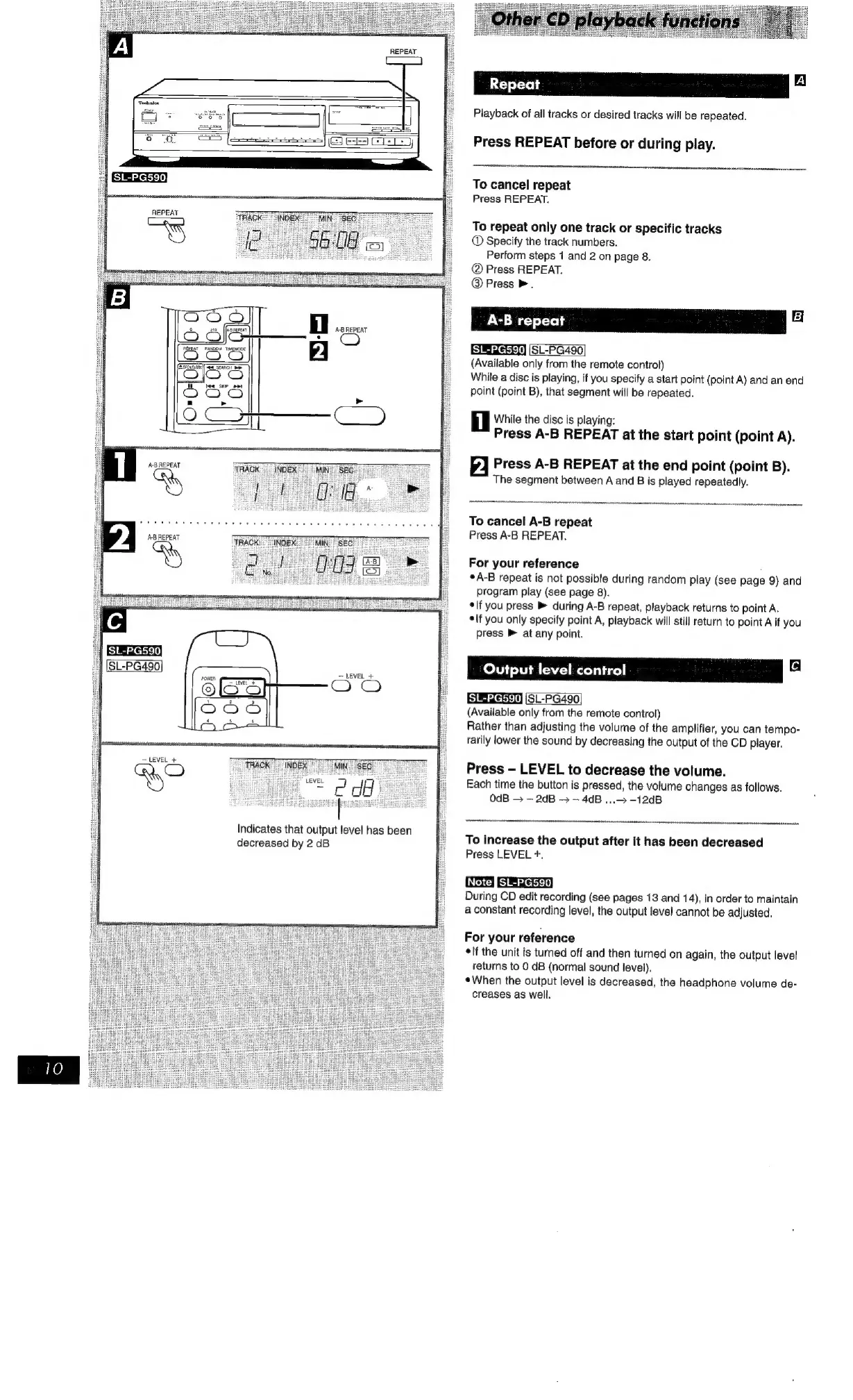
REPEAT
REPEAT
SL-PG590;
ACB
REPEAT
Ny
SL-PG590
LEVEL
+
LEVEL
MIE
SER
Eee
Indicates
that
output
level
has
been
decreased
by
2
dB
ee
Playback
of
ail
tracks
or
desired
tracks
will
be
repeated.
Press
REPEAT
before
or
during
play.
To
cancel
repeat
Press
REPEAT.
To
repeat
only
one
track
or
specific
tracks
©
Specify
the
track
numbers.
Perform
steps
1
and
2
on
page
8.
@
Press
REPEAT.
@
Press
>.
Se
©
SL-PG490
(Available
only
from
the
remote
control)
While
a
disc
is
playing,
if
you
specify
a
start
point
(point
A)
and
an
end
point
(point
B),
that
segment
will
be
repeated.
i
While
the
disc
is
playing:
Press
A-B
REPEAT
at
the
start
point
(point
A).
2
Press
A-B
REPEAT
at
the
end
point
(point
B).
The
segment
between
A
and
B
is
played
repeatedly.
To
cancel
A-B
repeat
Press
A-B
REPEAT.
For
your
reference
:
°A-B
repeat
is
not
possible
during
random
play
(see
page
9)
and
program
play
(see
page
8).
*lf
you
press
during
A-B
repeat,
playback
returns
to
point
A.
elf
you
only
specify
point
A,
playback
will
still
return
to
point
A
if
you
press
>
at
any
point.
Output
level:
control
SL-PG490
(Available
only
from
the
remote
control)
Rather
than
adjusting
the
volume
of
the
amplifier,
you
can
tempo-
rarily
lower
the
sound
by
decreasing
the
output
of
the
CD
player.
Press
-
LEVEL
to
decrease
the
volume.
Each
time
the
button
is
pressed,
the
volume
changes
as
follows.
0dB
>
2dB
->
--
4dB
...>
-12dB
To
increase
the
output
after
it
has
been
decreased
Press
LEVEL
+.
OS
SEG
During
CD
edit
recording
(see
pages
13
and
14),
in
order
to
maintain
a
constant
recording
level,
the
output
level
cannot
be
adjusted.
For
your
reference
elf
the
unit
is
turned
off
and
then
turned
on
again,
the
output
level
returns
to
0
dB
(normal
sound
level).
¢When
the
output
level
is
decreased,
the
headphone
volume
de-
creases
as
well.

Related product manuals