EasyManua.ls Logo

Technics SL-PJ27 - Page 8

Technics SL-PJ27
36 pages
Print Icon
To Next Page IconTo Next Page
To Previous Page IconTo Previous Page
Loading...
SL-PJ27
Ref.No.
|
Removal
of
the
yoke,
magnet
Ref.No.
|
Removal
of
the
disc
holder
and
5
and
clamper
6
power
switch
rod
Procedure
Procedure
14-5
oe
Yoke
1-4-6
¢
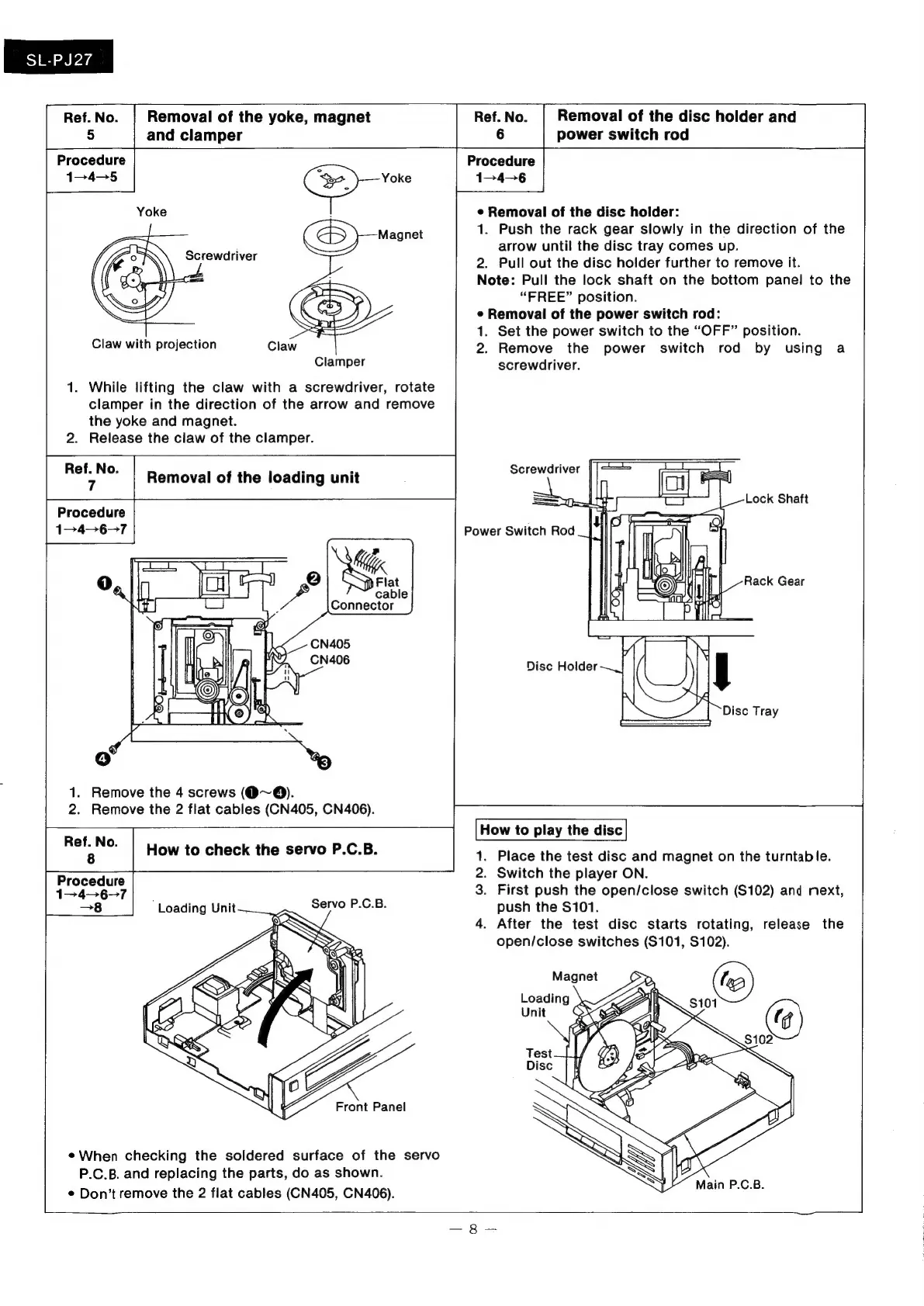
Removal
of
the
disc
holder:
1.
Push
the
rack
gear
slowly
in
the
direction
of
the
arrow
until
the
disc
tray
comes
up.
2.
Pull
out
the
disc
holder
further
to
remove
it.
Note:
Pull
the
lock
shaft
on
the
bottom
panel
to
the
“FREE”
position.
e
Removal
of
the
power
switch
rod:
1.
Set the
power
switch
to
the
“OFF”
position.
2.
Remove
the
power
switch
rod
by
using
a
Clamper
screwdriver.
1.
While
lifting
the
claw
with
a
screwdriver,
rotate
clamper
in
the
direction
of
the
arrow
and
remove
the
yoke
and
magnet.
2.
Release
the
claw
of
the
clamper.
Claw
with
projection
Ref.No.
|
Removal
of
the
loading
unit
1.
Remove
the
4
screws
(O~@).
2.
Remove
the
2
flat
cables
(CN405,
CN406).
ASP
How
to
play
the
disc
How
to
check
the
servo
P.C.B.
1.
Place
the
test
disc
and
magnet
on
the
turntable.
2.
Switch
the
player
ON.
3
Procedure
:
12467
.
First
push
the
open/close
switch
(S102)
and
next,
—8
Loading
Unit~
Servo
P.C.B.
push
the
$101.
4.
After
the
test
disc
starts
rotating,
release
the
open/close
switches
(S101,
S102).
@
When
checking
the
soldered
surface
of
the
servo
P.C.B.
and
replacing
the
parts,
do
as
shown.
¢
Don’t
remove
the
2
fiat
cables
(CN405,
CN406).

Related product manuals