EasyManua.ls Logo

Technics SM-ZS30 - Controls and Functions

Technics SM-ZS30
16 pages
Print Icon
To Next Page IconTo Next Page
To Previous Page IconTo Previous Page
Loading...
Controls
and
functions
[Front
panel]
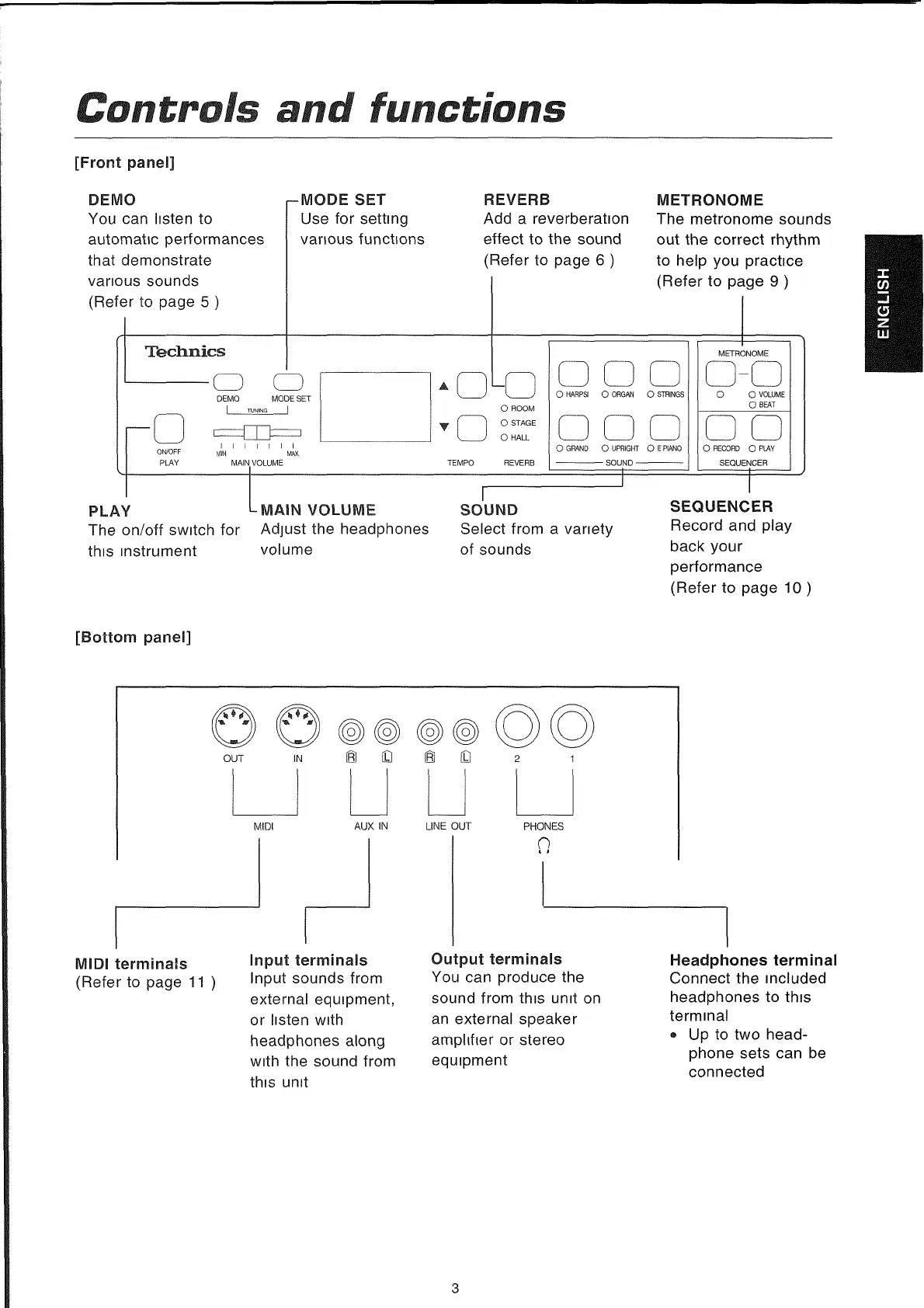
DEMO
You
can
listen
to
automatic
performances
that
demonstrate
vanous
sounds
(Refer
to
page
5
)
r-MODE
SET
Use
for
setting
vanous
functions
Tectmics
REVERS
Add
a
reverberation
effect
to
the
sound
(Refer
to
page
6
)
■o
o
DEMO
MODE
SET
I
__
TUNING
____
|
METRONOME
The
metronome
sounds
out
the
correct
rhythm
to
help
you
practice
(Refer
to
page
9
)
ON/OFF
PLAY
I
I
t
I
I
I
i
WftX
MAiN
VOLUME
O
HARPSI
O
ORGAN
O
STRINGS
O
GRAND
O
UPRIGHT
O
E
PIANO
-----------------------
SOUND
-------------------------
METRONOME
O
O
VOLUME
O
BEAT
O
RECORD
O
PLAY
SEQUENCER
PLAY
L
MAIN
VOLUME
The
on/off
switch
for
Adjust
the
headphones
this
instrument
volume
SOUND
Select
from
a
vanety
of
sounds
SEQUENCER
Record
and
play
back
your
performance
(Refer
to
page
10
)
[Bottom
panel]
(Refer
to
page
11
Input
sounds
from
external
equipment,
or
listen
with
headphones
along
with
the
sound
from
this
unit
You
can
produce
the
sound
from
this
unit
on
an
external
speaker
ampltfter
or
stereo
equipment
Connect
the
mcluded
headphones
to
this
terminal
®
Up
to
two
head-
phone
sets
can
be
connected
3
ENGLISH