EasyManua.ls Logo

Technics ST-600 - Page 12

Technics ST-600
18 pages
Print Icon
To Next Page IconTo Next Page
To Previous Page IconTo Previous Page
Loading...
7 8 9
|
10
1
12
13
390--others
!C201
For
CEG,
EI)
areas
rs
--—
-
220K
othe
(EG,
EL)
areas--100k
oA
x
ia
aed
FMA
eame,
DET
Site
22s
iL
1
nn
Is
TI
For(EG,EI)
—r313
a
Taare
a
b
;
i
an:
areas
47k
c308
In305
;
pees
ca!
:
GD
es
i
as
|e
og
«S|
ESE)
__™
eM
Ls
ORE
RT
:
is
o.6v
48)
}
i
Ic2o1
|
48v
1
O.6V
Vv
149V
148V
\69V)
-—\78V)
teal
py
tal
(em
ov
(01
AMP
(Spay?
a8
rar
ff
set
=
izev)
Tsw
[sw
:
T2o1
:
- - - -
BS.
i
aac
oly
|
BO
eau
Mca
i
aw
|
ige(omv)
ef
\
im
:
Rz06
|S
-
TP201
Bite
j
ae
294933
“qs
R214
820K
v
3
SIGNAL
|
c
ze
Tren
[2sy
Jfesvi,
R
aS
8
e
3
R216
S6K
205
(14.6V)
R7IO
o3[sovi___|
Sg
.c3o2
=<
Reaav
A331
R217
O.1V
9708
a70
ta
7
.
Pave
%
50v047
364
}
$
o
if
s
WT
100K
14
WAN
2K
e,
SWITCHING
SWITCHING
o3
|
maS
36V33
IK
output
vv
any
Eo
By
AN
3)
=7.
o7
\eytoiv
wy”
=
3/33
OV)
(ov)
@xS
|--MPX
VCO
adj.
+4
Q207
=
0204
Iss254
v2
|,
2SC1740
2
Bt
soy
SWITCHING
&
7
4
=
9701
«
2SC3940
gs
REGULATOR
ct
c912_
R922
p99
of
3
6V1000680
MAI65
L902
100yM
2
é
me:
A
F
=
28cl740
st
|,
_
:
il
te
a
53
;
8:
Sat
ers
|
REGULATOR
8
°
78g
38
RT
MAMOB2M
ON
J
16v2200~--
-
--(EG,E1)
areas
R924
3.9K
p910~918
(SS254TA
R930
100K
0402,403
LN48YCPPMP
SIGNAL
IND.
SELECT
Sw
P
.
y
7
)
eee
|
os
roueresg
B
=|
ET
eae
(ov
Rad
sus.
a
bh
5
eee
BOY
[el
[EE
i
133
E=t—t-+-4-4—-4-—!
a
G
wT
1907
G)—@-)-@)
OH(9()4)-49-O)
oo
i)
R915
820
ROIG
2.7K
2SC1740
@
O-O-S-@—_Q0-@40-O-O
3WITCHING
1g
26
46
56
66
76
36
86
q
fon
FOF
RESET)
S445
!
!
17
BV)
AN?
j
!
O™.—-)
OO
-O—©
y
:
;
Pies
Oe.
ieee
FI,
2h
-
9
SL
|
|
;
eon
=
ee
Iwate
|
Ht
:
rt
K
f-aoT
“t
2SD1450
787L
7
wa
:
ok
]
MUTING
oan
R3I7
47K
14
15
For
(EG,
EI)
areas
IL32)
301,302
rie
2SD1450
R305
R328
MUTING
*Power
s
A
T
AC
220V--(E,EH)
AC240V--(XL)
(50/60H2)
*Power
source
A
ource
For
(XA,XBJ
areas
Arr
A
A
AC
110/127/220/240V
(50/60Hz)
4
I
I
!
'
'
A
(
(
'
ac2zov
4
($0/60Hz)
{
!
!
|
a]
[eae
ee
eens
oe
a
we
oa
ee
7
Mi
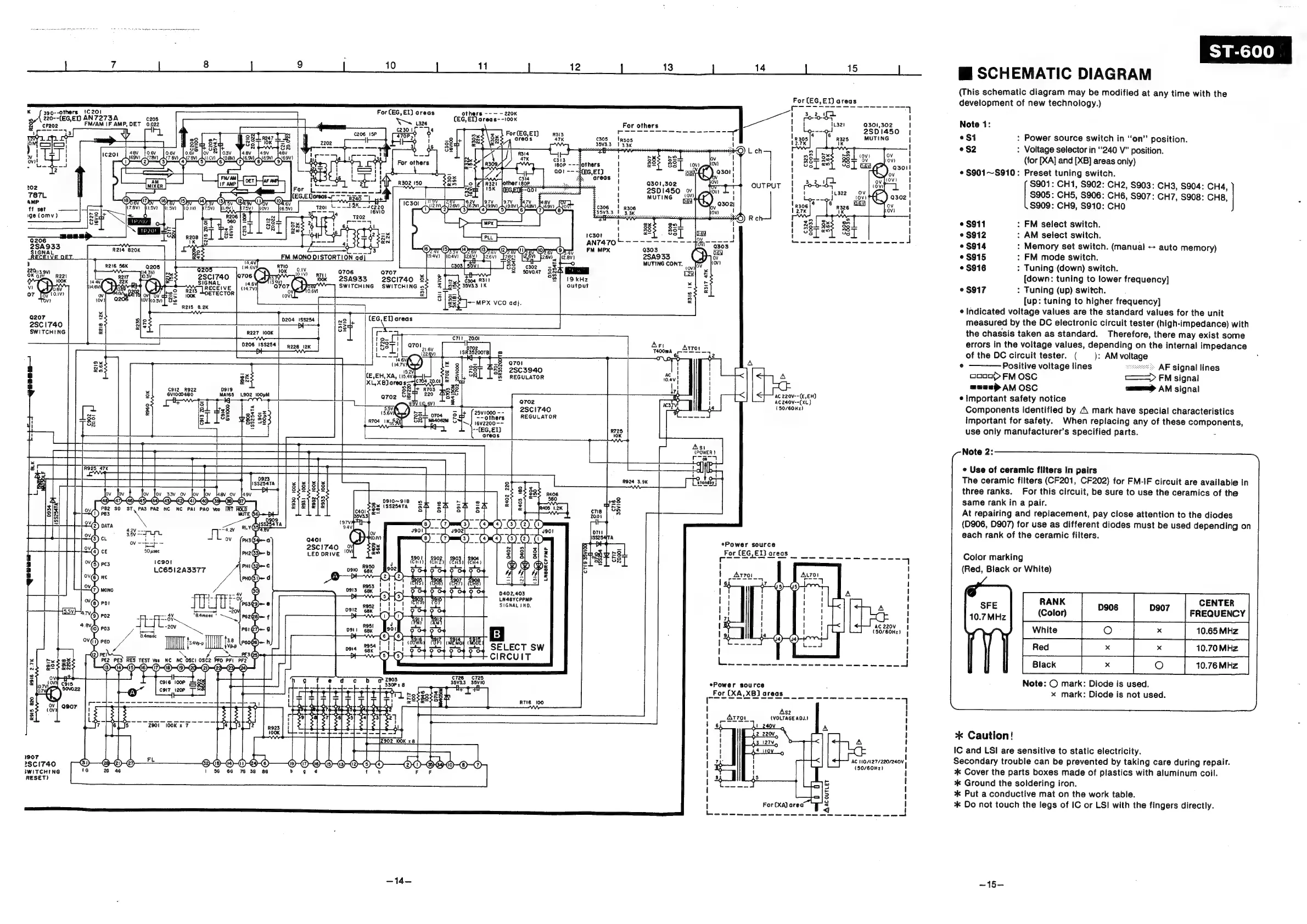
SCHEMATIC
DIAGRAM
(This
schematic
diagram
may
be
modified
at
any
time
with
the
development
of
new
technology.)
Note
1:
$1
:
Power
source
switch
in
“on”
position.
eS2
:
Voltage
selector
in
‘240
V”
position.
(for
[XA]
and
[XB]
areas
only)
¢
$901~S910:
Preset
tuning
switch.
$901:
CH1,
S902:
CH2,
$903:
CH3,
$904:
CH4,
$905:
CH5,
S906:
CH6,
S907:
CH7,
S908:
CH8
S909:
CH9,
S910:
CHO
©
$911
:
FM
select
switch.
©
$912
:
AM
select
switch.
e
$914
:
Memory
set
switch.
(manual
auto
memory)
©
$915
:
FM
mode
switch.
e
$916
>
Tuning
(down)
switch.
[down:
tuning
to
lower
frequency]
°
$917
:
Tuning
(up)
switch.
[up:
tuning
to
higher
frequency]
¢
Indicated
voltage
values
are
the
standard
values
for
the
unit
measured
by
the
DC
electronic
circuit
tester
(high-impedance)
with
the
chassis
taken
as
standard.
Therefore,
there
may
exist
some
errors
in
the
voltage
values,
depending
on
the
internal
impedance
of
the
DC
circuit
tester.
(
—_):
AMvoltage
e
———
Positive
voltage
lines
s
*
AF
signal
lines
coon}
FM
OSC
<=>
FM
signal
aaae>
AM
OSC
mama
AM
signal
©
Important
safety
notice
Components
identified
by
A
mark
have
special
characteristics
important
for
safety.
When
replacing
any
of
these
components,
use
only
manufacturer’s
specified
parts.
.
Note
2:
©
Use
of
ceramic
filters
in
pairs
The
ceramic
filters
(CF201,
CF202)
for
FM-IF
circuit
are
available
in
three
ranks.
For
this
circuit,
be
sure
to
use
the
ceramics
of
the
same
rank
in
a
pair.
At
repairing
and
replacement,
pay
close
attention
to
the
diodes
(D906,
D907)
for
use
as
different
diodes
must
be
used
depending
on
each
rank
of
the
ceramic
filters.
Color
marking
(Red,
Black
or
White)
RANK
CENTER
SFE
10.7MHz
(Color)
neve
D907
|
FREQUENCY
10.76
MHz
wits
fo
Peex
|
»
|
01
Note:
©
mark:
Diode
is
used.
x
mark:
Diode
is
not
used.
*
Caution!
IC
and
LSI
are
sensitive
to
static
electricity.
Secondary
trouble
can
be
prevented
by
taking
care
during
repair.
*
Cover
the
parts
boxes
made
of
plastics
with
aluminum
coil.
*
Ground
the
soldering
iron.
+
Put
a
conductive
mat
on
the
work
table.
*
Do
not
touch
the
legs
of
IC
or
LSI
with
the
fingers
directly.
—15—

Related product manuals