EasyManua.ls Logo

Technics ST-G460 - Page 7

Technics ST-G460
17 pages
Print Icon
To Next Page IconTo Next Page
To Previous Page IconTo Previous Page
Loading...
e
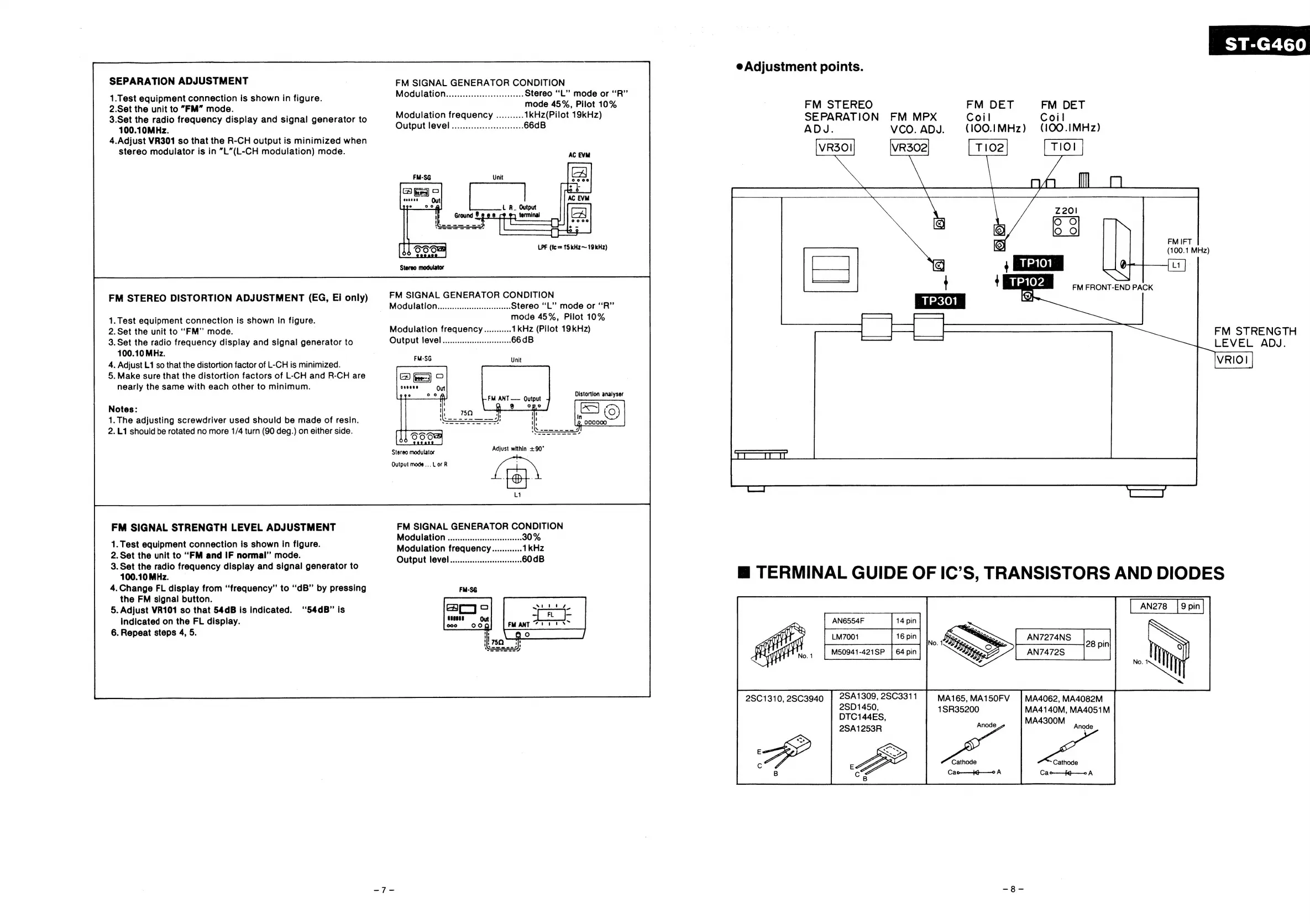
Adjustment
points.
SEPARATION
ADJUSTMENT
7
FM
SIGNAL
GENERATOR
CONDITION
.
fi
Modulation...............cccceceeneees
Stereo
‘“‘L’”’
mode
or
‘‘R”
1.Test
equipment
connection
is
shown
in
figure.
ae
oe
m
2'Set
the
unit
to
“FM”
mode.
|
Dee
een
oe
|
FM
STEREO
FM
DET
~—
FM
DET
3.Set
the
radio
frequency
display
and
signal
generator
to
pila
a
eas
setae
oes
19kHz)
SEPARATION
FM
MPX
Coil
Coil
100.10MHz.
utput
OV
CN
acinar
iirasasscteenioe
aes
ADJ.
VCO.
ADJ.
(100.1|MHz)
(100.IMHz)
4.Adjust
VR301
so
that
the
R-CH
output
is
minimized
when
stereo
modulator
is
in
“L”(L-CH
modulation)
mode.
AC
EVM
VRSOI
VRS02
Toe
Nol
an
Hl
rare
ee,
eee
|
Z20!
®)
OO
3
LPF
(fc
=
15
kHz~
19kHz)
noi
NA
EG
FM
SIGNAL
GENERATOR
CONDITION
'
4
a
BNEaGHI
CRD
BGK
FM
STEREO
DISTORTION
ADJUSTMENT
,
Ei
onl
&)
{
y)
_
Modulation
Stereo
“L”
mode
or
‘‘R”’
TP301
:
1.
Test
equipment
connection
is
shown
in
figure.
mode
45%,
Pilot
10%
FJ
—_—
2.Set
the
unit
to
“FM”
mode.
Modulation
frequency
ea
FM
STRENGTH
LEVEL
ADJ.
3.
Set
the
radio
frequency
display
and
signal
generator
to
Output
level
100.10
MHz.
4.
Adjust
L1
so
that
the
distortion
factor
of
L-CH
is
minimized.
5.
Make
sure
that
the
distortion
factors
of
L-CH
and
R-CH
are
eS
an)
nearly
the
same
with
each
other
to
minimum.
oveees
Out
FM
ANT
——
Qutput
Notes:
aed
a
1.
The
adjusting
screwdriver
used
should
be
made
of
resin.
2.L1
should
be
rotated
no
more
1/4
turn
(90
deg.)
on
either
side.
Stereo
modulator
Adjust
bal
+90°
FM
SIGNAL
STRENGTH
LEVEL
ADJUSTMENT
1.
Test
equipment
connection
is
shown
in
figure.
M
se
.
odulation
frequency
2.Set
the
unit
to
“FM
and
IF
normal”
mode.
Output
level
ee
frequency
display
and
signal
generator
to
8
TERMINAL
GUIDE
OF
IC’S,
TRANSISTORS
AND
DIODES
4.Change
FL
display
from
“frequency”
to
“dB”
by
pressing
the
FM
signal
button.
5.
Adjust
VR101
so
that
54dB
is
indicated.
‘54dB”
is
indicated
on
the
FL
display.
6.
Repeat
steps
4,
5.
seeces
000
AN6554F
LM7001
}
16
pin
|
MS50941-421SP
|
AN7274NS
|
3
|
AN7472S_—_
2SA1309,
2SC3311
2SD1450,
DTC144ES,
2SA1253R
MA165,
MA150FV
1SR35200
Anode
MA4062,
MA4082M
MA4140M,
MA4051M
MA4300M
Anode
2501310,
2SC3940
Cathode
Cao—_4q——0
A
Cathode
Cac-—fg—o
A

Related product manuals