EasyManua.ls Logo

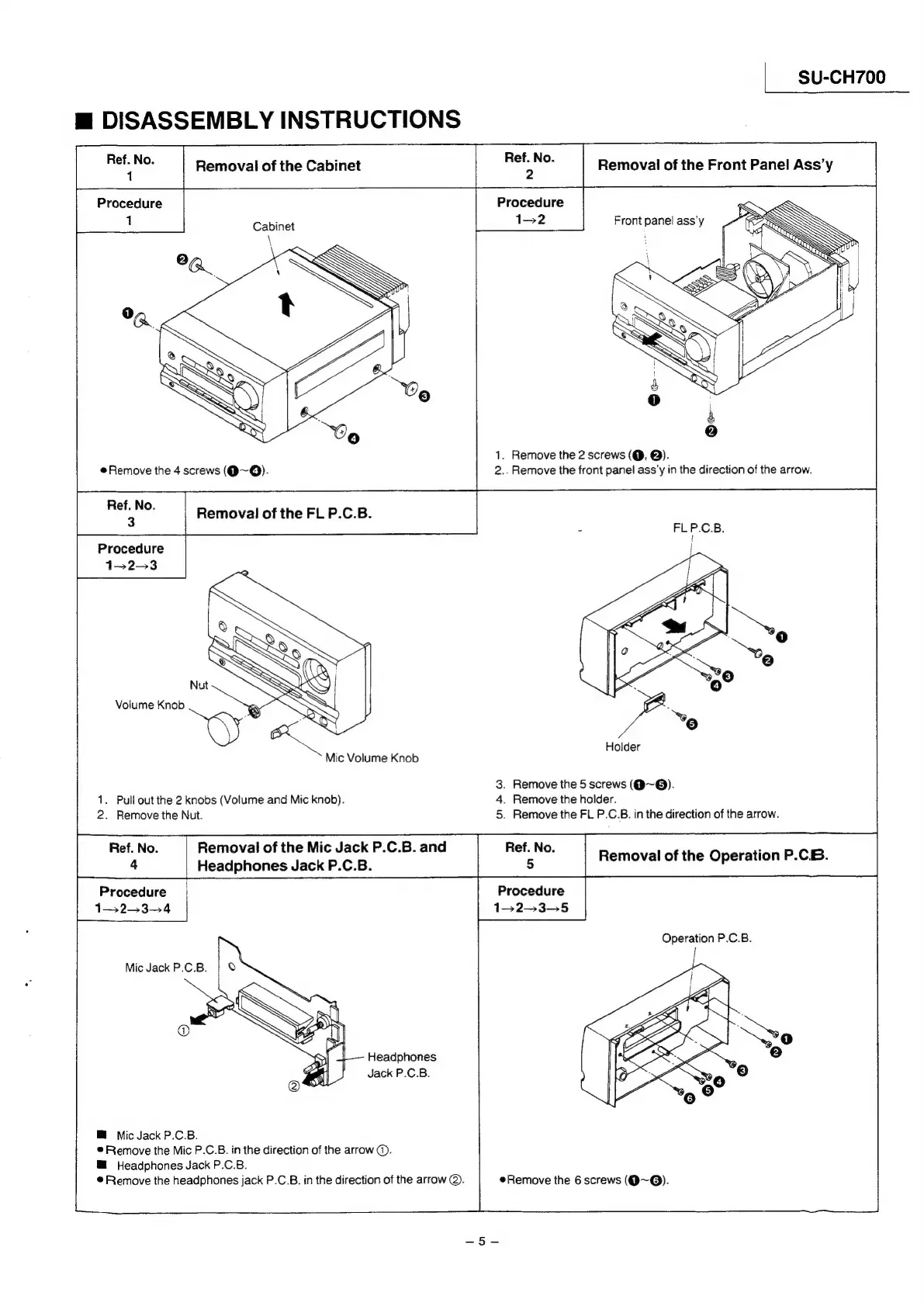
Technics SU-CH700 - Disassembly Instructions - Part 1; Cabinet Removal Steps; Front Panel Assembly Removal; FL PCB Removal Procedure

Technics SU-CH700
23 pages
Print Icon
To Next Page IconTo Next Page
To Previous Page IconTo Previous Page
Loading...
SU-CH700
m
DISASSEMBLY
INSTRUCTIONS
ie
ne:
Removal
of
the
Cabinet
ae
|
Removal
of
the
Front Panel
Ass’y
Procedure
Procedure
:
Cabinet
1-2
Front
panel
ass'y
2a
;
:
0
&
0
:
&
2)
1.
Remove
the
2
screws
(@,
@).
eRemove
the
4
screws
(@~Q).
2..
Remove
the
front
panel
ass'y
in
the
direction
of
the
arrow.
Ref.
No.
3
Removal
of
the
FL
P.C.B.
Procedure
1-2-3
Volume
Knob
-
.
a
Mic
Volume
Knob
3.
Remove
the
5
screws
(@~@).
1.
Pull
out
the
2
knobs
(Volume
and
Mic
knob).
4.
Remove
the
holder.
2.
Remove
the
Nut.
5.
Remove
the
FL
P.C.B.
in
the
direction
of
the
arrow.
Ref.
No.
Removal
of
the
Mic
Jack
P.C.B.
and
Ref.
No.
;
Removal
of
the
Operation
P.CB.
Headphones
Jack
P.C.B.
5
P
Procedure
Procedure
Operation
P.C.B.
Mic
Jack
P.C.B.
Headphones
Jack
P.C.B.
M
Mic
Jack
P.C.B.
®
Remove
the
Mic
P.C.B.
in
the
direction
of
the
arrow
@.
M@
Headphones
Jack
P.C.B.
®
Remove
the
headphones
jack
P.C.B.
in
the
direction
of
the
arrow
@.
Remove
the
6
screws
(@~@).

Related product manuals